^^ndstitle-1143^^

  • Thread starter Thread starter T-hug
  • Start date Start date
  • Views Views 56,233
  • Replies Replies 193
Sorry to be a bother but, anyone using G6 lite (and Passcard if it matters) got this to work yet? i've tried various settings from the first few pages and i've no luck in getting it to work.

If it wouldn't be too much to ask. can anyone give me a hand? sorry and thanks
 
you can only gain new spells by receiving it by NPC or from the shop

if you need mini, then check the shop or talk to one of the characters in the forest or check your item inventory after ordering everything
I mean, I already have mini, but can't cast level 2 spells. All my characters are LVL13 freelancers.
 
Yes, I am using Saturnplanet5's setup which is

Saver patch = SD card
Rom Postion Patch = SD card

Enable Restart = on

Faster play game = on

Enable patch cartridge access = on

the rest are off.
Please remember I am using the SuperKey with a Supercard SD only. Not an SD mini.
lecture.gif
 
QUOTE said:
I mean, I already have mini, but can't cast level 2 spells. All my characters are LVL13 freelancers.
You're characters are level 13 and yet, are still Freelancers?

Hit your main game menu (X or equiv. shoulder button), and go down to Job (???, 6th menu). You should be able to use Mini after assigning a Red Mage (??????) or a White Mage (??????).

To use Mini: Magic (???, 2nd menu) -> ???? (Remember) -> ???? (Mini) -> Whichever Red/White Mage you want to receive it.
 
QUOTE said:
I mean, I already have mini, but can't cast level 2 spells. All my characters are LVL13 freelancers.
You're characters are level 13 and yet, are still Freelancers?

Hit your main game menu (X or equiv. shoulder button), and go down to Job (???, 6th menu). You should be able to use Mini after assigning a Red Mage (??????) or a White Mage (??????).

To use Mini: Magic (???, 2nd menu) -> ???? (Remember) -> ???? (Mini) -> Whichever Red/White Mage you want to receive it.

Thanks a lot! I had never noticed the Job item was available... I'll have to play it again in english to understand what's going on
wink.gif
 
QUOTE said:
I am having the same problem with my M3 CF. Upgraded both my loader and game manager to v25, and i am still getting 2 white screens. Tired it with just safe mode on, and both safe mode and trim, and on 2 diff cf cards. even tried reformatting, and with v24 firmware(as someone else said there worked with that), but still nothing. Guess I will wait around until the next update from M3 to fix it.

All I really want to see right now is the intro, the only videos i have seen do not show it well, but I can wait for the US release to actually play it.

QUOTEI'm having the EXACT same problem It's pissing me off! I can't even play Rune Factory cause that also requires Safe Mode! I think it's a problem with safe mode not working for us...


I´ve got also the same problem...
huh.gif
 
use phoenix down... else... ur screwed as far as i know
smile.gif

u cannot buy phoenix down in first town...
smile.gif

it's the item with longest name
tongue.gif


btw, what am i supposed to do once I have all 4 characters?
I went into that creepy town and into the cave, but there's nothing there...
i also went to the other cave where you need the airship to enter.. and inside there was nothing of interest either...
wtf..
smile.gif
 
lol after you get ignus, fly to the mythril mine (the one over the water) and go down till the end ... there zoom in and look for a secret stone switch (sparkling ~~) that will open the passage to the rest of the mine.
 
not sure if this has been mentioned
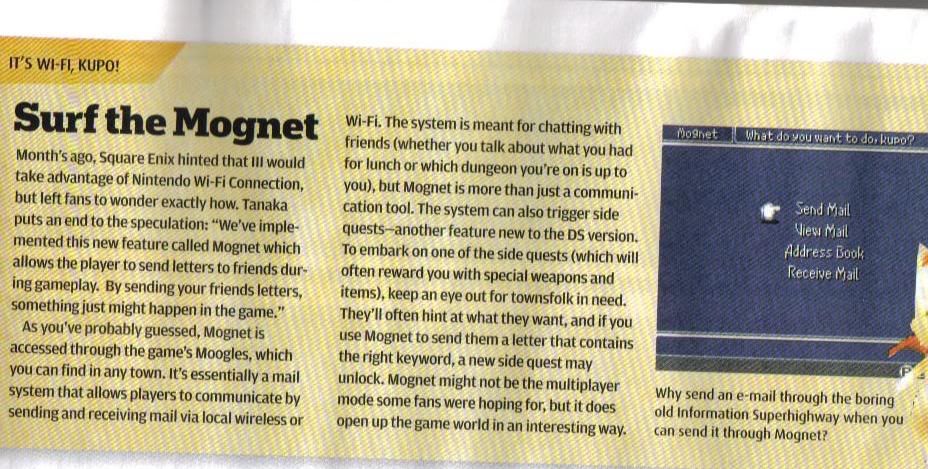
but here is a scan from np regarding wifi
ff3wifi.jpg

I would scan the whole article but i'm not sure of the legality of that....says the guy with 3 flashcarts
tongue.gif
 
No bother, sketch, here's how I got it working using my G6 Lite and Passcard 3 setup. First I extracted the .NDS from the ZIP, and added it using the Write command in G6 U-Disk Manager v4.3 (available at www.g6flash.com) then used the following options:

Main - Software Reset and Same method for all games both unchecked
Read Method - Safe Mode (No support SOFT RESET) selected
Rom Trim - No Trim Rom selected

This worked for me; without using the Safe Mode Read Method I was getting two white screens. Hope this helps!

Sorry to be a bother but, anyone using G6 lite (and Passcard if it matters) got this to work yet? i've tried various settings from the first few pages and i've no luck in getting it to work.

If it wouldn't be too much to ask. can anyone give me a hand? sorry and thanks
 
Anyone get it to work on a G6Lite? Can anyone tell me how to get it working? I Tried different options, never worked out for the best for me
frown.gif
bow.gif
 
Anyone get it to work on a G6Lite? Can anyone tell me how to get it working? I Tried different options, never worked out for the best for me
frown.gif
bow.gif

Huh thats strange, because I just used the standard procedure and didn't have any problems. So far I've played about 10 mins without any problems.
 

Site & Scene News

Popular threads in this forum