ROM Hack Metroid Prime 4 Native Resolution mod

  • Thread starter Thread starter masagrator
  • Start date Start date
  • Views Views 22,545
  • Replies Replies 121
  • Likes Likes 25

masagrator

The patches guy
Developer
Joined
Oct 14, 2018
Messages
7,230
Solutions
1
Reaction score
7,425
Trophies
3
XP
14,601
Country
Poland
I did it for myself, but I will share it here too.

Mod that increases resolution of docked mode to 1080p and handheld to 720p. Also disables dynamic resolution (for this thanks to @fl4sh_ )

Compatible only with 1.1.0.

Instructions:
Put folder "atmosphere" to root of sdcard, merge folders, run game. For emulator mods look at @fl4sh_ mods.

Overclocking obviously is required.
You can try 1224/614/1600 handheld + 1224/998/1996 for docked. I guess it should scale well enough to not be worse than stock experience. If you will still have drops, increase RAM or GPU accordingly.

If zip name starts with:
- "MetroidPrime4NativeResolutionMod" - fixed 720p handheld, 1080p docked, no dynamic resolution (except for when using psychic visor in docked mode, then resolution drops to 864p). (requires setting RAM to 2133/2400 MHz to solve problems with stuttering in docked mode.)
- "WithDR-MetroidPrime4NativeResolutionMod" - As above but Dynamic Resolution is not blocked
- "Fixed720p-MetroidPrime4NativeResolutionMod" - Fixed 720p with no Dynamic Resolution in both handheld and docked mode. Made on request to use docked's better graphics settings with ReverseNX-RT in handheld native resolution.

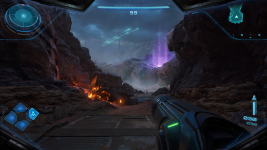
No mod handheld / mod 720p:
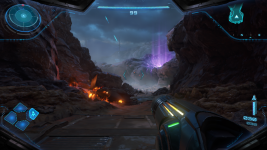
nomodhh.png modhh.png
no mod docked downscaled to 720p / mod 1080p downscaled to 720p:
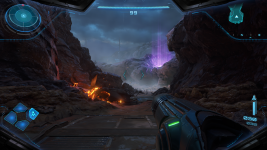
nomodd.png modd.png

Changelog:
- V3 (04.12.2025) - fixed issues with psychic visor crashing game in specific places and white lines appearing in wrong places.
- V4 (04.12.2025) - fixed an issue in variant with no dynamic resolution where when using psychic visor it was lowering resolution to 562p in handheld, 810p in docked.
- V5 (04.12.2025) - temporarily bringed back dynamic resolution for Psychic visor because it was breaking scanning. Investigating further where are original values stored.
- V6 (04.12.2025) - Dynamic resolution for psychic visor is now blocked only in handheld mode. In Docked mode it's now 864p. Issue occurs when resolution is 900p or higher.
 

Attachments

Last edited by masagrator,
Nice (especially docked). Handheld does not seem to make a difference, maybe is was already near 720p.

What is the 'trade off'?
 
Handheld does not seem to make a difference, maybe is was already near 720p.
It was basically 576p outside of gameplay, and 520p MAX in gameplay. That first image is 520p/576p. I think you need to buy new glasses or stop using browser scaling. :D
Post automatically merged:

What is the 'trade off'?
Like always - OC.
 
I would prefer dynamic res on, but capped to 720p/1080p. but what do I know
Issue is that dynamic resolution in this game is not scaled to GPU power. it's scaled to complexity of given scene and GPU power has no impact on resolution scale. You will get 7/9 of rendering resolution ALWAYS in the same scene no matter what clocks you have in handheld.
 
Last edited by masagrator,
I did it for myself, but I will share it here too.

Mod that increases resolution of docked mode to 1080p and handheld to 720p. Also disables dynamic resolution (for this thanks to @fl4sh_ )

Compatible only with 1.1.0.

Put folder "atmosphere" to root of sdcard, merge folders, run game. For emulator mods look at @fl4sh_ mods.


No mod handheld / mod 720p / no mod docked downscaled to 720p / mod 1080p downscaled to 720p:
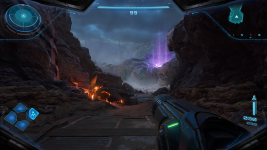
View attachment 543088View attachment 543091View attachment 543089View attachment 543090
Tried your patch, game runs at 20fps with it in docked mod ...
 
Tried your patch, game runs at 20fps with it in docked mod ...
No way, seriously? Who would have thought that increasing resolution without OC would tank performance...
Post automatically merged:

Also here is optional patch with DR left on. DR in this game is not scaled to GPU clocks, you will get always the same percentage scale in the same scene.
 

Attachments

No way, seriously? Who would have thought that increasing resolution without OC would tank performance...
Post automatically merged:

Also here is optional patch with DR left on. DR in this game is not scaled to GPU clocks, you will get always the same percentage scale in the same scene.
My machine is OC bro ...

And why do you respond to everyone with that condescending tone ?
 
And what other response do you want for stating the obvious that resolution mod tanks performance? :unsure:


Not enough I guess. :rofl2:
Thanks for trying to improve the games performance already. But please stop this toxic way of responding to people, This is a place, where we can learn from each other and it's not cool to act like everybody needs to be on the exact same level of knowledge otherwise is treated like an idiot!
 
Thanks for trying to improve the games performance already. But please stop this toxic way of responding to people, This is a place, where we can learn from each other and it's not cool to act like everybody needs to be on the exact same level of knowledge otherwise is treated like an idiot!
This guy is on this foum 13 years. They are long past "learning" phase.

After all these years they didn't learn to not write useless shit, they will continue to do it years after.
 
What are the clocks necessary for stable docked performance?
From what I checked 1963/998/2133 is good enough for prologue. Dunno about more heavy instances later.

Video of running this game in docked mode at those clocks. Overlay is not registered in this game sadly. Of course video quality is shit.

 
This guy is on this foum 13 years. They are long past "learning" phase.

After all these years they didn't learn to not write useless shit, they will continue to do it years after.
Yeah and did you see, that he stated that he actually did OC? And maybe he also knows, that this will result in higher performance drops and was just stating that it does?... At least he tried your mod and gives some feedback. And even if it read silly to you at first, there is no need to offend. That's all I had to say to this.
 
Do i need to Overclock?
Absolutely.
Post automatically merged:

Yeah and did you see, that he stated that he actually did OC? And maybe he also knows, that this will result in higher performance drops and was just stating that it does?...
Those are good arguments if we are talking about noobs, not forum veterans with track record of being active on forum. I won't mind words for guy that is longer on this forum than me that still provides very scarce amount of informations when something doesn't work as expected.
 
  • Like
Reactions: hharuhara
Which values should i use for oc?
Post automatically merged:

Sorry for this stupjd question, but is there a difference using the patch with DR or without?
 
Which values should i use for oc?
Personally I'm using 1963/768/2133 for handheld, 1963/998/2133 for docked. They may be a bit overkill because I use them for 30 FPS games to run at 60 FPS.

You can try 1224/614/1600 handheld + 1224/998/1996 for docked. I guess it should scale well enough to not be worse than stock experience. If you will still have drops, increase RAM or GPU accordingly.
 

Site & Scene News

Popular threads in this forum