GCN Looking for a GameCube ISO renaming tool.

  • Thread starter Thread starter TheRiceKing
  • Start date Start date
  • Views Views 14,447
  • Replies Replies 7

TheRiceKing

Member
Newcomer
Joined
Dec 4, 2017
Messages
22
Reaction score
3
Trophies
0
XP
114
Country
United States
Goal: To rename 636 backup GameCube ISO's to match https://www.gametdb.com/ list so that GameCube games show up in USBLoader GX. (ISOs already show up in Nintendont without name changing or subfolders but looks ugly)

As some of you already know ISO's need to be in their own individual folders in "X:/games" with naming scheme "NameOfTheGame [ID_Name].iso"

I already tried Wii Backup Manager but it doesn't do this job. Maybe it used to on old Windows OS but it crashed on me when I try to rename the entire folder or single game. Running it on compatibility mode didn't work.

Can someone please provide me with a solution?

Thank you

 
i did used the tool included in dios mios, i dont think there is a batch option sadly.. (cheese, 600 isos, damn son)
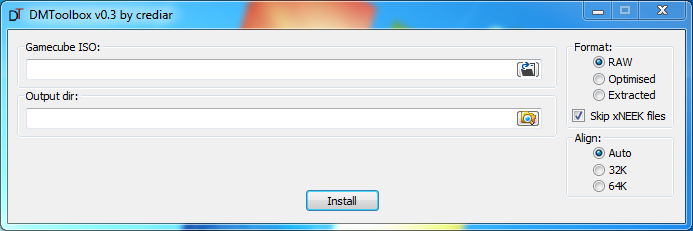
dmtoolbox its the name
there is a 1:1 option which doesn't appear to modify the isos
it renames the iso to game.iso and puts it in a folder with the game code (the ID) as the folder name
 
i did used the tool included in dios mios, i dont think there is a batch option sadly.. (cheese, 600 isos, damn son)
dmtoolbox its the name
there is a 1:1 option which doesn't appear to modify the isos
it renames the iso to game.iso and puts it in a folder with the game code (the ID) as the folder name

Yes that program was suggested to me earlier today but I am missing some information.

1. There is a checkbox that says "Skip xNEEK files" <-- What is that option for?

2. Select Align: 32K or 64K ?

I don't want to remove or modify anything from the original ISO.

dmltoolbox.png
 
Yes that program was suggested to me earlier today but I am missing some information.

1. There is a checkbox that says "Skip xNEEK files" <-- What is that option for?

2. Select Align: 32K or 64K ?

I don't want to remove or modify anything from the original ISO.

dmltoolbox.png

skip the xneek files, that is just some extra files that are added for ancient loader methods i believe.. (related to emunand stuff i think)
i did choose 32k align (either that is for the optimized option or i dunno), doesn't seem to make a difference if you select raw.
check with a md5\sha-1 or crc tool and compare it to redump.org if you really want to make sure its an untouched iso.
 
  • Like
Reactions: TheRiceKing
Thank you
one last tip i use this http://implbits.com/products/hashtab/
its a simple program that gets added to the windows file properties, when you see a file proprieties this adds an extra tab which you can check the checksums very quickly
i love it since i don't need an extra program in my desktop or cluttering other stuff like the right click menu... it feels part of the OS
 
Last edited by migles,
  • Like
Reactions: TheRiceKing

Site & Scene News

Popular threads in this forum