Homebrew LMP-ng 2 alpha problem

  • Thread starter Thread starter dsrules4
  • Start date Start date
  • Views Views 6,751
  • Replies Replies 21

dsrules4

Well-Known Member
Newcomer
Joined
Aug 25, 2008
Messages
52
Reaction score
0
Trophies
1
XP
166
Country
United States
hi i am new i just got the lmp-ng 2 the one with changable skins and when i put it on to my r4ds and load both ds screens go black and it has small white line were the text sould be.but other then that its all just black.
can someone help
yaynds.gif
 
On the root of your card, create a folder called "lmp-ng" and in this folder create another "skins" folder. There, copy and paste the *.zip files for the skins. Do NOT extract the .zip files.

Then try launching lmp-ng again.
 
The root is the highest level on your card, and it's "F:\" or "X:\" or whatever letter the memory card is assigned to. For instance, more than likely "C:\" is the root of your hard drive.
 
I had the same problem, just do what DanTheMan said. You could have the .nds file in the root of your card but you have to have an lmp-ng folder with the skin folder in it.
 
If you press Up and Down do you hear it clicking? If so, the program is running fine but just can't find your skins. If not, then you've got a problem booting the program in the first place.

How new is your R4? Have you been keeping the firmware up to date? There's a very small chance that you've got an old firmware that doesn't have automatic DLDI patching, so the program can't read your filesystem to find the skins.

Just to clarify, the following file should exist:
X:\lmp-ng\skins\default.zip

That's an example, with X:\ being the letter of your card and default.zip being the original iPod skin.

 
were do i put the nds file i have tryed but putting it on the root then in a folder called ipod but still black
 
The .nds file can go anywhere. You didn't answer any my questions, so I'm just gonna go ahead and suggest manually patching the *.nds file with the R4 DLDI file. Easiest method of doing this is with DLDIrc aka DLDI Right Click. Install it, right-click the *.nds file, choose the patching option that appears. I don't think it will make a difference, but it's the only thing I can think of at this point other than a bad name.
 
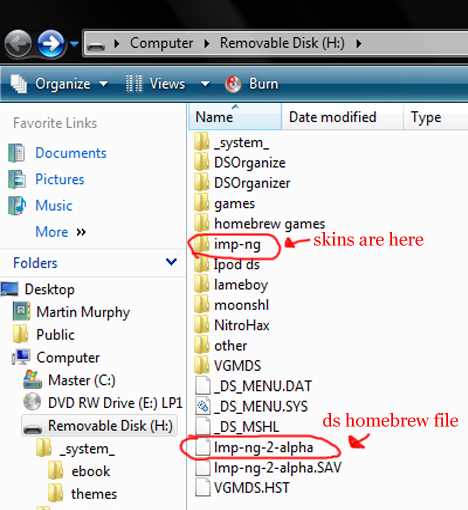
Can you post a screenshot of your folder structure? My only guess is that you misspelled one of the folder names or something.
 
dunno if it's just my bad eyes, but that looks like your skins folder is spelled imp-ng, it is supposed to be lmp-ng with an L
 
umm....It works for me but I cant switch skins....I know you go to settings then go to skins but there is only default.zip in my file....and I can t open it please help me....
smile.gif
 

Site & Scene News

Popular threads in this forum