Hacking Black screen during SysNAND restore after getting OTP

  • Thread starter Thread starter tri_fin
  • Start date Start date
  • Views Views 1,999
  • Replies Replies 12

tri_fin

Well-Known Member
Member
Joined
Feb 7, 2016
Messages
198
Reaction score
46
Trophies
0
XP
350
Country
Hi,
I think this is pretty bad (and unlucky?) but whilst following Plailect's guide, Part4, section IV, 4 - restore SysNand I got a black screen. Up to this point the process was working perfectly.

Any ideas?

I have tried booting with and without the mSD card. It's a N3DS.
 
Without the mSD and still a black screen? Sounds like you have a brick on your hand... Does holding A+L+R+DpadUp as you boot up do anything?

EDIT: Out of curiosity, can you right-click>properties on that SysNAND.bin and tell me the filesize, in bytes? I feel like it was dumped improperly, maybe due to lack of SD card space.
 
Last edited by CrispyYoshi,
I haven't tried restore as the guide says this is a total no for a N3DS. Not sure what I have to loose?

The SysNAND.bin is 1,300,234,240 bytes (1.3 GB on disk). I think it is fine.

--------------------- MERGED ---------------------------

It was at this moment that tri_fin knew, he fucked up


Try again, and again. Maybe wait a bit longer. Wait 2-5 minutes. If it won't work, try to enter recovery mod, and if this doesn't work... you are screwed and you'll need hardmod.

Bit harsh! I probably did make a mistake but I followed the guide to the letter and had no errors.
 
I haven't tried restore as the guide says this is a total no for a N3DS. Not sure what I have to loose?

The SysNAND.bin is 1,300,234,240 bytes (1.3 GB on disk). I think it is fine.

Do you have another NAND backup to compare the size to? I only want to verify it before we continue troubleshooting.
 
I have a bunch of NAND (emu and sys) backups they are all the correct size for my N3ds with the Samsung NAND.
 
n3ds has two brands of nand, toshiba - 1.84gb and samsung 1.21gb

--------------------- MERGED ---------------------------

Without the mSD and still a black screen? Sounds like you have a brick on your hand... Does holding A+L+R+DpadUp as you boot up do anything?

EDIT: Out of curiosity, can you right-click>properties on that SysNAND.bin and tell me the filesize, in bytes? I feel like it was dumped improperly, maybe due to lack of SD card space.

Restore on boot does nothing.
 
Thanks to a great hard mod by gamesquest1 I have my N3DS back and I just repeated restoring the SysNAND and EmuNAND. I used exactly the same process, cards, files etc. The first time the I got a brick, this time it worked. Bricking is not always down to user error - it would appear to have an element of luck!

Now to finish the rest of the tutorial..
 
Hi,
I think this is pretty bad (and unlucky?) but whilst following Plailect's guide, Part4, section IV, 4 - restore SysNand I got a black screen. Up to this point the process was working perfectly.

Any ideas?

I have tried booting with and without the mSD card. It's a N3DS.
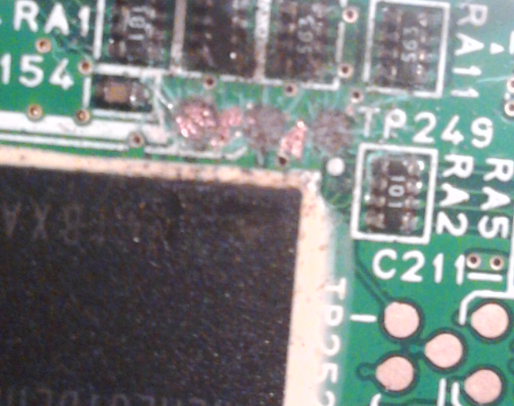
Sorry. It happened to me,restoring a NAND backup after getting the OTP. If you do not have any other NAND backup,you are fucked.
(If you have another one,a tip...dont be dummy like me and use flux... Or theese things... Can happen:

c1cb1574140e1f3f64c79bbf5261e1b6.png


(permanent blue-screen)

Good luck.
 
Almost looks like a lot more than flux. Looks like a high wattage iron ripped the pads clean off.
 
Can't tell if what happened to you happened to me based on the thread title but just figured I'd contribute. During the process of restoring my sysNAND while on 2.1 I got a black screen as it was flashing my NAND backup to my 3DS (also using a n3DS). It looked like OTP Helper crashed half way through flashing. I assumed I was bricked but decided to let it sit for a few more minutes and then forced a reboot. Oddly enough it worked fine and I was able to finish the process. So if anyone else tries to set up a9lh and the screen goes black while flashing your NAND backup, instead of immediately trying to reboot your 3DS just try letting it sit for 15 to 20 minutes and then force a reboot. Can't guarantee it'll work out the way it did for me but I'm thankful I didn't immediately try to reboot mine.
 
So if anyone else tries to set up a9lh and the screen goes black while flashing your NAND backup, instead of immediately trying to reboot your 3DS just try letting it sit for 15 to 20 minutes and then force a reboot. Can't guarantee it'll work out the way it did for me but I'm thankful I didn't immediately try to reboot mine.

This is the one thing I might have missed (apart from not crossing my fingers). Have to say though that during the massive tutorial there are quite often a few times where things 'hang' or crash and if you waited you would probably be there for ever. That's the great bit about computers - if you do then your dammed, if you don't you are dammed and whatever you do someone will tell you that you did the wrong thing.

Getting a hard mod was one of the best things I've done.
 
  • Like
Reactions: wulyfclan

Site & Scene News

Popular threads in this forum