
18.1.0 OFW does not boot on modded OLED

  • Thread starter Thread starter ikynx
  • Start date Start date
  • Views Views 7,942
  • Replies Replies 20

ikynx

Well-Known Member
Member
Joined
May 9, 2023
Messages
406
Reaction score
394
Trophies
0
XP
1,347
Country
United Kingdom
Hi there,

Had an OLED switch with 18.0.1installed from daybreak on both CFW@SysMMC and CFW@EmuMMC. (with a fuse mismatch (18) since I'd never booted to OFW since FW16 so couldn't boot to OFW).
Decided to start all fresh, starting by having OFW accessible and up to date.
Since I had this fuse mismatch, I had to update SysMMC using Semi-stock. Did so, updated to 18.1.0 using the online updater. All well. semi-stock is indeed 18.1.0 after reboot.
Rebooting to Hetake 6.2.0, decided to run the systemwipe script from tegraexplorer to completely clean SysMMC.
Once done, rebooted to Hetake 6.2.0, checked correct fuse count (19 -> OK) then booted to OFW with the intention to initialise it, set it to flightmode, remove autoupdating...
cannot currently boot to OFW 18.1.0 completely clean (not even initialised) from Hetake 6.2.0 : I don't even get the nintendo or switch splashscreen, only black screen stall.
cannot either boot to semi-stock 18.1.0: get the nintendo screen, then black screen.
Power off
power on to hetake
booting semi-stock -> no it's red errors over buggy multicolor artefacts
semi-stock.jpg


booting to CFW@SysMMC -> I now get this new funky error screen
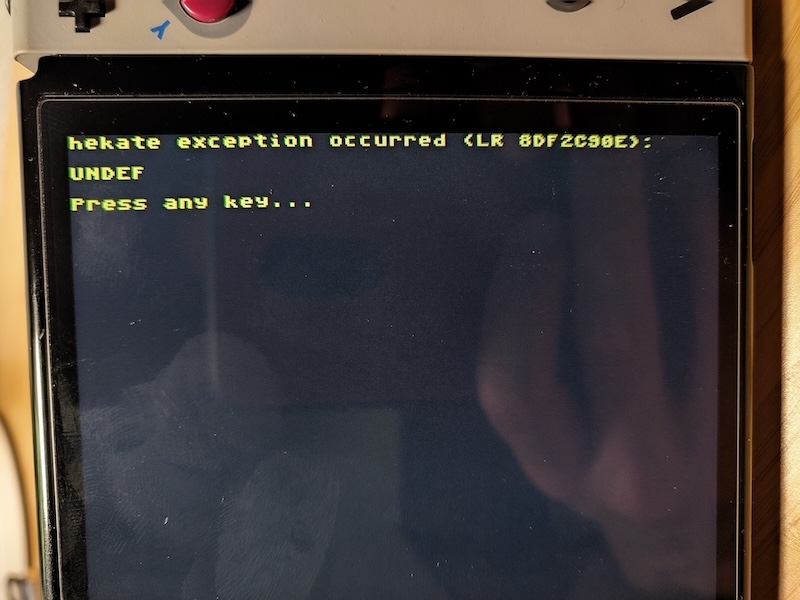
cfw@sysmmc.jpg

when I press power on this screen, I get an animated greyish multicolor screen
PXL_20240612_011407784.jpg


Seems my OLED device (at least SysMMC stuff) is currently in a bricked state.

I should probably be able to still restore access to an EmuMMC thanks to an old back up I must have somewhere and using the previous hetake version.

I wonder what might be off.

Probably not that, but may Nintendo have found a way to detect modchips from OFW?
 
Last edited by ikynx,
Nintendo hasn't done anything against modchips else it would be mentioned all over the place here.

The UNDEF error comes from the Nyx module so there is a chance that the files on your SD card are corrupted.
I would suggest to try again with a fresh install of the latest version of Hekate from Github.
 
Hello, I was having exactly the same issue after updating OFW to 18.1.0 and updating Atmos + Hekate using the HATS package. After manually installing everything, downloading hekate and Atmosphere separately, it's working as expected. Not sure if it's the HATS download or if something is not ok with it since I tried downloading twice.
 
  • Wow
Reactions: jkyoho
Whyso? Isn't systemwipe precisely to clean a system from any potentially banworthy leftovers?

It's probably because it could result in a mismatch in telemetry data between what ninty last received from your switch and what you have in your "post-wiped" switch, assuming systemwipe (like haku33) touches the telemetry data in sysnand as well. That's to say, you post-wiped switch could be lacking all the telemetry data that it is supposed to contain up to the point before the wipe, a total blank. It's the surest way for ninty to know something is up because ordinary users wouldn't be able to touch that. That's why some folks do regular sysnand backups.
 
Last edited by Lumpofcoal,
  • Like
Reactions: RednaxelaNnamtra
It's probably because it could result in a mismatch in telemetry data between what ninty last received from your switch and what you have in your "post-wiped" switch, assuming systemwipe (like haku33) touches the telemetry data in sysnand as well. That's to say, you post-wiped switch could be lacking all the telemetry data that it is supposed to contain up to the point before the wipe, a total blank. It's the surest way for ninty to know something is up because ordinary users wouldn't be able to touch that. That's why some folks do regular sysnand backups.
Interesting thanks.
Post automatically merged:

Hello, I was having exactly the same issue after updating OFW to 18.1.0 and updating Atmos + Hekate using the HATS package. After manually installing everything, downloading hekate and Atmosphere separately, it's working as expected. Not sure if it's the HATS download or if something is not ok with it since I tried downloading twice.
what I am more affraid of is that, if I remember correctly, one can bypass the modchip and having to use an SDcard to boot to OFW as if non-modded by powering on with buttons minus and plus pressed. When I do so, it still powers on (I suppose, since black screen on OLED is kind of... black... and there doesn't seem to be noticeable fanspin) to black screen and nothing happens. As if the HOS or bootloader part of the SysMMC had an issue.
Had this issue even before starting my process described in the first post, that I attributed to fuse mismatch. Since there is no fuse mismatch anymore and it is still happening, I fail to understand what may be preventing OFW from booting.
 
Last edited by ikynx,
  • Like
Reactions: Lumpofcoal
Just follow Sthetix's level 2 guide and be on your way.
thanks, gonna start by trying out his Level1 new method unbrick method (that he personnally advised me to use). If that doesn't suffice, I'll go to Level2 I guess...

I wonder if the systemwipe v3 script has an issue with 18.1.0. It's the only thing I can think of that may be the root cause of my situation.
 
I did checked systemwipe script before and it does only touch system &user partition therefore I don't think I would lead to a ban or what. Just like you could do offline format/wipe system and Ninty wont know how your partitions do until you setup Internet again.
The most safe way to "clean" sysnand is by offline formart/wipe from OFW or maintenance mode.
FYI, like @Hayato213 mentioned, TegraExplorer script tends to be problematic and slow process nowadays.
 
  • Like
Reactions: Hayato213
where are the logs store?
It's in some system save data. You remove this, and next time you connect online, they see you have zero logs when there used to be several, and just that is enough for them to know you've been naughty

Will they ban for this? Up to them, but clearing the logs makes it trivially easy for them to detect and ban if they want to
 
Hi there,

Had an OLED switch with 18.0.1installed from daybreak on both CFW@SysMMC and CFW@EmuMMC. (with a fuse mismatch (18) since I'd never booted to OFW since FW16 so couldn't boot to OFW).
Decided to start all fresh, starting by having OFW accessible and up to date.
Since I had this fuse mismatch, I had to update SysMMC using Semi-stock. Did so, updated to 18.1.0 using the online updater. All well. semi-stock is indeed 18.1.0 after reboot.
Rebooting to Hetake 6.2.0, decided to run the systemwipe script from tegraexplorer to completely clean SysMMC.
Once done, rebooted to Hetake 6.2.0, checked correct fuse count (19 -> OK) then booted to OFW with the intention to initialise it, set it to flightmode, remove autoupdating...
cannot currently boot to OFW 18.1.0 completely clean (not even initialised) from Hetake 6.2.0 : I don't even get the nintendo or switch splashscreen, only black screen stall.
cannot either boot to semi-stock 18.1.0: get the nintendo screen, then black screen.
Power off
power on to hetake
booting semi-stock -> no it's red errors over buggy multicolor artefacts
View attachment 441812

booting to CFW@SysMMC -> I now get this new funky error screen
View attachment 441813
when I press power on this screen, I get an animated greyish multicolor screen
View attachment 441814

Seems my OLED device (at least SysMMC stuff) is currently in a bricked state.

I should probably be able to still restore access to an EmuMMC thanks to an old back up I must have somewhere and using the previous hetake version.

I wonder what might be off.

Probably not that, but may Nintendo have found a way to detect modchips from OFW?
hekate v3 should fix that issue.
 
It's in some system save data. You remove this, and next time you connect online, they see you have zero logs when there used to be several, and just that is enough for them to know you've been naughty
So you saying system save data wont be format even from official format?
 
I guess the conundrum boils down to, does systemwipe clear the telemetry data on sysnand as well? Heck, what purpose would a systemwipe on sysnand serve if it doesn't as well? As we all can agree on, ninty logs everything we do on sysnand. Let's say someone bought a switch that has a "dirty" sysnand that hasn't been banned yet, I'm sure many would recommend to do a syswipe for it. But what good would it do if it just removes all traces of "dirty files" from sysnand while leaving the trail record in telemetry? It would be like leaving the job (of getting rid of everything incriminating) half done. Ninty would end up still knowing because of it anyway.

And if syswipe does remove the telemetry record as well, it could end up in a mismatch with the last known record on ninty's end.

It's a catch 22 situation. Which is why clean sysnand backups is the preferred method since that would in theory satisfy both (getting rid of "dirty" files while preserving "clean" telemetry that matches ninty's last known record).
 
Strictly speaking, if you want to stay clean, you make a new backup every time after connecting to online services, and never restore a backup older than this

But again, it's possible that even if they can see a mismatch, that they dont care as long as it doesnt show piracy. but they also ban very quickly for custom profile pictures even if the custom picture isn't inappropriate, so I'd operate on the assumption that anything that can indicate unauthorized modification would result in a ban
 
  • Like
Reactions: Lumpofcoal
Strictly speaking, if you want to stay clean, you make a new backup every time after connecting to online services, and never restore a backup older than this

But again, it's possible that even if they can see a mismatch, that they dont care as long as it doesnt show piracy. but they also ban very quickly for custom profile pictures even if the custom picture isn't inappropriate, so I'd operate on the assumption that anything that can indicate unauthorized modification would result in a ban
Some things seem to, and others don't. Anything affecting other users seems to lead to a ban from at least the game you do it in, such as save editing (in online games). For profiles, full console ban. Downloading any eShop or cartridge game outside of the eShop is always a console ban, free or not, but homebrew seems to not lead to bans. I personally have never seen blank logs lead to any kind of restriction, which would be asinine and extremely anti-repair- not that that's ever stopped a corporation from doing that kind of thing.
 
Last edited by TheSynthax,

Site & Scene News

Popular threads in this forum


