

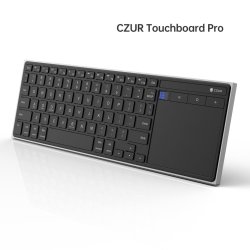
 CZUR K5S TouchBoard Pro GBAtemp review
Hardware
Product Information:
Modern Aesthetic
Product Features:
🔹Dual Mode: Bluetooth / Wired
🔹Multi-OS: Windows / macOS / Android / iOS
🔹Optimized Multimedia Keys(New)
🔹500mAh Battery | 2H Charge | 90 Days Standby
🔹Ultra-Slim: 13.2 × 4.3 × 0.3 in | 0.71 lb
🔹Stable wireless connection up to 10m (33ft) – no dropouts, no delays.
🔹CZUR Protection: 1 year warranty, plus responsive Tech-support team
Tough Competition


With prominently featured Android hotkeys above the massive touch-pad rink, the K5S leans more towards the mobile device market rather than the media center crowd. Simply packed with a small manual and "charge only" USB-C cable, what you see is essentially what you get.
The top of the keyboard looks very pleasing with low profile keys that have a snappy membrane and nice clear keys. The bottom plastic, however, feels a bit cheap and thin. The top faceplate is a solid high quality bit of plastic, but the underside feels a bit naff. I'm guessing this was to save on weight, but I think I would have preferred a heaver keyboard with consistent body.
The switch on the top helps save the battery if you carry it in a bag to stop keys from accidentally being pressed, however, I found that while plugged in to a device, the switch is ignored and the keyboard is powered and sends inputs all the time. This was a bit annoying as I was charging it for the first time with my media center PC and my cat walked across it, sending my YouTube player into a frenzy.
Bluetooth connectivity works as expected, syncing quickly with a key combination to enter pairing mode in Windows 11 and my Android tablet. I didn't have a Mac to test, but it appears you can select the mode with another hotkey mode, possibly making the command keys work in a more appropriate manner for the OS.
The touch-pad rink was smooth and pleasant to glide around on, but I don't personally care for under-pad clickers, which this has. In my own small survey (3 people), they all had no problem with this style of input, so maybe it's just me. It works perfectly fine, either way, it's just not my cup of tea.
When comparing it against the classic and, dare I say, fan favorite Logitech K400/K400+ for media center interaction, it comes very close in terms of size. The much smaller rink of the K400 is a bit harder to work with when dragging files or getting the cursor across the screen, but the mouse clicker in the top left is an amazing addition that allows you to hold the keyboard with both hands and still use the mouse comfortably-- something I seriously missed when using the K5S.
When it came to Android usage, having the Menu/Home/Back keys was a God-send. I no longer needed to reach over to my tablet and stab at the screen to get out of an app or switch between windows. I wish these two keyboards could get together and have a baby, it would be the best of both worlds.
At nearly double the price (Edit: it seems the K400+ has jumped from $25 up to $34 in the last 3 days!), though, it's hard to recommend Czur's Touchboard Pro over a tried-and-true classic. Built in bluetooth and physical Android controls may make it worth your while if you heavily rely on your tablet and DeX or other desktop interactive modes, or if you use a wireless version or dock which makes reaching over to press these keys inconvenient (if not impossible).
Verdict
- Android Shortcut Keys
- Large Trackpad Rink
- 500 mAh Rechargeable
- Naff Bottom Quality
- Doesn't Turn Off While Charging*
- High Price vs Competitors


