

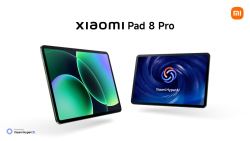
 Xiaomi Pad 8 Pro GBAtemp review
Hardware
Product Information:
Android tablets have come a long way, and Xiaomi’s tablets have really convinced me to use them as a secondary productivity device. The company’s latest iteration is the Xiaomi Pad 8 Pro, which has just launched globally. Let's take a closer look!
Xiaomi Pad 8 Pro contents and specs
The Xiaomi Pad 8 Pro starts at €550. The package comes with the following items:
I was positively surprised by the inclusion of a power brick. It's a 67W HyperCharge brick and is a welcome addition to make the most of the device's features, especially considering the trend of companies (including Xiaomi) not including this accessory with their devices.
Specs of the Xiaomi Pad 8 Pro are as follows:
Hardware and accessories impressions
Bearing the Pro suffix, this tablet is Xiaomi’s top-of-the-line tablet model, and the hardware is indicative of that. Its all-metal unibody with a brushed finish gives it a professional look. With all of its innards packed in a compact, 5.75mm-thin package, Xiaomi’s craftsmanship is on display.


To make the most out of Android tablets, especially as a productivity companion, certain accessories are quasi-mandatory. Xiaomi has populated its tablet ecosystem with such accessories, and the Pad 8 Pro is no different.
Available for the Xiaomi Pad 8 Pro are the dedicated Keyboard, Focus Keyboard, Cover and Focus Pen Pro. For general protection, the Smart Cover is recommended, but if you need to choose one, the Focus Keyboard is the one to get. With a familiar layout and integrated trackpad, it really makes the case for using this tablet as a secondary workstation, even if it adds noticeable heft and thickness to the device. There's also the regular Keyboard which is similar to the Focus one but lacks a trackpad.


If you can spare some extra cash, the Focus Pen Pro is also something that will come in handy. This version is fancier in that in doesn’t have any buttons but features a touch panel and is pressure sensitive. Squeezing it will lead to a menu to pop up while the touch panel works as buttons would (swapping between pen types) and also lets you scroll down pages.
All of these accessories complement the professional feel and quality that Xiaomi's mainline products are known for.
Gaming performance of the Xiaomi Pad 8 Pro
Xiaomi’s latest tablet sports the Snapdragon 8 Elite chip and GeekBench 6 scores position it among the upper tier.


With its specs, the device is well capable of gaming. I'm not especially fond of gaming on a tablet, except for games that would really benefit (or require) from the larger screen, such as Planescape Torment and Magic: The Gathering Arena.
It is also well capable of emulation. Older systems like Dreamcast and Gamecube (at 3x resolution) have no issues running at full speed.


PS2 games at 3x resolution is also not an issue. I got Ratchet & Clank and Shadow of the Colossus to both run at 60fps. Wii’s The Last Story at 3x resolution would also run at full speed.
The Pad 8 Pro’s 11.2", 3.2K display with up to 144Hz refresh rate delivers crisp visuals and the quad-speaker system really enhances the experience. The massive 9,200 mAh battery also lends itself well to gaming purposes. The included 67W HyperCharge brick allows the tablet to get juiced up relatively quickly so that you can jump back into your gaming session without much delay.


A worthwhile portable productivity workstation
Gaming potential aside, the Xiaomi Pad 8 Pro has much more potential as a productivity workstation. I'm totally fond of its 11.2" dimensions, which aren't too small for practical usage nor too large to limit its portability.
Equipped with the Focus Keyboard, you can easily edit documents, navigate intuitively with the trackpad and make proper use of the split-screen feature for enhanced productivity. For example, I use one half to write drafts and the other half to browse the internet and conduct research on what I'm working on.
The Smart Pen is great for making sketches and annotating PDFs. The latter use case is particularly apt for me when I’m researching for my next article. The pen attaches magnetically to the side of the tablet and also charges it. It's a sleek and convenient feature.
The display is great for watching YouTube videos or catching up on the latest TV series. The quality audio delivered through its quad-speaker system makes it well-suited as a portable entertainment system.
I also tend to read news articles and manga on the tablet. Using the Cover is apt for such uses, allowing the user to rest the tablet on a surface instead of holding it in the hands.


The Xiaomi Pad 8 Pro has become a trusty companion for me. I use it daily to check the news, watch videos and take video calls, and, when I'm out and about or travelling, it's my go-to machine for productivity uses.
Operating on Android OS means that not all software is accessible, and it might not be as useful for those requiring specific apps for their work. I hope that Xiaomi considers making a device of a similar form factor that runs on Windows instead. This would make for a much more attractive proposition, even presenting itself as a full laptop replacement.
My only major complaint is that the front camera could be better. Tablets lend themselves well to video calling, and switching the back 50MP camera to the front would make more sense.
Nevertheless, for general purposes, such as video calls, document editing and browsing, it's an excellent companion (or even laptop replacement), especially when used in combination with its accessories. These will cost extra but are a must-have to really unleash the potential of the Xiaomi Pad 8 Pro as a true portable workstation. It’s an incremental upgrade from last year’s Xiaomi Pad 7 Pro, so it’s not worth an upgrade if you are using the latter model. However, if you haven’t made the jump to Android tablets yet, this one is the one to go for.
Verdict
- Premium build
- Specs, display and speakers lend themselves well to gaming and general uses
- Ecosystem of accessories designed to support productivity use cases
- Front camera could be better for video calls
- Must-have accessories come at an extra cost
- Incremental upgrade from last year’s model

Reviews
REDMAGIC Astra 2 Gaming Tablet review
The next generation of small form factor gaming tablet, we check out REDMAGIC’s Astra 2.
TX3 LAB-X Lite review
In this review, we’ll take a look at the TX3 LAB-X Lite Ergonomic Gaming Desk.
TX3 SOLO 360 review
From gaming peripheral manufacturer Thunder X3 comes the TX3 SOLO 360 gaming chair. Will it improve the comfort of your gaming sessions?
Xteink X4 Pro review
Xteink just released a revamped version of its hugely popular tiny e-reader. Does the Xteink X4 Pro tick all the boxes?
BOSGAME M5 Mini PC review
An absolute powerhouse from BOSGAME, we check out their flagship M5 Mini PC!
Site & Scene News
New Hot Discussed
Limited Edition Zelda-themed Switch 2 images have leaked online


42Sponsored Raid: Shadow Legends F2P Progression Guide: Free Shards, Energy & Champions
It’s decent enough - an early look at Oblivion Remastered on Switch 2


33'Angelic: Dark Symphony', a narrative RPG from former Bungie and Crytek developers, announced


22Narrative newsroom thriller 'Static Hour' announced


9Nintendo Direct announced for the 4th of August, set to feature 20 minutes of the new Fire Emblem game


62ROM Hack Pokemon Emerald EX released, features new routes and towns alongside eight new gyms


24Banjo Kazooie PC port "Lighthouse" released, includes built-in randomiser and ROM hack support


24Pokemon Yellow added to first generation recompilation library, voxel mod updated to support "3Dish battles"


47Editorial It's nice to still have rhythm games like this - A look at Rhythm Paradise Groove


10ROM Hack Ocarina of Time 3D gets huge mod to enable single-screen play


67A multi-platform port for Pokemon Emerald is in the works, supports Windows, Linux, and Android


57ROM Hack Better Super Mario Sunshine Online released, adds online co-op and custom hide and seek game mode to play


25Pokemon Yellow added to first generation recompilation library, voxel mod updated to support "3Dish battles"


47ROM Hack Pokemon Timeless Diamond and Spaceless Pearl released, enhances original Sinnoh releases with quality of life changes and new events


36Homebrew app PS2 emulator NetherSX2 gets a Switch port
Homebrew app Wii U emulator Cemu gets a homebrew Switch port, Wind Waker HD shown running at full speed
Homebrew app GameCube and Wii emulator Dolphin gets a native Switch port, supports RetroAchievements and loading from USB storage
ROM Hack Pokemblem is the best spin off Game Freak never made


21ROM Hack Pokemon Emerald EX released, features new routes and towns alongside eight new gyms


24ROM Hack Ocarina of Time 3D gets huge mod to enable single-screen play
Nintendo Direct announced for the 4th of August, set to feature 20 minutes of the new Fire Emblem game
A multi-platform port for Pokemon Emerald is in the works, supports Windows, Linux, and Android
Pokemon Yellow added to first generation recompilation library, voxel mod updated to support "3Dish battles"
Limited Edition Zelda-themed Switch 2 images have leaked online
Remasters for Fallout 3 and New Vegas announced, Fallout 5 still in development
Octopath Traveler and Octopath Traveler II set to launch digitally on Switch 2 today, unclear as to whether an upgrade path will be available
ROM Hack Pokemon Timeless Diamond and Spaceless Pearl released, enhances original Sinnoh releases with quality of life changes and new events
It’s decent enough - an early look at Oblivion Remastered on Switch 2
Monster Hunter Wilds to get permanent price drop from August 4th