
Im still new to switch mods but on my current modded switch (v1 unpatched switch) which is running atmosphere v1.11.2, I've tried installing .NSP games using 2 different methods so far but keep getting failures. Its becoming frustrating. There so much different info online where every different place someones using something else . Finding any actually consistent legit modded switch support online is very tedious. Everyone and every forum and site has different ways they do things. I just want to get my damn games installed on this thing. I have alot to install but havent been able to get a single one installed.
Please read my 2 attempted methods below and look at screenshots if they are of any help at all idk really. If you can help me in any way with how I can get these nso games installed please reply and let me know what I should try next. Thanks for your time.
Method-1: I first tried installing according to instructions given by chatGPT using DBI. It was a version of DBI with a translator patch. I connected to my switch through USB to my PC and they recognized eachother. I would start MTP connection and plug up to PC via USB. The Explorer window would pop up once DBI was openin and running in MTP mode. I would drag and drop/copy a single NSP file at a time to the folder where it said. On the switch, even though DBI was an english version, for some reason when installing NSP's it still shows the status bars and text in russian while instaling. I let it install and they would take 10-15min and "complete." Well there were apparently errors bc the text was red and games were installed. I looked at the text through my phone camera using google translate and it read something like "failed...error" in regards to the install. I tried multiple other files to no success.
After 8 fails in a row, I moved onto try another method.
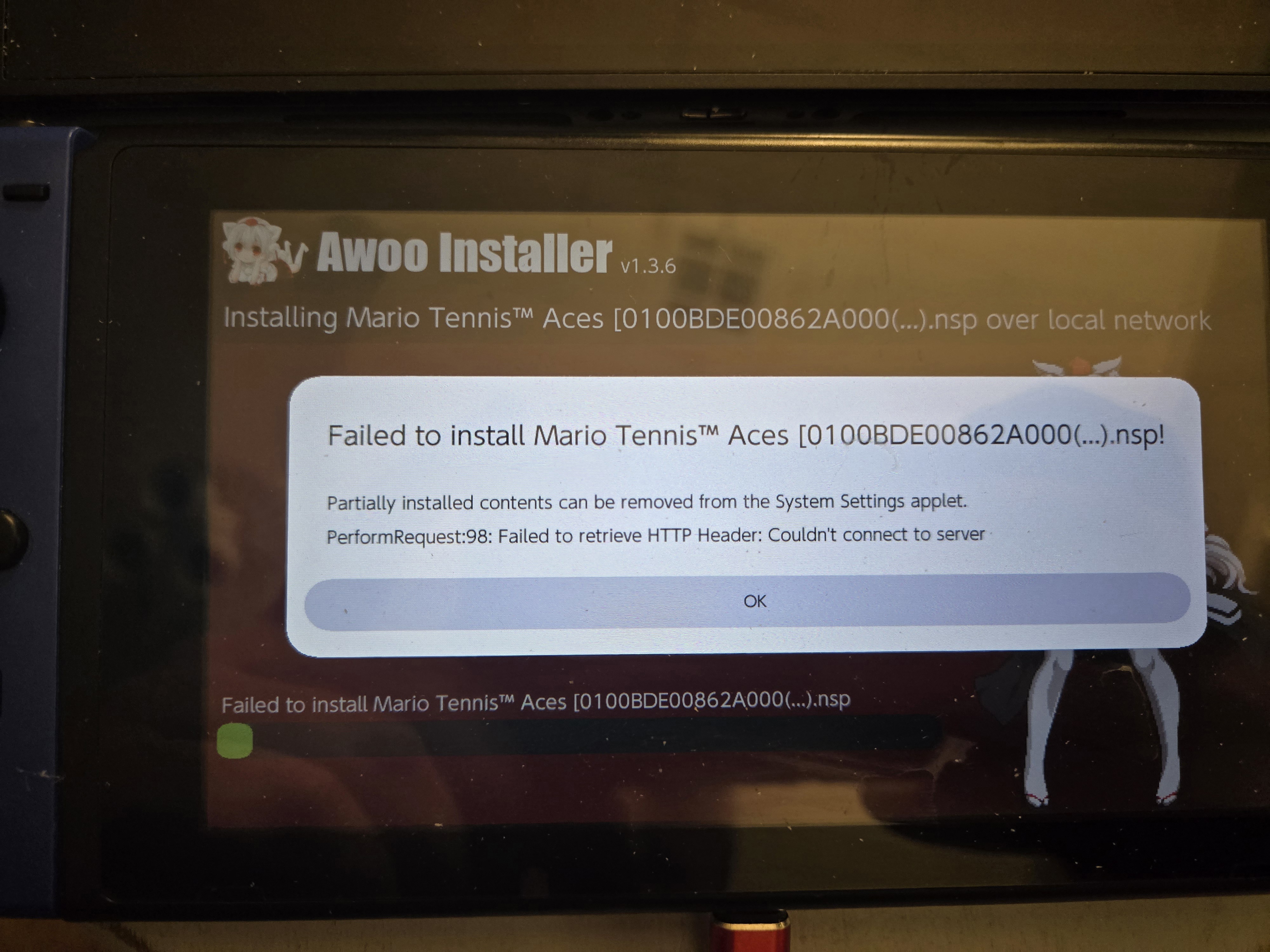
Method-2: For my second attempt I used Awoo installer home brew app with NS-usbloader on my pc. I tried installing NSP's both via USB connections and via LAN connection. They would slowly go throught the install then at the end it would say the installs failed. I tried multiple nsp files. The files are all good i know that for a fact so thats not the problem.
Screenshot 1 - this is the error screen after failed install using DBI (as translated somewhat (badly) by google translate)

Screenshot 2 - same screen with different view of translated text (albeit crap tranlation by google translate)

Screenshot 3 - after failed install using Awoo installer with NS-usbloader on PC (attempted install via LAN)
this failed install was via LAN but the screen was pretty much showing the same thing when it failed while attemping to install via USB as well.
screenshot 4 - this doesnt really show anything its just an image of NS-usbloader up and running just as the install failed. The app on the PC didnt really show any errors it was only on the switch in the Awoo app.

Please read my 2 attempted methods below and look at screenshots if they are of any help at all idk really. If you can help me in any way with how I can get these nso games installed please reply and let me know what I should try next. Thanks for your time.
Method-1: I first tried installing according to instructions given by chatGPT using DBI. It was a version of DBI with a translator patch. I connected to my switch through USB to my PC and they recognized eachother. I would start MTP connection and plug up to PC via USB. The Explorer window would pop up once DBI was openin and running in MTP mode. I would drag and drop/copy a single NSP file at a time to the folder where it said. On the switch, even though DBI was an english version, for some reason when installing NSP's it still shows the status bars and text in russian while instaling. I let it install and they would take 10-15min and "complete." Well there were apparently errors bc the text was red and games were installed. I looked at the text through my phone camera using google translate and it read something like "failed...error" in regards to the install. I tried multiple other files to no success.
After 8 fails in a row, I moved onto try another method.
Method-2: For my second attempt I used Awoo installer home brew app with NS-usbloader on my pc. I tried installing NSP's both via USB connections and via LAN connection. They would slowly go throught the install then at the end it would say the installs failed. I tried multiple nsp files. The files are all good i know that for a fact so thats not the problem.
Screenshot 1 - this is the error screen after failed install using DBI (as translated somewhat (badly) by google translate)
Screenshot 2 - same screen with different view of translated text (albeit crap tranlation by google translate)
Screenshot 3 - after failed install using Awoo installer with NS-usbloader on PC (attempted install via LAN)
this failed install was via LAN but the screen was pretty much showing the same thing when it failed while attemping to install via USB as well.
screenshot 4 - this doesnt really show anything its just an image of NS-usbloader up and running just as the install failed. The app on the PC didnt really show any errors it was only on the switch in the Awoo app.