


Original post by me on reddit, upvote so more people can be exposed to my settings and not waste a lot of time and energy liked I did: https://www.reddit.com/r/wiiu/s/WuN3fBHUKH
Hey everyone!
If you’ve been messing around with the evWii plugin on Aroma, you probably know the exact pain I just went through. Nintendo’s default vWii scaling leaves annoying overscan/borders, and finding actual solid display numbers for the config file online feels impossible.
After falling down a massive rabbit hole of testing and fine-tuning the DMCU viewport parameters, I finally dialed in values that give you a clean picture without clipping or leaving an ugly blurry picture.
If you’re ready to finally end the suffering and fix your config file once and for all, paste these numbers in (My personal values I use when I play Wii games):
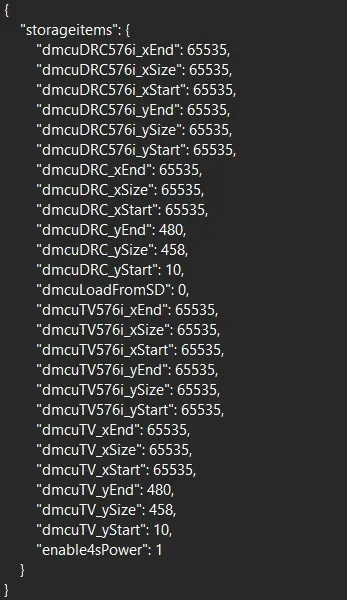
Results on my TV in Mario Galaxy 1:

Now, if you don't want those black bars on the left and right sides of the screen these are the settings for you! (these are the values that I used before and posted 4 months ago) These settings are "Pure 16:9 Values" They're also great for Gamecube games:
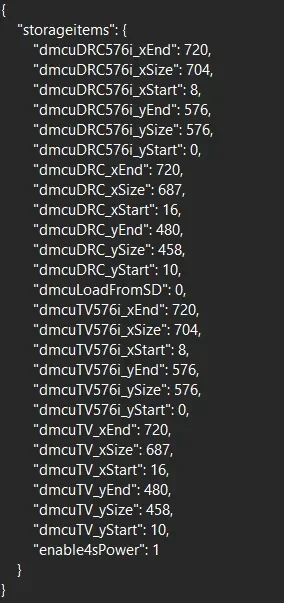
Didn't take a photo of these values on my TV, but trust me, it's the exact same as the first config—just without the side black bars so it's pure 16:9.
Here's my old post on reddit about these values if you're interested: https://www.reddit.com/r/WiiUHacks/s/15bSzZsnFU
-------------------------------------------------------------------------------------------------------------------------------------------------------------------------------------------------------------------
The best values for GameCube?:
GameCube testing status:
Value 1: Didn't test, didn't have time (in theory should be pretty good.)
Value 2: Tested, verified, looks amazing.
-------------------------------------------------------------------------------------------------------------
TL;DR: Stop guessing numbers, paste MY config, and go play your games. You're welcome!
If this helped you, great! If your screen still looks weird... well, at least we suffered together. Enjoy!
Again, this is the original post by me on reddit, you can help me by upvoting so more people can be exposed to my settings and not waste a lot of time and energy liked I did: https://www.reddit.com/r/wiiu/s/WuN3fBHUKH
Hey everyone!
If you’ve been messing around with the evWii plugin on Aroma, you probably know the exact pain I just went through. Nintendo’s default vWii scaling leaves annoying overscan/borders, and finding actual solid display numbers for the config file online feels impossible.
After falling down a massive rabbit hole of testing and fine-tuning the DMCU viewport parameters, I finally dialed in values that give you a clean picture without clipping or leaving an ugly blurry picture.
If you’re ready to finally end the suffering and fix your config file once and for all, paste these numbers in (My personal values I use when I play Wii games):
Results on my TV in Mario Galaxy 1:
Now, if you don't want those black bars on the left and right sides of the screen these are the settings for you! (these are the values that I used before and posted 4 months ago) These settings are "Pure 16:9 Values" They're also great for Gamecube games:
Didn't take a photo of these values on my TV, but trust me, it's the exact same as the first config—just without the side black bars so it's pure 16:9.
Here's my old post on reddit about these values if you're interested: https://www.reddit.com/r/WiiUHacks/s/15bSzZsnFU
-------------------------------------------------------------------------------------------------------------------------------------------------------------------------------------------------------------------
The best values for GameCube?:
GameCube testing status:
Value 1: Didn't test, didn't have time (in theory should be pretty good.)
Value 2: Tested, verified, looks amazing.
-------------------------------------------------------------------------------------------------------------
TL;DR: Stop guessing numbers, paste MY config, and go play your games. You're welcome!
If this helped you, great! If your screen still looks weird... well, at least we suffered together. Enjoy!
Again, this is the original post by me on reddit, you can help me by upvoting so more people can be exposed to my settings and not waste a lot of time and energy liked I did: https://www.reddit.com/r/wiiu/s/WuN3fBHUKH


