Homebrew [Release] eBook reader for Nintendo 3DS: 3DSLibris (DSLibris port)

  • Thread starter Thread starter Rigle
  • Start date Start date
  • Views Views 3,362
  • Replies Replies 13
  • Likes Likes 19

Rigle

Well-Known Member
Member
Joined
Apr 15, 2008
Messages
173
Reaction score
35
Trophies
1
Website
rigle.dev
XP
701
Country
Spain
Hello!

A while ago, I was looking for an eBook reader for the 3DS, but I couldn’t find one that really fit my needs. So after some time, I decided to take the DSLibris code and start porting and improving it for the Nintendo 3DS.
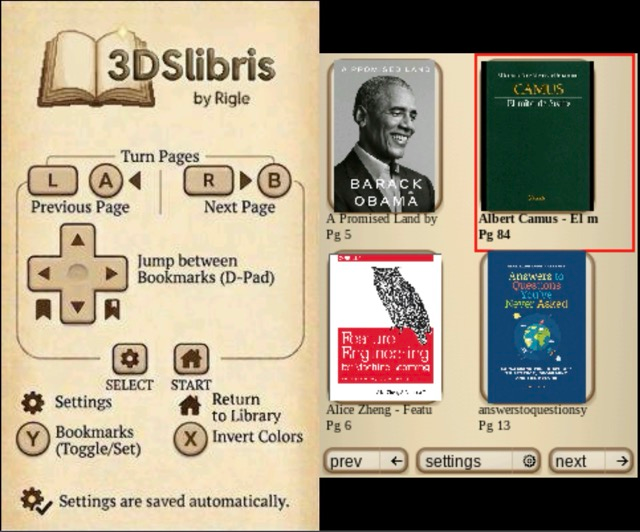
1773328463045.png


So far, I’ve added custom fonts, bookmarks, table of contents/index support, left- and right-handed layouts, and three color modes: Daylight, Night, and Book.

It has strong EPUB support, good FB2, TXT, RTF and ODT support, and I tried my best with MOBI, but I have to improve it.

Also, it doesn't offer DRM support.

I hope you find it useful! And if you run into any issues, please report them on GitHub.

Download: https://github.com/RigleGit/3dslibris/releases
 
Nice. I use DSlibris a lot, but the limitations of the DS are very apparent, so seeing something like this in the works is exciting.
I tested it out for a bit, and it ran perfectly fine through the Homebrew Launcher with various books. I'm definitely looking forward to moving all my books over to 3DSlibris. Sadly, I am getting the same error as in the reported CIA issue (on Github) when trying to launch from the home screen, but I can make do with the Homebrew Launcher for now.

I love that you can navigate through chapters via the index. That's an incredible addition.

The new UI is nice. Having the controls so visible rather than tucked away in a document is handy, and the grid layout is a lot more eye-catching. It does make me wish there were ways to sort the library, which I never felt the need for with the original DSlibris, but I should probably just name my epubs in a more organised fashion...

Is there any documentation on the cover file format? I see a bunch of CVR files, but I'm not sure what they are or how they're named. I'd love to be able to manually add covers to books that normally lack them.

Oh, and for other users, if you increase the text size while a book is open, it won't display properly until you reload that book. So if words aren't fitting on the screen after you mess with the display settings, just switch over to another book and then switch back, or shut the software down and relaunch it.
 
Thanks for your words! These cvr are the cache files of your own ebook covers, to make the system load faster. I'll see what can I do with these features, and I'm trying to recreate the CIA problem. I think it's related to something I don't have in the menu (maybe a different Luma version / custom theme), but I'll try to get more info.
 
This is really cool! I've been experiencing the same kinds of limitations with book reading on the 3ds. Do you plan to reach out to Universal-UB to make it availible on Universal-Updater? (I'm happy to do that on your behalf if you'd like)
 
Holy this is amazing! I will ABSOLUTELY download this

I unironically use dslibris a lot, I've read quite a few books in it, and having a 3ds port and improved version of it makes me super excited

Thank you so much for your contribution :yay3ds:
Will definitely read the heck out of my 3ds now
 
  • Like
Reactions: Rigle
Just want to say that I love all the improvements you've made to it.
Thank you! I'm still working actively in the project and I had some bad times with the .cia rsf configuration, but it seems to be working good atm.

If you see any bug, report it on Github issues! :)
 
Wow, this is really impressive!

I looked at doing this myself a while ago, but never got very far with it.

Very cool!
 
  • Love
Reactions: Rigle

Site & Scene News

Popular threads in this forum