
Homebrew KeyX-Supports Turbo and Button Remapping

  • Thread starter Thread starter TOMSUN
  • Start date Start date
  • Views Views 6,159
  • Replies Replies 48
  • Likes Likes 14

TOMSUN

Active Member
Newcomer
Joined
Jul 27, 2025
Messages
42
Reaction score
47
Trophies
0
Age
31
XP
266
Country
China
GITHUB: https://github.com/TOM-BadEN/KeyX

KeyX - Key Assistant​


Nintendo Switch key assistant with Turbo , remapping and Macro support.
Has global and per-game configurations, and automatically starts based on saved preferences.
Consists of
Tesla overlay and system module.


1764547646381.png

  • Beautiful and modern UI design
  • Dynamically modify turbo and mapping settings
  • Record macros directly using Tesla overlay with comprehensive guidance
  • Optional notification popups
  • Blue icons on home page indicate remapped buttons
  • Yellow badges indicate turbo-enabled buttons
  • Red badges indicate macro-bound buttons

Key Mapping​

  • Remap 16 buttons (A/B/X/Y/L/R/ZL/ZR/D-pad/SELECT/START/L3/R3)
  • Works together with turbo without conflicts
  • Perfectly avoids system warning popups about button changes
  • Global and per-game configuration
  • Auto-remembers on/off state

Turbo​

  • Turbo for 12 buttons (A/B/X/Y/L/R/ZL/ZR/D-pad)
  • Multiple buttons can turbo simultaneously
  • Non-turbo buttons work normally during turbo
  • Customizable press and release duration
  • Global and per-game configuration
  • Auto-remembers on/off state

Macro​

  • Auto-remembers macro function on/off state
  • Both stick and button states are recorded
  • Maximum recording duration: 30 seconds
  • Recording frame rate: 60 FPS
  • Press shortcut key once for single playback
  • Hold shortcut key for loop playback
  • Press shortcut key again during playback to cancel
  • Supports editing of recorded macros

Macro​

  • System module: only 343 KB
  • Notification popup: extra 688 KB
  • Popup only uses memory when triggered

Installation​

  • Copy files to SD card root.

Multi-Language​

  • Chinese is hardcoded, no need to add
  • I used AI to translate the English language file (Sorry, I only know Chinese.)
  • I don't understand other languages, and AI is even worse at it
  • You can refer to en.json to add support for other languages
SUPPORTED LANGUAGES:
- en.json (English)
- zh-cn.json (No need to add, already hardcoded)
- zh-tw.json (Traditional Chinese)
- ja.json (Japanese)
- ko.json (Korean)
- fr.json (French)
- de.json (German)
- it.json (Italian)
- es.json (Spanish)
- pt.json (Portuguese)
- ru.json (Russian)
- nl.json (Dutch)


Wish everyone a happy gaming time.


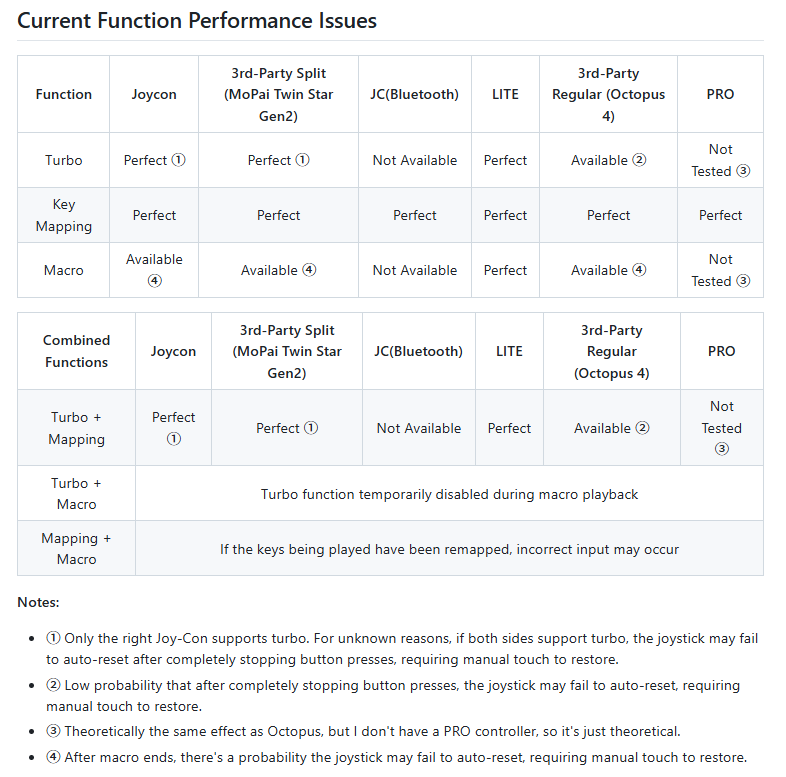
BUG report

I have two Switch consoles, one OLED and one Lite.
I have already carried out the following tests.

Switch LITE (4GB)
KEYX 1.4.3
HOS 21.1
AMS 1.10.1
Ultrahand 2.2.4
ovlloader is set to 4MB
LITE & third-party integrated controllers (Pro protocol)

Everything is working normally.
Switch OLED (4GB)
KEYX 1.4.3
HOS 20.5
AMS 1.9.5
Ultrahand 2.2.4
ovlloader is set to 4MB
JC & third-party integrated controllers (Pro protocol)

Everything is working normally.

If you find that it does not work properly during actual use, please describe the following details in as much detail as possible:

  1. What exactly is not working as expected.
  2. Whether the issue can be reproduced.
  3. What actions trigger the issue.
  4. The system and software versions mentioned above.

This information will be very helpful for identifying and resolving the problem.

Additionally, if you find that none of the features are working, you can try disabling other sysmodules first and then testing again.
 

Attachments

  • 1763354535468.png
    1763354535468.png
    63.5 KB · Views: 50
Last edited by TOMSUN,

Is it possible to configure button in home screen as well, and avoid the warning popup? Every time i create a global mapping it removes my custom mapping. Coming from PlayStation, having A and B swapped is pretty nice.
 
Last edited by browntigerz,
Nice and usefull app. Too bad that i'm selling my switch after finishing 4 games and going back to pc gaming.
 
Is it possible to configure button in home screen as well, and avoid the warning popup? Every time i create a global mapping it removes my custom mapping. Coming from PlayStation, having A and B swapped is pretty nice.
The API calls are global by default; I only blocked the desktop part so that it only works in games.
If you want to make it global, the pop-ups cannot be avoided 100%.
 
  • Like
Reactions: browntigerz
The API calls are global by default; I only blocked the desktop part so that it only works in games.
If you want to make it global, the pop-ups cannot be avoided 100%.
How can i keep my custom mapping for when not in games and make per game config. Im okay with the popup, but every time i change mapping for game it defaults my custom
 
How can i keep my custom mapping for when not in games and make per game config. Im okay with the popup, but every time i change mapping for game it defaults my custom
This plugin cannot do that at the moment.

To achieve it, a feature would need to be specially developed for your specific requirement, and quite a bit of code would have to be modified.


The current logic of the project is:

When you are in a game in the foreground, the mapping is activated.

When you are in the background or not in a game, the mapping is deactivated,

and deactivating the mapping will revert the buttons back to the Switch's default.
 
  • Like
Reactions: browntigerz
Hey, can anyone please tell me how I can use turbo mode? I set the key (button A) -> then switched on Turbo Mode. But it's not doing anything. I'm on Switch OLED.
 
Hey, can anyone please tell me how I can use turbo mode? I set the key (button A) -> then switched on Turbo Mode. But it's not doing anything. I'm on Switch OLED.
After setting the turbo button, enable the turbo function on the HOME menu.
In theory, the turbo should then take effect.


No one else has encountered the issue you’re having so far.
What version of Atmosphère are you using? It is currently known that on HOS 18 with AMS 1.7, it does not work, while on AMS 1.8, it works correctly.
 
After setting the turbo button, enable the turbo function on the HOME menu.
In theory, the turbo should then take effect.


No one else has encountered the issue you’re having so far.
What version of Atmosphère are you using? It is currently known that on HOS 18 with AMS 1.7, it does not work, while on AMS 1.8, it works correctly.
I am doing the same thing. , I set the turbo button, then click on Turbo (in the home menu via overlay) -> it goes to ON state. Then I click "B" to go back to the game. But it doesn't take place : (.

Macros & Mappings are running fine. I tried that.

After going into the game - I don't need to click on any button combination, right?

I am on Version: 19.0.1 | AMS 1.8.0
 
Last edited by falcxarp,
I am doing the same thing. , I set the turbo button, then click on Turbo (in the home menu via overlay) -> it goes to ON state. Then I click "B" to go back to the game. But it doesn't take place : (.

Macros & Mappings are running fine. I tried that.

After going into the game - I don't need to click on any button combination, right?

I am on Version: 19.0.1 | AMS 1.8.0
Sorry, to be honest I’m not sure what the cause is either.
Try disabling the remapping and macro features, and enable only turbo to see if it works.
I will run more tests as well.


I suspect it might be related to the AMS version? (Just a guess.)
Since most people are already on version 1.9.0+, I haven’t really been paying attention to compatibility issues with older versions.
I’ll ask some others to help test it too.
It may take some time.
 
  • Like
Reactions: falcxarp
Sorry, to be honest I’m not sure what the cause is either.
Try disabling the remapping and macro features, and enable only turbo to see if it works.
I will run more tests as well.


I suspect it might be related to the AMS version? (Just a guess.)
Since most people are already on version 1.9.0+, I haven’t really been paying attention to compatibility issues with older versions.
I’ll ask some others to help test it too.
It may take some time.
It's okay.

Thanks so much for making the tool. I can simulate the turbo functionality with macro playback, so it's fine for my use case.
 
  • Like
Reactions: TOMSUN
Sorry, to be honest I’m not sure what the cause is either.
Try disabling the remapping and macro features, and enable only turbo to see if it works.
I will run more tests as well.


I suspect it might be related to the AMS version? (Just a guess.)
Since most people are already on version 1.9.0+, I haven’t really been paying attention to compatibility issues with older versions.
I’ll ask some others to help test it too.
It may take some time.
I have the same issue as well, on v20.5.0, AMS 1.9.5. Still a really awesome tool!
 
This is really, really strange.
I’m also on 1.9.5 & 20.5.0, and yesterday I tested both the Joy Cons and third-party split controllers, all of them worked normally.
 
@TOMSUN with how the overlay recognises inputs for Macros and Turbo, could a feature be added to this tool that simply counts the button presses of a targeted button? Just think it would be cool to have a sort of shiny hunt counter for pokémon games that counts based on you pressing a button.
 
@TOMSUN with how the overlay recognises inputs for Macros and Turbo, could a feature be added to this tool that simply counts the button presses of a targeted button? Just think it would be cool to have a sort of shiny hunt counter for pokémon games that counts based on you pressing a button.
The way this project works is quite special,
so it’s also not possible to accurately identify how many times it is triggered within a game.
 

Site & Scene News

Popular threads in this forum