- Joined
- Jul 11, 2006
- Messages
- 6,881
- Reaction score
- 28
- Trophies
- 1
- Website
- jphtemp.net
- XP
- 1,192
- Country

M3/G6 DS Real v3.8 Loader E28
FFTA2 Soft Reset Fixed; #2385 Semi-fixed
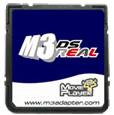 A nice update for the M3 DS Real and the G6 DS Real. This update fixes soft reset for both the FFTA2 region versions, as well as The Tower DS (Japan).
It semi-fixes Daigasso Band Brothers DX (Japan; you can't save your songs and Wi-Fi doesn't work).
Changelog and Download below.
 Download
 M3/G6 Downloads Website
FFTA2 Soft Reset Fixed; #2385 Semi-fixed
It semi-fixes Daigasso Band Brothers DX (Japan; you can't save your songs and Wi-Fi doesn't work).
Changelog and Download below.
Changelog said:Soft reset now works with these games:
2381 - Final_Fantasy_Tactics_A2_Grimoire_of_the_Rift_EUR_MULTi4_NDS-EXiMiUS
2384 - Final_Fantasy_Tactics_A2_Grimoire_of_the_Rift_USA_NDS-iND
2386 - The_Tower_DS_NDS_JPN-XPA
This game was semi fixed:
2385 - Daigasso_Band_Brothers_DX_NDS_JPN-XPA
* If you tried to boot this ROM on a previous firmware then you will need to delete the old 512kb save. The card will then create a 1MB save file which works with the game.