Hacking Theme's for USB Iso Loader GUI by dimok,nIxxx,cyrex et al :P

  • Thread starter Thread starter starstremr
  • Start date Start date
  • Views Views 115,944
  • Replies Replies 481

starstremr

Well-Known Member
Member
Joined
Nov 15, 2007
Messages
379
Reaction score
0
Trophies
1
Age
55
XP
359
Country
United States
OK now that i figured it out i am having fun with the themes

Here is the default templates

Here is a transparent bg_options.png so that you can see through the game list

bg_options.png


Feel free to post your themes at USB Loader GUI Themes

Here is my first

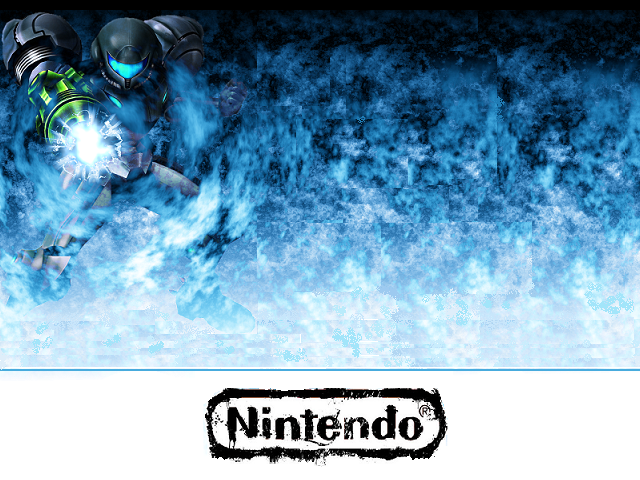
Metroid 3 Corruption

Demo Screen
demo-1.jpg

Background
background.png


[url=http://h
 
starstremr said:
OK now that i figured it out i am having fun with the themes

they all look good. once I figure out what I wanna do, ill throw one of my own in there, since my display is widescreen, i will have at least that, if not both 16x9 and 4x3 when they are done

Edit: Get from Theme Site

Themes

sample i threw together in photoshop, so its not exact, but gives you a better idea of what it looks like
sample.jpg


Its easier to update the theme site now, plus more people go there anyways, so if you are looking for an update check the Theme site linked above

I created all the pics in fireworks, with the exception of the background which was made in flash =þ
 
I had created one for myself and any other juggalos on here, since I had found out there are a few on here. For some reason my cursor wont show up as the hatchet man so im not sure if it has not been built in yet or if its a bug, but here are the images.

background.png

player1_point.png

player1_grab.png


The cover location looks off if you are using the 3d box art


Edit: removed the white game placeholder

backgroundNEW.png
 
background.png


here is the one i use for myself. i am not an artist and it is super basic.

when you flip between games and the cover art disappears for a second you see Samus's cannon in your face. i think it is pretty cool and it looks good on my TV.

it is widescreen and i have it set so the top edge of the cover art comes up just short of samus's helmet so it is never blocked. cover coordinates are 20,92. everything else is default.
 
sorry if this was asked before. Where do i place the files? And what is the default config file that is needed (If needed).
 
deakphreak said:
I had created one for myself and any other juggalos on here, since I had found out there are a few on here. For some reason my cursor wont show up as the hatchet man so im not sure if it has not been built in yet or if its a bug, but here are the images.

background.png

player1_point.png

player1_grab.png


The cover location looks off if you are using the 3d box art


Edit: removed the white game placeholder

backgroundNEW.png

Dude that is fresh as hell
 
starstremr could you move the pic of super girl to the other side and make bg_options.png transparent
 

Site & Scene News

Popular threads in this forum