Homebrew cIOS and IOS installed but the Internet games aren't loading

  • Thread starter Thread starter xX_Leo_Xx
  • Start date Start date
  • Views Views 4,510
  • Replies Replies 33
don't remove them if you don't know what you're doing.
google "complete sofmod guide" and click on "cIOS installation".

you need to be able to follow that instructions until the end! carefully!
don't miss anything!

after that you have the correct cIOS to run games.
 
don't remove them if you don't know what you're doing.
google "complete sofmod guide" and click on "cIOS installation".

you need to be able to follow that instructions until the end! carefully!
don't miss anything!

after that you have the correct cIOS to run games.

OK thank you and sorry for wasting your time

--------------------- MERGED ---------------------------

OK thank you and sorry for wasting your time
I tried this https://sites.google.com/site/completesg/backup-launchers/installation
AND IT DIDN'T WORK
 
You took 20 minutes to try that!
Are you sure you finished the tutorial?

So, some games still work and some don't?

I had to check you're entire setup to see what fails, and we are a thousand miles away!
 
never follow video tutorial from youtube ! they are ALL 100% wrong.
people always end up on gbatemp for help.

your folder structure for the wbfs looks fine.
your HDD size...16GB .. ok, that's NOT a HDD, but a Flash drive.

FLASHDRIVE ARE BAD !

though, you said other game you dumped yourself worked. you dumped them directly from USBLoaderGX to the drive? You probably found a working flashdrive, that's very rare!
though, I'd still try with a REAL external HDD just to exclude the flashdrive from being the problem. you could use it back after trying and being sure it's not the problem. (if it's not)
 
Last edited by Cyan,
no, not for games launched from a loader.

Priiloader is a "System menu" patcher.
it's useful in case you install a WAD channel from another region, or have a disc from another region, in order to launch it from the system menu, and bypass the system menu's region check.

You can boot the Wii directly into HBC or USBLoaderGX, with priiloader or bootmii (without any priiloader patch affecting the sysMenu, because you completely bypass the sysMenu, it's never launched), and therefore don't even care about patching anything.
 
Last edited by Cyan,
You took 20 minutes to try that!
Are you sure you finished the tutorial?

So, some games still work and some don't?

I had to check you're entire setup to see what fails, and we are a thousand miles away!
Wait i skipped a part
sorry LOL i am such a lazy a*s

--------------------- MERGED ---------------------------

Actually i don't have Priiloader
 
I'm sorry if this is total BS rn, but don't you need to have the "Region free EVERYTHING" hack activated in Priiloader, in order to play NTSC games on a PAL Wii?
I don't have Priiloader but i have a similar thing called TinyLoad

--------------------- MERGED ---------------------------

I'm sorry if this is total BS rn, but don't you need to have the "Region free EVERYTHING" hack activated in Priiloader, in order to play NTSC games on a PAL Wii?
OMG I didn't think about it!!!
Can you pls tell me how to do it?
Thank you all in advance for helping me, and sorry for wasting your time :,)

--------------------- MERGED ---------------------------

I'm sorry if this is total BS rn, but don't you need to have the "Region free EVERYTHING" hack activated in Priiloader, in order to play NTSC games on a PAL Wii?
Actually, that USB drive is the actual drive that i shown :/

--------------------- MERGED ---------------------------

OK so i gonna buy a new USB, is this one good?
https://www.amazon.it/gp/product/B00X9GK6QK/ref=ox_sc_saved_title_4?smid=A3F94FNOYG4WWX&psc=1
(is a italian page cuz i am italian)
 
Last edited by xX_Leo_Xx,
  • Like
Reactions: Alexander1970
yes, you skipped a lot of things.

1)
didn't you read the answer I gave him ?
Priiloader has nothing to do with your problem.


2)
didn't you read the answer I gave YOU ?
FLASHDRIVES DO NOT WORK ON WII or vWII !
DO NOT USE FLASH DRIVES !!! EVER !!
problem solved.

if you want a new USB, then buy a new USB (external HDD), not a new USB (flash drive).
Stop calling flashdrive an "USB".


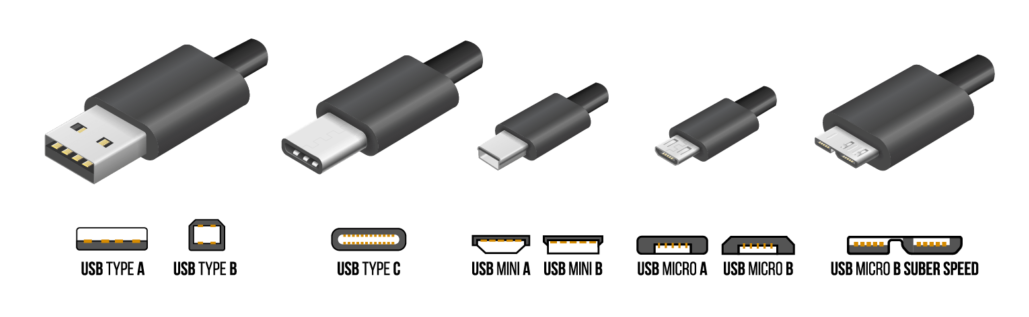
this is USB :
2017-11-11_191452.png


this is an USB flash drive:
usb-flashdrive-32gb-emtec-.jpg


this is an USB external HDD:
9db7b24e-edf7-45f0-b37c-e17e11da59d8.jpg


see, they are BOTH USB!


if you want a new device for your wii or vWii, get a Wester Digital Element (max size 2TB, not more !).
if it's too expansive... get the smallest size you find, don't pick 2TB !
 
Last edited by Cyan,
tinyload and "region free everything" is used to bypass region check with physical DVD media.
usb ISO loaders don't have region locks, so don't need to bypass anything.
 
  • Like
Reactions: jeannotte

Site & Scene News

Popular threads in this forum