


Ok, so this is what it happened:
I have a Luma'd O3DS. The CFW and all my games were in a 32 GB SD Card.
I'm poor and here in Peru an 32GB SD Card is not cheap. So I only had one. I have another 16 GB card around.
Last week I decided to hack my Wii U, and since I wanted Xenoblade I needed to use a 32 GB card.
I decided to copy all the files of the 3DS card onto my PC and use the same card to hack the Wii U.
Once that was done, it was time to copy back the 3DS files onto the card.
Buuuuuut I had a little problem. My cheap-ass card reader on my PC wasn't reading the card anymore.
I found out that it was because the card and the reader were not in full contact, and that when I pushed the card downwards, it would read it if only for a little while.
Then I decided to tape something onto the card, but then the damn thing cracked and broke in two pieces.
So, TL;DR. I have a 27 GB or something copy of my 3DS card in my PC, and I want to copy it into a 16 GB SD.
Problem is, I don't know what folders to erase, or where are the actual games are installed. I have a lot of heavy games there: MonHun, Pokemon, Fire Emblem and lots more.
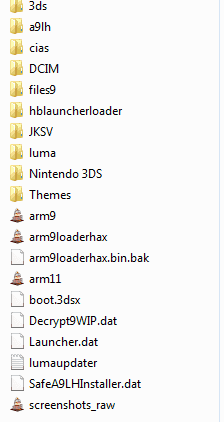
This is my folder structure. Help a brother out and tell me what folders should I delete so the copy fits into my new card. Otherwise I'm onna have to buy a new 32 GB one.
I have a Luma'd O3DS. The CFW and all my games were in a 32 GB SD Card.
I'm poor and here in Peru an 32GB SD Card is not cheap. So I only had one. I have another 16 GB card around.
Last week I decided to hack my Wii U, and since I wanted Xenoblade I needed to use a 32 GB card.
I decided to copy all the files of the 3DS card onto my PC and use the same card to hack the Wii U.
Once that was done, it was time to copy back the 3DS files onto the card.
Buuuuuut I had a little problem. My cheap-ass card reader on my PC wasn't reading the card anymore.
I found out that it was because the card and the reader were not in full contact, and that when I pushed the card downwards, it would read it if only for a little while.
Then I decided to tape something onto the card, but then the damn thing cracked and broke in two pieces.
So, TL;DR. I have a 27 GB or something copy of my 3DS card in my PC, and I want to copy it into a 16 GB SD.
Problem is, I don't know what folders to erase, or where are the actual games are installed. I have a lot of heavy games there: MonHun, Pokemon, Fire Emblem and lots more.
This is my folder structure. Help a brother out and tell me what folders should I delete so the copy fits into my new card. Otherwise I'm onna have to buy a new 32 GB one.



