Gaming DS Lite flickers and turns off

  • Thread starter Thread starter Haloman800
  • Start date Start date
  • Views Views 7,152
  • Replies Replies 46
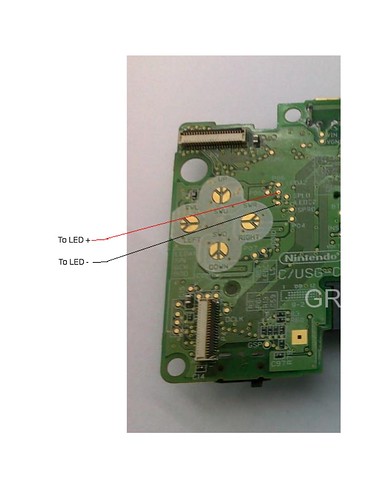
You do it by soldering a resistor (or LED bulb) to the DS Lite motherboard. It has to be on the points labelled LEDA2 and LEDC2.

I wouldnt do it with soldering though, I'd use electrical tape or just any tape. There's also conductive glue as an alternative to soldering, but I'd try it with tape since that way if I get it wrong I can just redo. The points are really small. There is every reason to avoid soldering.

For the record I have never done this mod. I've done it on 3DS XL (and DSi) but never DS Lite, but I did read a lot about doing it to a DS Lite.

See also:
- youtube video titled: "DS lite running without top screen"
- youtube video titled: "DSboy Lite 2 (DS lite in permanent GBA mode)"
- acidmods forum thread titled "run your Ds lite with only the bottom screen"
 
  • Like
Reactions: Haloman800
You do it by soldering a resistor (or LED bulb) to the DS Lite motherboard. It has to be on the points labelled LEDA2 and LEDC2.

I wouldnt do it with soldering though, I'd use electrical tape or just any tape. There's also conductive glue as an alternative to soldering, but I'd try it with tape since that way if I get it wrong I can just redo. The points are really small. There is every reason to avoid soldering.

For the record I have never done this mod. I've done it on 3DS XL (and DSi) but never DS Lite, but I did read a lot about doing it to a DS Lite.

See also:
- youtube video titled: "DS lite running without top screen"
- youtube video titled: "DSboy Lite 2 (DS lite in permanent GBA mode)"

- acidmods forum thread titled "run your Ds lite with only the bottom screen"


So I could theoretically get a 1K resistor and use electrical tape on the points you mentioned and it should work?

edit: would this work? http://www.radioshack.com/1k-ohm-1-4-watt-carbon-film-resistor-5-pack/2711321.html

I'd love to be able to finish this tomorrow.
 
if you look up other people mods and see what resistor they used.. I might check myself but later. But chances are multiple kinds will work fine. People who figured out the DS Lite mod by trial and error just used whatever worked. Same with me and my 3DS XL, I picked a resistor and it ended up working.

actually if i remember correctly most people don't state the wattage of the resistor for some reason, they just state the K value. When I went to buy a resistor I was asked the wattage and my mind went "wtf" because none of their modders had even mentioned it.

p.s.
6752733273_ed94be4f55.jpg


edit:

the rs1n guy from the video above says he uses a 1K resistor. He does not specify the wattage of his resistor.

psppunk from the acidmods thread used a 10k resistor but he says only the lowest brightness setting works.
 
  • Like
Reactions: Haloman800
  • Like
Reactions: Haloman800
if you look up other people mods and see what resistor they used.. I might check myself but later. But chances are multiple kinds will work fine. People who figured out the DS Lite mod by trial and error just used whatever worked. Same with me and my 3DS XL, I picked a resistor and it ended up working.

actually if i remember correctly most people don't state the wattage of the resistor for some reason, they just state the K value. When I went to buy a resistor I was asked the wattage and my mind went "wtf" because none of their modders had even mentioned it.

p.s.
6752733273_ed94be4f55.jpg


edit:

the rs1n guy from the video above says he uses a 1K resistor. He does not specify the wattage of his resistor.

psppunk from the acidmods thread used a 10k resistor but he says only the lowest brightness setting works.


I can't get enough pressure for it to stay connected (Only if I push the resistor down with my finger), any ideas on how to increase pressure?

edit: pic http://i.imgur.com/o7l87yD.jpg
 
If you close the case, that might apply enough pressure.

Also I just remembered, the people in the videos use some kind of wire as a bridge between the motherboard and the resistor. This might make the connection easier. It will also give you freedom to place the resistor somewhere where it can fit inside the casing. (assuming it doesn't fit where you put it)

By the way, did you actually get the bottom screen to work while holding down the resistor? The mod works and you just need to find a way to get it held down?

edit: If you use conductive glue and apply a teeny little bit to the ends of the resistor (or wire) before putting it onto the motherboard, that might help make the connection. It's risky though since the glue may bleed out to one of the other connectors. (you want to put on as little glue as possible) Just putting the idea out there. But while the glue is wet, you will need to hold it in place with your fingers for maybe at least a minute until it can hold in place on its own, and this will get tiring.

But hey maybe if something goes wrong it might be possible to just wipe the glue off the motherboard and start over. The glue is delicate, even after it dries it's hardly tougher than styrofoam.
 
If you close the case, that might apply enough pressure.

Also I just remembered, the people in the videos use some kind of wire as a bridge between the motherboard and the resistor. This might make the connection easier. It will also give you freedom to place the resistor somewhere where it can fit inside the casing. (assuming it doesn't fit where you put it)

By the way, did you actually get the bottom screen to work while holding down the resistor? The mod works and you just need to find a way to get it held down?

edit: If you use conductive glue and apply a teeny little bit to the ends of the resistor (or wire) before putting it onto the motherboard, that might help make the connection. It's risky though since the glue may bleed out to one of the other connectors. (you want to put on as little glue as possible) Just putting the idea out there. But while the glue is wet, you will need to hold it in place with your fingers for maybe at least a minute until it can hold in place on its own, and this will get tiring.

But hey maybe if something goes wrong it might be possible to just wipe the glue off the motherboard and start over. The glue is delicate, even after it dries it's hardly tougher than styrofoam.


Radioshack apparently closes at 8:00, so I went to Home Depot and got Liquid Electrical Tape, but it isn't strong enough. So maybe tomorrow I can see if the conductive glue works.

And yes, it does work when I hold it down with my finger, I just need the glue or something to hold it in place.
 
I got my conductive glue from radio shack, its not strong at all but it might be good for bridging the gap where the resistor is not touching the motherboard. For something that needs a lot of strength it isn't so good.

Cartmanuk mentions hot glue which I never tried before. But that gives me an idea, maybe regular glue will work. (provided it is not conductive!) This way you can glue the resistor on without having to worry about glue touching other parts of the motherboard. All you need to worry about is making sure glue doesn't get in between the resistor and motherboard. But this assumes that glue has no conductivity. I dont know whether ithas or not.

By the way, some DS Lite systems have a glob of white compound on the motherboard. That stuff is probably perfect for getting the resistor to stay on. (and obviously has no conductivity) Its just a matter figuring out what its called, and getting some.
 
I got my conductive glue from radio shack, its not strong at all but it might be good for bridging the gap where the resistor is not touching the motherboard. For something that needs a lot of strength it isn't so good.

Cartmanuk mentions hot glue which I never tried before. But that gives me an idea, maybe regular glue will work. (provided it is not conductive!) This way you can glue the resistor on without having to worry about glue touching other parts of the motherboard. All you need to worry about is making sure glue doesn't get in between the resistor and motherboard. But this assumes that glue has no conductivity. I dont know whether ithas or not.

By the way, some DS Lite systems have a glob of white compound on the motherboard. That stuff is probably perfect for getting the resistor to stay on. (and obviously has no conductivity) Its just a matter figuring out what its called, and getting some.


I had a similar experience with conductive glue.
I tried using super glue, but it messed up the connections. So I ordered a new top screen, maybe I'll cut the ribbon and try to solder a resistor onto the connection points. Not sure yet.

Out of curiosity why did you remove the top screen on your 3DS XL?
 
I had a similar experience with conductive glue.
I tried using super glue, but it messed up the connections. So I ordered a new top screen, maybe I'll cut the ribbon and try to solder a resistor onto the connection points. Not sure yet.
Don't use solder, conductive glue will probably suffice. Let me tell you a story. I once tried to do what you're about to do to a DSi. But I ruined the part of the cable where the resistor had to be soldered on. So what I had to do was cut the ribbon, and glued a resistor to the part of the ribbon I cut. It actually worked! (though the bottom screen started to get blurry shortly afterwards, dunno why) Just mentioning this to show how awesome conductive glue can be.

Also, your last sentence makes it sound like you will cut the ribbon first, before adding the resistor, but I'm sure you were going to do those steps in reverse. After all the cutting is only needed to fit everything inside.

Out of curiosity why did you remove the top screen on your 3DS XL?
The main reason I did it was to make it a good drawing device. You can't draw on the top screen so all it does it make the system heavier and more cumbersome to handle, especially when held 90 degrees, or when you're constantly switching orientation while drawing.
 
Don't use solder, conductive glue will probably suffice. Let me tell you a story. I once tried to do what you're about to do to a DSi. But I ruined the part of the cable where the resistor had to be soldered on. So what I had to do was cut the ribbon, and glued a resistor to the part of the ribbon I cut. It actually worked! (though the bottom screen started to get blurry shortly afterwards, dunno why) Just mentioning this to show how awesome conductive glue can be.

Also, your last sentence makes it sound like you will cut the ribbon first, before adding the resistor, but I'm sure you were going to do those steps in reverse. After all the cutting is only needed to fit everything inside.


The main reason I did it was to make it a good drawing device. You can't draw on the top screen so all it does it make the system heavier and more cumbersome to handle, especially when held 90 degrees, or when you're constantly switching orientation while drawing.
Where exactly am I supposed to cut the ribbon cable (in order to remove it from the top LCD) ? I tried slicing right along the edge, but now (even with the resistor attached), it won't turn on.

I hope I didn't mess it up. Pic:
 
"Where exactly am I supposed to cut the ribbon cable?" <-- I thought the video earlier in this thread tells you exactly everything you had to do? Since you decided to go with his method.

I might say to scrape off the glue and try again.
Are you sure you're connecting the resistor to the right place?
edit: it does seem to be the right place. Dunno what else to say, then. Hopefully you figure it all out. Good luck!
 
"Where exactly am I supposed to cut the ribbon cable?" <-- I thought the video earlier in this thread tells you exactly everything you had to do? Since you decided to go with his method.

I might say to scrape off the glue and try again.
Are you sure you're connecting the resistor to the right place?
edit: it does seem to be the right place. Dunno what else to say, then. Hopefully you figure it all out. Good luck!

I got it to work, and I have it attached. It stays in place but once again, there's not enough pressure to keep it attached, I have to physically push with my finger on the place where the resister meets the contact point to keep the screen on.

I really appreciate your help. Do you have any ideas on how I can make the contact stronger?


edit: How long does conductive glue take to dry? I let it sit for ~15 minutes then held a cold hair dryer on it for 5 more. I read online it can take upwards of 12 hours to dry, This may be my problem.
 
You have to get the resistor in place without the help of glue. Then add the glue.

One thing I did was tape the resistor to the table/desk in such a way that the contacts are levitating above the desk. Then do the same with the cable. They should be touching each other on their own. Then add glue and wait for it to dry, then very carefully remove the tape after it dries.

That's the gist of it anyway. I might have used my hand a little instead of relying solely on tape.

After that comes the tricky part of fitting it inside the casing without the resistor coming off. It might be best to make sure everything will fit before actually doing the gluing. The guy in the video (rs1n was it?) uses wires, maybe it was an important step. He also removes the DS cart slot, but that was to make room for speakers if im not mistaken, so you probably don't need to do that.
 
You have to get the resistor in place without the help of glue. Then add the glue.

One thing I did was tape the resistor to the table/desk in such a way that the contacts are levitating above the desk. Then do the same with the cable. They should be touching each other on their own. Then add glue and wait for it to dry, then very carefully remove the tape after it dries.

That's the gist of it anyway. I might have used my hand a little instead of relying solely on tape.

After that comes the tricky part of fitting it inside the casing without the resistor coming off. It might be best to make sure everything will fit before actually doing the gluing. The guy in the video (rs1n was it?) uses wires, maybe it was an important step. He also removes the DS cart slot, but that was to make room for speakers if im not mistaken, so you probably don't need to do that.


I got everything working, but I cut the resistor too short and there's nowhere it will fit in the casing, ha ha.. I have to pull off the glue and start over using a larger resister.. At least I know it's possible now.

The problem I was having, I didn't wait long enough for the conductive glue to harden. 2-3 hours and it worked great.
 
So I have an original DS sitting around that I completely destroyed as a kid trying to do what the OP is doing, but because I had no idea how these things worked, and didn't apparently know what the internet was, I did this:

EXDzmY4.jpg


Yes, that's the ribbon cable and speaker wire... Ripped them right out.

Anyway, if I were to replace those parts, could I do something similar to what's being done here? Is the layout of an original DS any different from a DS Lite? I don't currently have whatever the "Star shaped" screwdriver is that's holding the bottom half togethor, so I can't take a closer look just yet. I just want to know if it's possible.

Also, the bottom screen touch resistor is complete garbage. I ruined that thing as a kid, tapping way to hard and using things as styluses that I should not have. I recently ordered a replacement top screen cover for my 3DS, but they sent me this instead:

wpQDYwL.jpg


Yeah, a touch pad. I don't plan on taking my whole 3DS apart any time soon, so it goes left unused. Is there any chance I could maybe reuse it for my original DS? It's probably a longshot, but worth asking.

Thanks!
 
I got everything working, but I cut the resistor too short and there's nowhere it will fit in the casing, ha ha.. I have to pull off the glue and start over using a larger resister.. At least I know it's possible now.

The problem I was having, I didn't wait long enough for the conductive glue to harden. 2-3 hours and it worked great.
I just hope it still works the second time.


The guy removed his DS cart slot so maybe that will help it fit. But I'd like to leave it in there to help protect the motherboard from dust.

When you say bigger resistor, I assume you mean one with longer antenna. You should try to get one with the same values if possible so you'll know it will work. But instead of getting a new resistor you could try connecting wires like the guy in the video did.

I went to radio shack recently, but I forgot what the wires were called. And they might be a bit too thick. Personally I never got the mod to work when using wires so take it with a grain of salt.
 

Site & Scene News

Popular threads in this forum