Hacking wwt+wit: Wiimms WBFS+ISO Tools

  • Thread starter Thread starter Wiimm
  • Start date Start date
  • Views Views 697,151
  • Replies Replies 1,984
  • Likes Likes 12
Update to v2.22b:
Code:
wit v2.22b r4520 - 2013-06-22

 - Command "wit DOLPATCH":
    - Bug fix: If loading a file, wrong data was used.
    - Tag 'memory', attribute 'value': 4 MiB data are accepted now.
    - Sub command 'address=hexstring': 4 MiB data are accepted now.
 
Update to v2.22b:
Code:
wit v2.22b r4520 - 2013-06-22
 
- Command "wit DOLPATCH":
    - Bug fix: If loading a file, wrong data was used.
    - Tag 'memory', attribute 'value': 4 MiB data are accepted now.
    - Sub command 'address=hexstring': 4 MiB data are accepted now.
Hello

Sorry in advance for the question as I am a newbie.

Is it possible to put a wii disc (zumba for instance) in a PC drive and dump it anywhere on PC's disk ?

I have read on several wii forums that either I need an old LG dvd read or I need to install homebrew, but nothing on my concern.
wit tools suite looks like it would make it possible, is it true ? if yes on which OS (Win, Ubuntu,...) ?

PS : I tried to put the wii disc in my drive successively on Win and Ubuntu, but it has not been recognized.

Thanks a lot for your response.
 
Hello

Sorry in advance for the question as I am a newbie.

Is it possible to put a wii disc (zumba for instance) in a PC drive and dump it anywhere on PC's disk ?

I have read on several wii forums that either I need an old LG dvd read or I need to install homebrew, but nothing on my concern.
wit tools suite looks like it would make it possible, is it true ? if yes on which OS (Win, Ubuntu,...) ?

PS : I tried to put the wii disc in my drive successively on Win and Ubuntu, but it has not been recognized.

Thanks a lot for your response.

only certain lg drives can rip a wii disk using your pc
or you can use an app like cleanrip on yopur wii to rip the disk to usb or sd and add that to your pc
 
only certain lg drives can rip a wii disk using your pc
or you can use an app like cleanrip on yopur wii to rip the disk to usb or sd and add that to your pc
Thanks a lot markehmus.

I am look for something that doesn't need hbc or cios, look like it doesn't exist, does it ?

kind regards
 
Thanks a lot markehmus.

I am look for something that doesn't need hbc or cios, look like it doesn't exist, does it ?

kind regards

actually if you install bootmii and dont instal hbc or cios then you can use sneek/uneek to dump the disk
*no hbc or cios required just bootmii
(unless you use bootmii as ios since you might not have boot2bootmi capable wii)

s/uneek1:1 Disk Dumper :
You must HOLD the 1 button on the first wiimote in the system menu to open the menu. Then press the '-' button (minus button) on the first wiimote to access the dump. dump extensions are .gcm(GC) and .iso(Wii)
important : make sure the disk you want dumped is inserted into the Wii prior to starting up the Wii
The disc you want to dump must be in the Wii from start up!
It does NOT support changing the disc while running and dump another disc.
You have to restart the Wii for now.
As SNEEK is using FAT32 the files are splitting into 4GB chunks, every OS has a copy command which is able to join files.
We often encounter situation when we need to join multiple split parts of a file into a whole file. Say, we have 3 split parts of a file myfile.ext and the splits are myfile.ext.001, myfile.ext.002 & myfile.ext.003.
Following command in the cmd will join all of them into one:
copy /b Game_0+Game_1 game.iso
Explain'd for Windows7 users and users of XP with the feature of shift_right_click_open_cmd_prompt from CmdHerePowertoySetup:(app included here in rar)
http://download.microsoft.com/download/whistler/Install/2/WXP/EN-US/CmdHerePowertoySetup.exe
shift-right-click in the destination folder (example here is C:\) and select open cmd window here then drag and drop the files dumped in chunks from sneek on you UsbHDD to the cmd prompt window,and set the destination of the output file (where the chunks will end up as 1 file)
Example: copy /b F:\SMNE01_0+F:\SMNE01_1 C:\NewSuperMarioBros.iso

 
how do i use the option --patch-file with the DIFF command? I've tried:
Code:
wit diff image1.iso image2.iso --patch-file patch

but the resulting patch file it's just something like this:

Code:
5749542D50415443484552000100000300010000000100000200000943726561746F723A205749542076322E3232622072343532302063796777696E410000060000000F000000005749542D5041544348455200
Code:
WIT-PATCHER.................Creator: WIT v2.22b r4520 cygwinA...........WIT-PATCHER.
 
wimm, Hi thanks for the lovely Wiimms tools. I had a question I hope you can help me with. Your program is pretty amazing loaded with tons of uses. I'm ok with CLI but not the best and definitely still have a deep learning curve to get all I can get out of your program. I've been using qtwitgui for a little over a year now but there's been so many enhancements in Wit that I'd like to update qtwitgui to use your latest version.

Using Win7 would it be a simple matter of replacing wit.exe/wwt.exe/cygwin1.dll and possibly cygpath.exe with cp.exe(much larger file I don't think it's the same) to get things to work in qtwitgui with your latest version of Wit 2.22b?
 
wiimms-tools.png


WIT: Wiimms ISO Tools v2.23a - 2013-07-12
A command line ISO+WBFS tool set for various os.

WIT (Wiimms ISO Tools) is a set of command line tools to manipulate Wii ISO images and WBFS containers. The two main tools are called wit (Wiimms ISO Tool) and wwt (Wiimms WBFS Tool, the WBFS manager).

Feature overview:
Visit http://wit.wiimm.de/features.htmlfor more details.

Download of the current version:
There are also some GUI available:
Change log:

Code:
wit v2.23a r4534 - 2013-07-12
 
- Bug fix: wit DOLPATCH: Conditions were ignored.
  (Already fixed in unofficial v2.22c)
- Built-in docu.
- Title data base updated.
- Windows only: Cygwin update to v1.7.20 2013-06-07.
- Some makefile changes because of a new Cygwin compiler.

The source is published under the license of GPL2. Checkout the sources directly from the SVN repository or browse the source. Visit http://wit.wiimm.de/ for more information.
 
Hello.

I'm executing WIT.EXE VERIFY "C:\<File>.ISO".

I believe this verifies an .ISO file by loading SHA1 checksums that are embedded in the ISO.

Is this correct?
Do all Wii ISOs have built-in checksums?

Please advise.
 
I'm new with this, and I've read every guide the site has on this program, but if anyone can help me out, that would be great.

First off, I don't see a windows installer or a bat file in this download, so I have no idea how to install this.
Untitled_zpsbef290e8.png


The text file says to install windows-install.exe, which doesn't exist. It's not in bin, either. I tried renaming the install.sh to install.bat to see if that would do it, but it didn't. So I'm lost here. :(
Basically all I want to do is replace these two files on Rune Factory Frontier for Wii:

Untitled_zpsda0c407e.png


I tried using Wii scrubber since it had a useful GUI, and found both of these files in the drop list, but it became corrupted and just kept crashing/freezing, which seems to be an issue for the scrubber. So I need to use this tool, but it seems a lot more difficult to use when you're unfamiliar with it and since it lacks a GUI.

Can anyone please, please direct me on how to replace these two files using this software?
 
I'm new with this, and I've read every guide the site has on this program, but if anyone can help me out, that would be great.

First off, I don't see a windows installer or a bat file in this download, so I have no idea how to install this.
Untitled_zpsbef290e8.png


The text file says to install windows-install.exe, which doesn't exist. It's not in bin, either. I tried renaming the install.sh to install.bat to see if that would do it, but it didn't. So I'm lost here. :(
Basically all I want to do is replace these two files on Rune Factory Frontier for Wii:

Untitled_zpsda0c407e.png


I tried using Wii scrubber since it had a useful GUI, and found both of these files in the drop list, but it became corrupted and just kept crashing/freezing, which seems to be an issue for the scrubber. So I need to use this tool, but it seems a lot more difficult to use when you're unfamiliar with it and since it lacks a GUI.

Can anyone please, please direct me on how to replace these two files using this software?

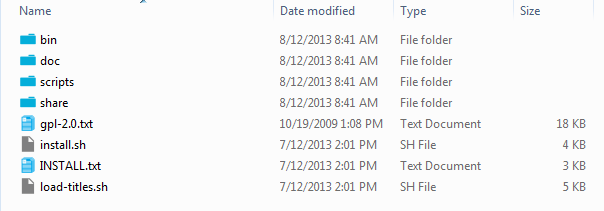
You downloaded the wrong version. If you're using Windows then get the Windows version: http://wit.wiimm.de/download/wit-v2.23a-r4534-cygwin.zip
The files inside look like this:
wit.png
 
Hey Wiimm, would it be possible to support the --sections option for the CHECK and REPAIR commands of wwt? That would simplify a lot the implementation of these commands in GUIs.
 
Hey Wiimm, would it be possible to support the --sections option for the CHECK and REPAIR commands of wwt? That would simplify a lot the implementation of these commands in GUIs.
I have seen your request and will answer next weekend, if I have more time for a code review.
 
Hey Wiimm, would it be possible to support the --sections option for the CHECK and REPAIR commands of wwt? That would simplify a lot the implementation of these commands in GUIs.
I have seen your request and will answer next weekend, if I have more time for a code review.
Because real life and other projects stole my time, this must wait a week.
 

Site & Scene News

Popular threads in this forum