

Kinestop
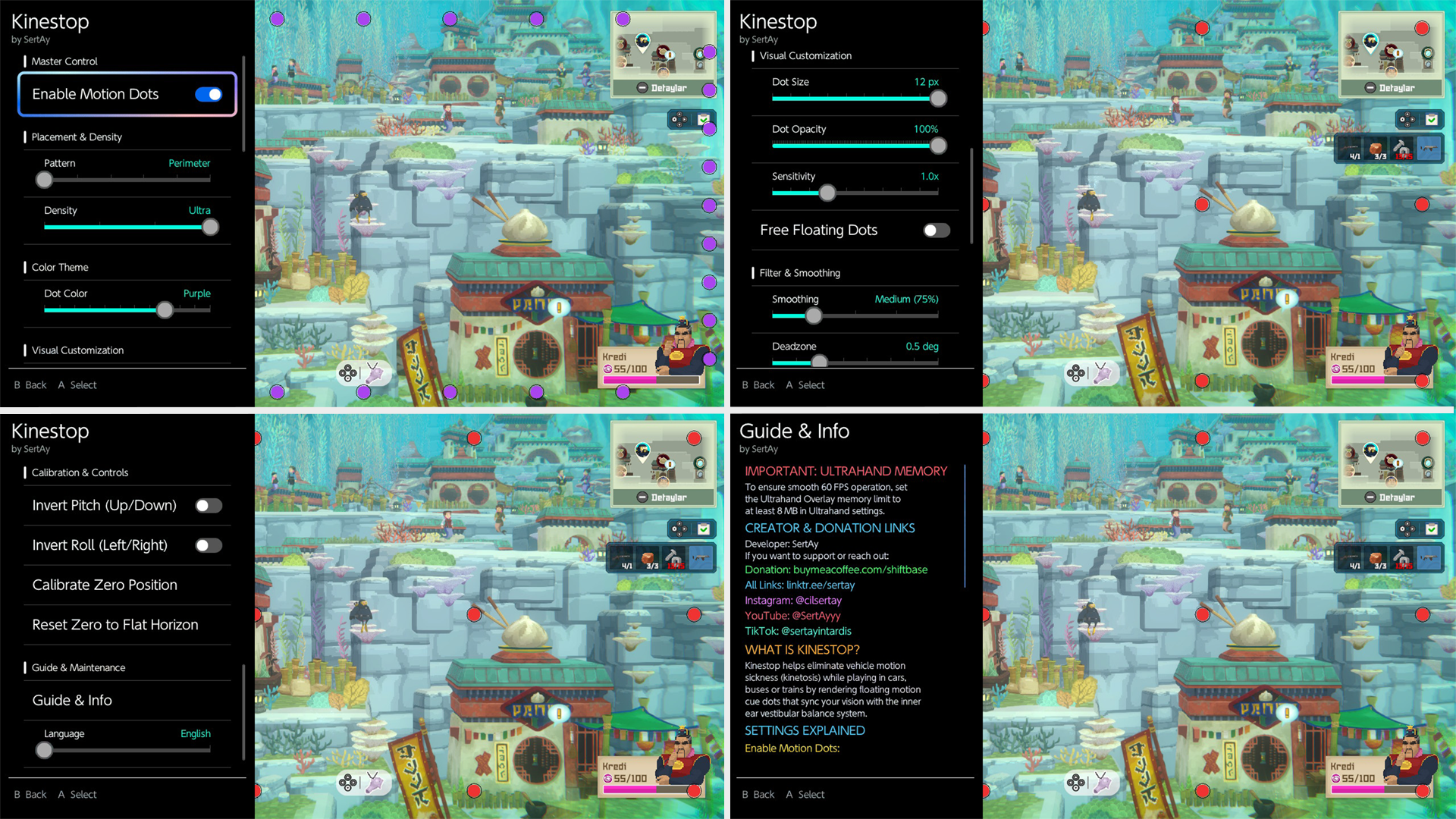
Kinestop is a motion sickness and nausea prevention app developed for the Nintendo Switch. It helps eliminate the sensory conflict and nausea experienced by gamers while traveling in moving vehicles such as cars, buses, or trains. By drawing motion paths, it synchronizes your eyes with your inner ear’s balance system, allowing you to play games comfortably throughout your journey.
--------------------------------------------------------------------------------------------------------------------------------------------------------------------------------------------------
Features
Step 1: Important Preparation (Required)
To prevent your console from crashing, you must increase the UltraHand memory limit:
1. Open the UltraHand menu (L + D-Pad Down + R3, or swipe from the left side of the screen to the right).
2. Press the + button to open Settings, then go to System.
3. Change the Overlay Memory value from 4 MB to 8 MB.
Requirements: nx-ovlloader and Ultrahand-Overlay MUST be installed for this application to work!
Step 2: Installation
Method 1: Homebrew App Store (Automatic Installation)
You can download and install the app directly onto your Switch from the HB App Store.
Method 2: GitHub (Manual Installation)

You can install the app by downloading it to your computer and transferring it to your SD card.
Download the .zip file for the latest version. Unzip the file and drag all the contents of the resulting “sdcard” folder directly into the root directory of your SD card.
The files are already placed in the correct folder paths (switch/.overlays/kinestop.ovl and config/kinestop/config.ini).
--------------------------------------------------------------------------------------------------------------------------------------------------------------------------------------------------
Step 3: How to Use It?
1. Open UltraHand: While in-game, swipe your finger from the left edge of the screen to the right, or press L + R + D-Pad Down + Right Analog (R3).
2. Launch Kinestop: Select the Kinestop option from the list. (Tip: You can assign a quick-access shortcut by pressing the Y button when you hover over it).
Configure Settings
- Enable Movement Points: Activate the points.
- Color and Layout: Choose a color theme and screen layout you like.
- Sensitivity & Free-Float Mode: Adjust the response sensitivity and free-float mode to your preference.
4. Switch to the Game: While in the menu, press the (B) key. The menu will close, the controls will switch 100% to the game in the background, and the points will begin to float smoothly over the game at 60 FPS!
5. Bring Up the Menu: If you want to change settings while in the game, you can instantly bring up the Kinestop menu by swiping from the left edge of the screen to the right or by pressing your shortcut key.
--------------------------------------------------------------------------------------------------------------------------------------------------------------------------------------------------
by SertAy
Kinestop is a motion sickness and nausea prevention app developed for the Nintendo Switch. It helps eliminate the sensory conflict and nausea experienced by gamers while traveling in moving vehicles such as cars, buses, or trains. By drawing motion paths, it synchronizes your eyes with your inner ear’s balance system, allowing you to play games comfortably throughout your journey.
--------------------------------------------------------------------------------------------------------------------------------------------------------------------------------------------------
Features
- Motion Sickness Prevention: Prevents nausea with 60 FPS movement points synchronized with the physical movement of the device.
- Support for All Use Cases: Works in games, emulators, and the Switch Home Menu.
- Free Movement Mode: Prevents the dots from getting stuck at the edges, allowing them to naturally fade off-screen as if you were looking out the window of a real car toward the horizon.
- Visual Customization: 12 vibrant color themes, 6 different layout templates (Perimeter, Full Screen, Sides, Corners, etc.), 10 different dot sizes, and transparency settings.
- Sensitivity and Vibration Filter: A 10-step sensitivity range (0.2x–6.0x) and a smart filtering engine that ignores hand tremors.
- Zero-Point Calibration: Locks the angle at which you’re leaning back in your chair or lying down as the center horizon level with a single button press from the menu.
- Turkish and English Language Support: A bilingual interface with the ability to switch languages instantly.
Step 1: Important Preparation (Required)
To prevent your console from crashing, you must increase the UltraHand memory limit:
1. Open the UltraHand menu (L + D-Pad Down + R3, or swipe from the left side of the screen to the right).
2. Press the + button to open Settings, then go to System.
3. Change the Overlay Memory value from 4 MB to 8 MB.
Requirements: nx-ovlloader and Ultrahand-Overlay MUST be installed for this application to work!
Step 2: Installation
Method 1: Homebrew App Store (Automatic Installation)
You can download and install the app directly onto your Switch from the HB App Store.
Method 2: GitHub (Manual Installation)
You can install the app by downloading it to your computer and transferring it to your SD card.
Download the .zip file for the latest version. Unzip the file and drag all the contents of the resulting “sdcard” folder directly into the root directory of your SD card.
The files are already placed in the correct folder paths (switch/.overlays/kinestop.ovl and config/kinestop/config.ini).
--------------------------------------------------------------------------------------------------------------------------------------------------------------------------------------------------
Step 3: How to Use It?
1. Open UltraHand: While in-game, swipe your finger from the left edge of the screen to the right, or press L + R + D-Pad Down + Right Analog (R3).
2. Launch Kinestop: Select the Kinestop option from the list. (Tip: You can assign a quick-access shortcut by pressing the Y button when you hover over it).
Configure Settings
- Enable Movement Points: Activate the points.
- Color and Layout: Choose a color theme and screen layout you like.
- Sensitivity & Free-Float Mode: Adjust the response sensitivity and free-float mode to your preference.
4. Switch to the Game: While in the menu, press the (B) key. The menu will close, the controls will switch 100% to the game in the background, and the points will begin to float smoothly over the game at 60 FPS!
5. Bring Up the Menu: If you want to change settings while in the game, you can instantly bring up the Kinestop menu by swiping from the left edge of the screen to the right or by pressing your shortcut key.
--------------------------------------------------------------------------------------------------------------------------------------------------------------------------------------------------
by SertAy