

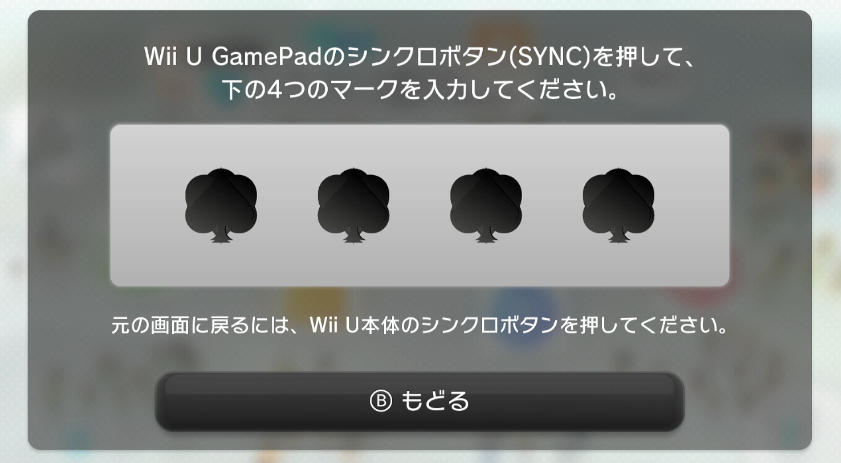
Hardware An ancient Wii U with one-of-the-kind pairing code...

  • Thread starter Thread starter neverendsDull
  • Start date Start date
  • Views Views 1,964
  • Replies Replies 7
  • Likes Likes 1

neverendsDull

Well-Known Member
Member
Joined
Jan 22, 2023
Messages
385
Reaction score
114
Trophies
1
XP
1,038
Country
Antarctica
Says the title:P

treeicon.png


Dissembled, found water trace inside, maybe the culprit of the bizarre pairing code. Switched to an other 5G module, pairing code not changed.

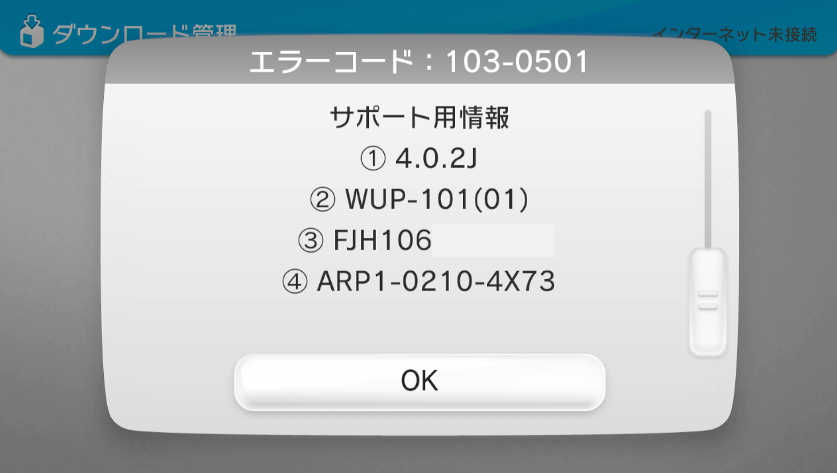
More info: 32GB black, 4.0.2 J (oops!) firmware:
error402.png


so no UDPIH and no recovery menu. Can pair wiimote and wiiupro normally. Disc drive working. vwii mode working. There are two WiiU games on it, NSMBU and Nintendo Land, can both be played smoothly.

Tried Bluubombs here:https://github.com/GaryOderNichts/bluubomb

Exploit succeeded, but the console hung at the pairing menu, so I cannot use it to gain access to EnvironmentLoader for aroma. Any ideas guys? I mean except to ask me to try all the combinations...
Post automatically merged:

Got some ideas:

1.Bluubomb-->install_wup.bin-->install latest iosv10 to gain access the UDPIH explit? Is this doable on 4.0.2? Or it will stuck at logo?

2.Bluubomb-->wupserver.bin-->gain access to system files, is the pairing code some kind of file I can get with the python script? Or any other tricks with changing system files?

3. Bluubomb-->wupserver.bin-->upload NETCfg(x).xml and let the console go online to get firmware update? Not sure if the process could finish without gamepad though. And I would like to keep this ancient firmware as far as possible...
 
Last edited by neverendsDull,
  • Like
Reactions: Old_Hattey_Hero
Considering that - internally - the pairing code is just numbers... Hmm. Could you run System Config Tool somehow? You'd need sigpatches and WUP installation. It should be easy to find by searching "System Config Tool SysNAND" or something or other. Pretty sure that has another means of pairing GamePads.
 
Considering that - internally - the pairing code is just numbers... Hmm. Could you run System Config Tool somehow? You'd need sigpatches and WUP installation. It should be easy to find by searching "System Config Tool SysNAND" or something or other. Pretty sure that has another means of pairing GamePads.
If I have sigpatches then aroma is installed already...
 
Says the title:P

View attachment 496452


Dissembled, found water trace inside, maybe the culprit of the bizarre pairing code. Switched to an other 5G module, pairing code not changed.

More info: 32GB black, 4.0.2 J (oops!) firmware:

View attachment 496455

so no UDPIH and no recovery menu. Can pair wiimote and wiiupro normally. Disc drive working. vwii mode working. There are two WiiU games on it, NSMBU and Nintendo Land, can both be played smoothly.

Tried Bluubombs here:https://github.com/GaryOderNichts/bluubomb

Exploit succeeded, but the console hung at the pairing menu, so I cannot use it to gain access to EnvironmentLoader for aroma. Any ideas guys? I mean except to ask me to try all the combinations...
Post automatically merged:

Got some ideas:

1.Bluubomb-->install_wup.bin-->install latest iosv10 to gain access the UDPIH explit? Is this doable on 4.0.2? Or it will stuck at logo?

2.Bluubomb-->wupserver.bin-->gain access to system files, is the pairing code some kind of file I can get with the python script? Or any other tricks with changing system files?

3. Bluubomb-->wupserver.bin-->upload NETCfg(x).xml and let the console go online to get firmware update? Not sure if the process could finish without gamepad though. And I would like to keep this ancient firmware as far as possible...
so no UDPIH and no recovery menu

Why no UDPIH? You need to give us some more information. That should allow you to pair any gamepad iirc Even region free ones since in the US its cheaper to import a gamepad then by a new one in our region

There should be an aroma plugin that does this as well.

I guess the question really is, what are you trying to do? I assume its get this gamepad paired but maybe I misread?
 
Bluubomb-->wupserver.bin-->upload NETCfg(x).xml and let the console go online to get firmware update? Not sure if the process could finish without gamepad though. And I would like to keep this ancient firmware as far as possible..
You would need a working network connection for that in the first place. But maybe you could just make a custom bin to copy the file from SD.
But trying to update the OSv10 would be worth a try.

But I think the weird symbols you see there (all symbols overlapping) hints to a hardware problem related to the 5Ghz module. Since you already replaced that, The problem might be a bad DRH chip.
If I have sigpatches then aroma is installed already...
How? On this old old frmware I wouldn't expect it to work.
 
so no UDPIH and no recovery menu

Why no UDPIH? You need to give us some more information. That should allow you to pair any gamepad iirc Even region free ones since in the US its cheaper to import a gamepad then by a new one in our region

There should be an aroma plugin that does this as well.

I guess the question really is, what are you trying to do? I assume its get this gamepad paired but maybe I misread?
'cause last time I checked you need at least 5.5.x for the UDPIH to run...
My goal is to restore the usability of this console, but to preserve this ancient firmware as far as possible.

When you attempt to pair you should be able to see a network on 5 GHz with tools like WiFiAnalyzer on your mobile phone. This should give you the mac address of the Wii Us 5 GHz WiFi card.
Then go to https://garyodernichts.github.io/drc_pin_generator/ and see what you get.
Thank you, this trick is really good to know!!
Sadly on my phone there is no 5G signal coming out of this console when in gamepad sync mode, so maybe there is something wrong to the hardware as SDIO said below...
You would need a working network connection for that in the first place. But maybe you could just make a custom bin to copy the file from SD.
But trying to update the OSv10 would be worth a try.

But I think the weird symbols you see there (all symbols overlapping) hints to a hardware problem related to the 5Ghz module. Since you already replaced that, The problem might be a bad DRH chip.

How? On this old old frmware I wouldn't expect it to work.
Yeah, on second thought I noticed that uploading network connection file itself needs a working network :rofl2:
And making a bin for copying files from SD is out of my ability...

For the last sentence, do you mean the payload loader/environment loader will not work on such old firmware? And what is the change of stuck at logo if I chose iosv10 method? Kinda want to avoid de_fuse when possible.
 
But trying to update the OSv10 would be worth a try.
Nope, no juice. I tried use "install_wup.bin" as Bluubomb's kernel, the exploit reported success:

Code:
connecting to host...
connected to 9C:E6:35:9D:96:7C
sent 638
kernel bin sent
sent 772
rop sent
pivot (size 207) sent
cleaning up...
Can't restore device name: Connection timed out (110)
Failed to restore device name

but again, the TV output freeze the second it displays "kernel bin sent", the console freezes totally, I can only force it power off.
This is the same when using "loadrpx.bin" as the kernel, which also displays the same error

Can't restore device name: Connection timed out (110)

So I am stuck here. No 5G signal to discover the mac address and the correct pair code, no way to break the barrier for homebrew.

Any other ideas?
 

Site & Scene News

Popular threads in this forum
