Gaming Emulation Misc Xenoblade Chronicles 3 - Emulator/Etc Discussion

  • Thread starter Thread starter Gnostalgia
  • Start date Start date
  • Views Views 1,116,025
  • Replies Replies 1,766
  • Likes Likes 15
Hi guys. I was wondering if anybody is finding similar texture glitches and knows how to fix them. They started appearing with beginning of August builds and no matter what I try I can't find a way to fix them. I purged all shaders and cache, no filtering is forced. I'm on Nvidia, OpenGL, Vulkan is crashing for me still and on I'm latest drivers and like I said I've tried all Yuzu builds from the last couple of months. I'm loving the performance, but the glitches make it hard to play. They appear when I more around and pan the camera. It gets really bad at times. Thanks a lot! :)
Screenshot 2023-09-25 203806.png
Screenshot 2023-09-25 203839.png
Screenshot 2023-09-25 203957.png
 
Hi guys. I was wondering if anybody is finding similar texture glitches and knows how to fix them. They started appearing with beginning of August builds and no matter what I try I can't find a way to fix them. I purged all shaders and cache, no filtering is forced. I'm on Nvidia, OpenGL, Vulkan is crashing for me still and on I'm latest drivers and like I said I've tried all Yuzu builds from the last couple of months. I'm loving the performance, but the glitches make it hard to play. They appear when I more around and pan the camera. It gets really bad at times. Thanks a lot! :)
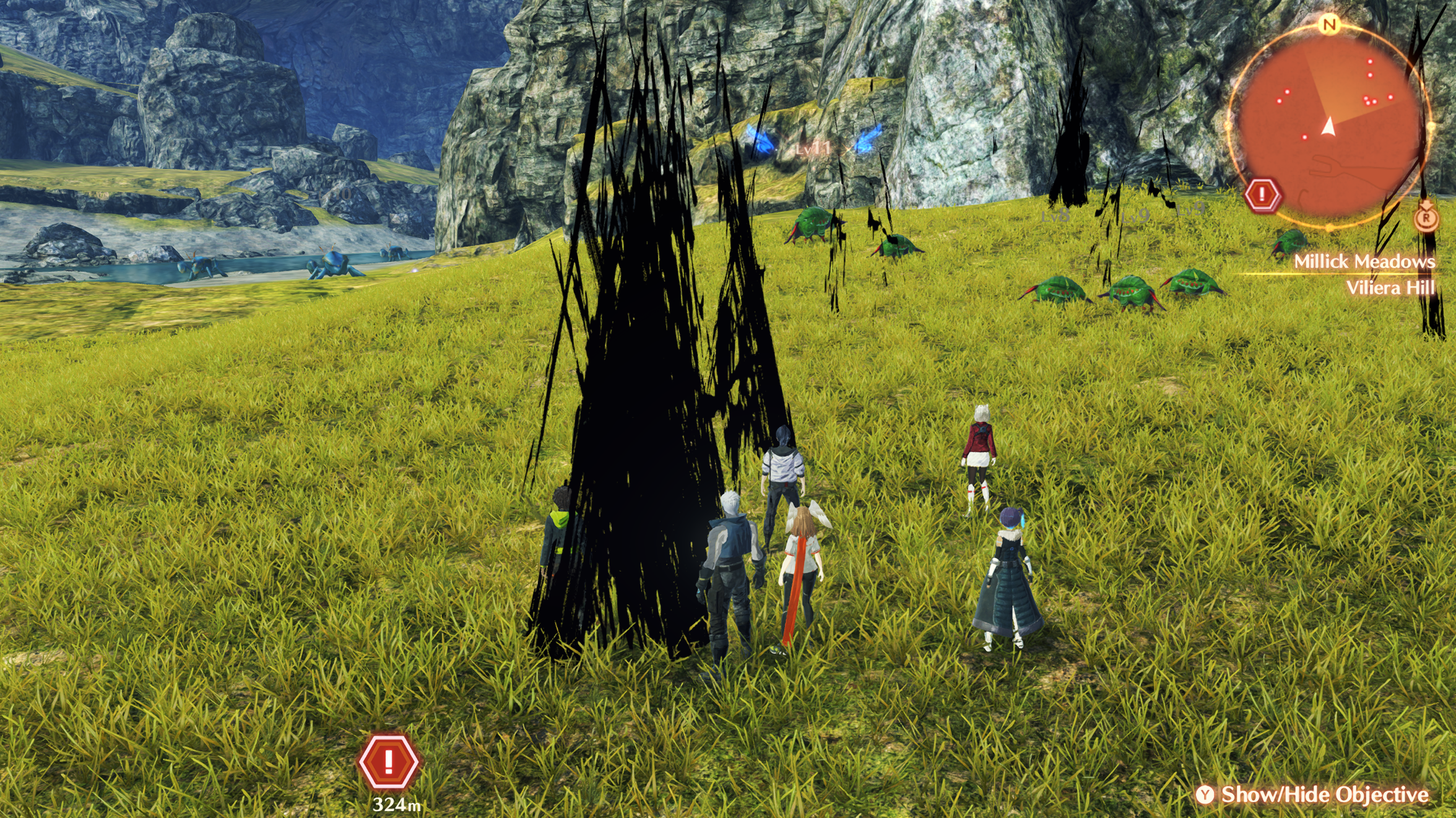
Oof yeah I haven't seen visual glitches such as that. In my experience I've only played around with Vulkan on Nvidia hardware with no issue really. Only visual glitches I get are from mods.
 
Hi guys. I was wondering if anybody is finding similar texture glitches and knows how to fix them. They started appearing with beginning of August builds and no matter what I try I can't find a way to fix them. I purged all shaders and cache, no filtering is forced. I'm on Nvidia, OpenGL, Vulkan is crashing for me still and on I'm latest drivers and like I said I've tried all Yuzu builds from the last couple of months. I'm loving the performance, but the glitches make it hard to play. They appear when I more around and pan the camera. It gets really bad at times. Thanks a lot! :)
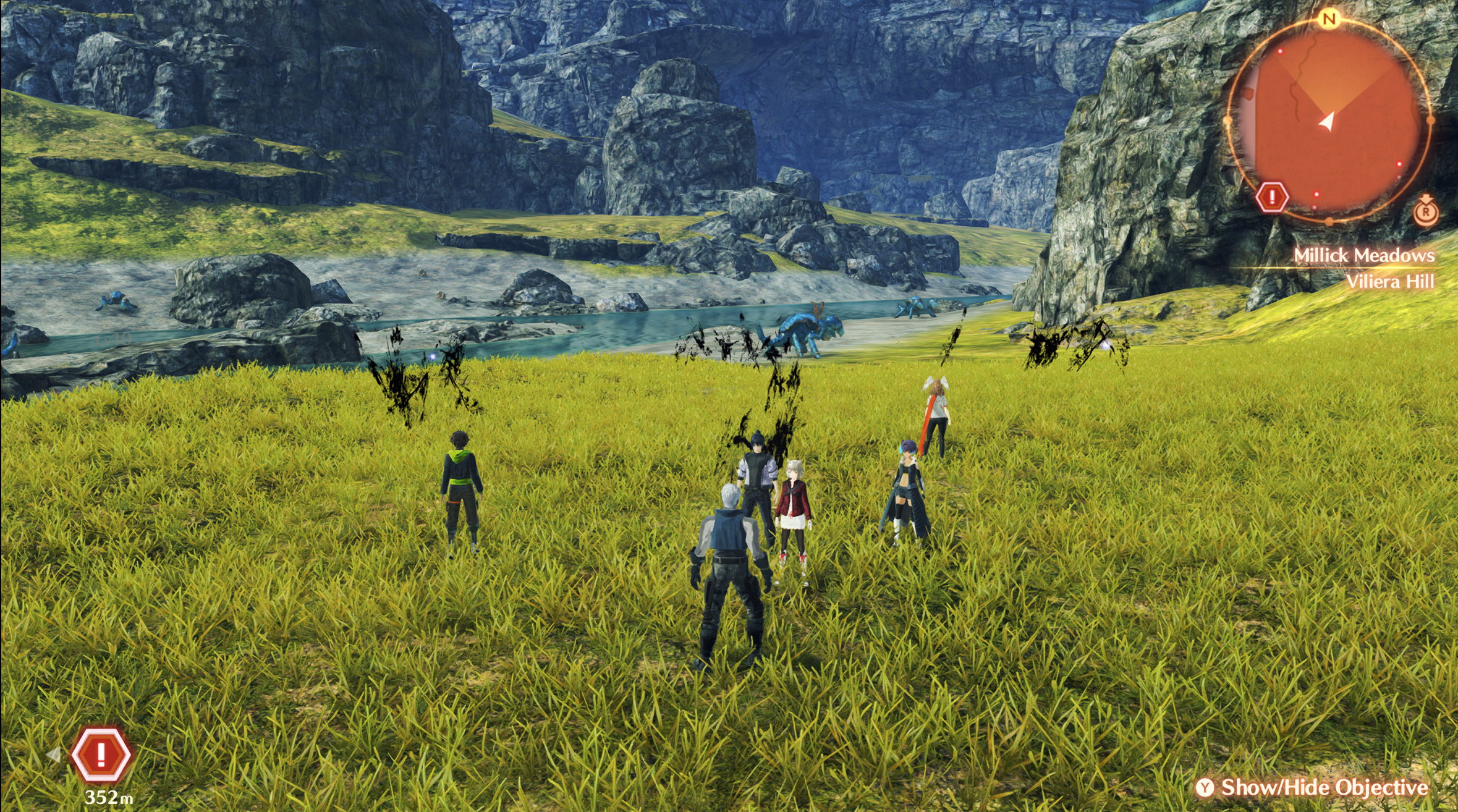
Looks like vertex explosions... Looks like every shot has them coming from the grass.

What CPU and GPU do you have?
What game version are you playing? With what mods?
What type of crashes are you getting on Vulkan (becasue Vulkan should be a lot more stable than OpenGL everywhere but the Pentalas Region)?
What are your Yuzu settings?
 
Anyone know what's causing this lighting issue on Yuzu? It happened on XC2 as well. Basically during gameplay or cutscenes it becomes blindingly bright all of a sudden, sometimes on part of the screen other times the entire screen. It can be fixed by simply switching to the menu screen, but won't work during cutscenes.

I have an Nvidia GPU and and already tried changing all the graphics settings on Yuzu but it still happens randomly. Any help is appreciated!

lighting.jpg

12.jpg
13.jpg
14.jpg
 
Anyone know what's causing this lighting issue on Yuzu? It happened on XC2 as well. Basically during gameplay or cutscenes it becomes blindingly bright all of a sudden, sometimes on part of the screen other times the entire screen. It can be fixed by simply switching to the menu screen, but won't work during cutscenes.

I have an Nvidia GPU and and already tried changing all the graphics settings on Yuzu but it still happens randomly. Any help is appreciated!
Try using Yuzu EA build 3352.
As to your settings, I only see 2-3 things that really need changing:
exclusive fullscreen -> borderless windowed (ALWAYS use borderless windowed over exclusive fullscreen on ANY programs)
accuracy level -> normal (always use normal unless you have to use high/extreme, some changes to the graphics pipeline a while back MASSIVELY improved normal accuracy in almost every game)
ASTC Recompression Method -> Uncompressed
 
Try using Yuzu EA build 3352.
As to your settings, I only see 2-3 things that really need changing:
exclusive fullscreen -> borderless windowed (ALWAYS use borderless windowed over exclusive fullscreen on ANY programs)
accuracy level -> normal (always use normal unless you have to use high/extreme, some changes to the graphics pipeline a while back MASSIVELY improved normal accuracy in almost every game)
ASTC Recompression Method -> Uncompressed
I only have a mid range rig and the performance on such an old build may not be very good but I'll have a go nonetheless, thanks!

I use exclusive fullscreen bc VRR won't work in borderless. I also set accuracy level to high so glow particles in the game will appear more consistently (yuzu said it requires async shader building off as well, but the shader stutters were too bad for me with it off). I have tried changing these graphics settings one by one but the issue still persists.
 
@OldManKain @theboy181

The Improved Shadows update from 2 hours ago (much more recent than the other 2.1.1 updates in the repo) freezes my game moments after starting a battle.

Other mods in there are working fine.
Post automatically merged:

Updated just the [Disable Chain Attack BGM], [Disable Pause Menu BGM] and [Disable Rest Spot BGM] for v2.1.1.

This update isn't working for me with 2.1.1. Worth calling out this did end up working for me. I don't know if this is a Yuzu-specific thing or not (since Yuzu is what I use), but I needed to remove the first line in your file and then it started working for me.
 
Last edited by Kritan,
idk if its the right spot to ask but since I saw the game running @ 60fps on page 1, can a day-1 model Switch safely OC enough to get the same results?
 
idk if its the right spot to ask but since I saw the game running @ 60fps on page 1, can a day-1 model Switch safely OC enough to get the same results?
Overclocking your Switch should be safe, but you may want some form of cooling mod and/or to be extra vigilant to not let the Switch's air intake/output get blocked.
 
@OldManKain @theboy181

The Improved Shadows update from 2 hours ago (much more recent than the other 2.1.1 updates in the repo) freezes my game moments after starting a battle.

Other mods in there are working fine.
Post automatically merged:


This update isn't working for me with 2.1.1.
Should be updated and fixed now on the github.
 
Last edited by OldManKain,
Should be updated on github and fixed now on the github.
The one that is updated in the GitHub right now is the one I tested this on yesterday originally and it freezes my game. I had also pulled from the git history the original 2.1.1 version (that was known incorrect) and tried it also and it froze my game slightly faster. I diff'd both those files to just ensure they were different and they were.

If there's anything else I can provide that helps here, let me know.
 
The one that is updated in the GitHub right now is the one I tested this on yesterday originally and it freezes my game. I had also pulled from the git history the original 2.1.1 version (that was known incorrect) and tried it also and it froze my game slightly faster. I diff'd both those files to just ensure they were different and they were.

If there's anything else I can provide that helps here, let me know.
This is the one that should be posted on the github, theboy might have forgot to update it. Let me know if it still crashes.
 

Attachments

  • Like
Reactions: darqy and Kritan
This is the one that should be posted on the github, theboy might have forgot to update it. Let me know if it still crashes.

Thanks for the attached update. This one works great. Like you suggested, sounds like simply an incorrect update over on the GitHub.
 
Hey everybody. Started this game a couple weeks ago after a replay of XS III and happened across this forum looking for graphical fixes and quality of life mods for this game.

Just wanted to say thanks for everyone that has contributed!

Edit : Running v2.1.0 and I've got most everything working except the No BGM Change options. Did I misunderstand something or do they go in their own cheats folder?
 
Last edited by vicious5,

Site & Scene News

Popular threads in this forum