

Switch Cheat Companion
Introducing Switch Cheat Companion: your ultimate tool for managing Atmosphere cheat files. With the latest update, you can now download cheats and seamlessly combine multiple local and online cheats. Effortlessly search for title IDs and build IDs based on game names, and export organized cheat files in a breeze. Simplify your cheat management process with Switch Cheat Companion.
Key Features:
Instructions:
PLANS: More sources for online cheat retrieval and allow you to lookup by titleid/buildid .
Ongoing development until I run out of time, or exhaust ideas for additional enhancements.
Yes, I understand that there is another cheat manager already available. However, this project initially started as a local management tool and has since evolved into something more comprehensive. There are specific quality-of-life (QOL) features that I plan to incorporate into this cheat manager.
Life has gotten busy, I plan to return to this project once things slow down for me. I want to clean up code to download cheats through cheatslip and other sites. I will update this with more info soon...
Introducing Switch Cheat Companion: your ultimate tool for managing Atmosphere cheat files. With the latest update, you can now download cheats and seamlessly combine multiple local and online cheats. Effortlessly search for title IDs and build IDs based on game names, and export organized cheat files in a breeze. Simplify your cheat management process with Switch Cheat Companion.
Key Features:
- Open local Atmosphere cheat files effortlessly.
- Search for a game's list of build IDs using the game name.
- Search for a game's cheat's online
- Select and export only the desired cheats without modifying the original file.
- Export selected cheats from online
- The suggested filename in the save file dialog will be automatically set based on the selected build ID when exporting.
Instructions:
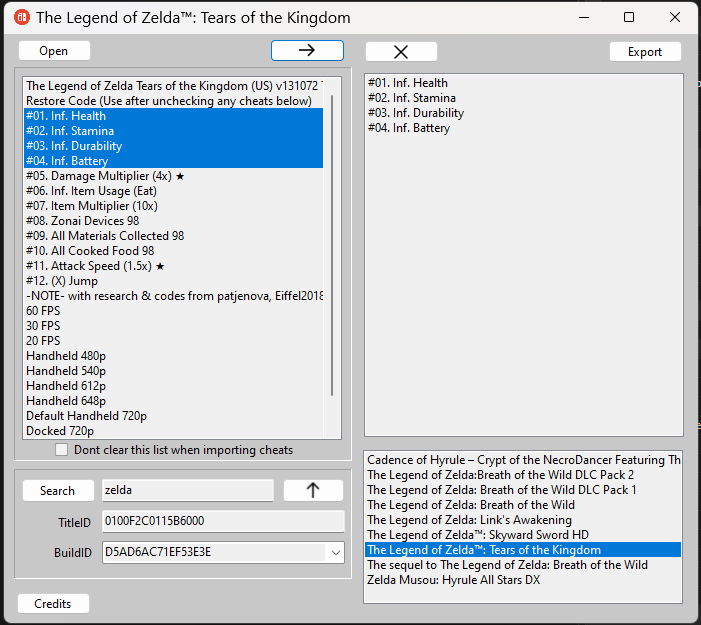
- To transfer selected cheats from the left listbox to the right, simply click the right arrow button. Please note that this action does not modify the original file.
- If you wish to remove a selected item from the right listbox, just click the "X" button.
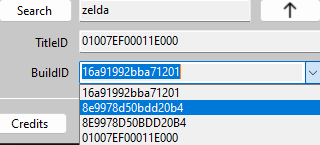
- When conducting a search, make sure to enter a name and click the search button. A list of games will appear, allowing you to select the desired title. Once you've made your selection, the title ID and multiple build IDs will load. To specify the exact version you're using, click the arrow next to the build ID. Additionally, you can utilize the up arrow to import online data. To streamline the process, I have included a checkbox that allows you to keep cheats in the left listbox. This feature greatly simplifies testing cheats from various sources, including local and online, as well as older versions with newer updates.
- To export the saved data in the right listbox to a file, use the appropriate function.
PLANS: More sources for online cheat retrieval and allow you to lookup by titleid/buildid .
Ongoing development until I run out of time, or exhaust ideas for additional enhancements.
Yes, I understand that there is another cheat manager already available. However, this project initially started as a local management tool and has since evolved into something more comprehensive. There are specific quality-of-life (QOL) features that I plan to incorporate into this cheat manager.
Life has gotten busy, I plan to return to this project once things slow down for me. I want to clean up code to download cheats through cheatslip and other sites. I will update this with more info soon...
Attachments
Last edited by Type_O_Dev,