
Atmosphere error 2162-0002 (0x4a2) when booting

  • Thread starter Thread starter Kunzel
  • Start date Start date
  • Views Views 9,197
  • Replies Replies 8

Kunzel

Member
Newcomer
Joined
May 9, 2021
Messages
15
Reaction score
2
Trophies
0
Age
29
XP
98
Country
Brazil
Hi everyone.

I keep getting this error every time I try booting into Atmosphere. When the Home menu is about to show up, all I get is the Atmosphere error screen below saying this error.

Just so you know, I don't have the atmosphere/contents/010000000000001000 or 01000000000000100c folder.

Atmosphere is currently on 1.4.0. OFW is on 15.0.1. I've deleted my atmosphere, bootloader and switch folders and reinstalled everything, but nothing happens. I usually try booting into CFW by chain-loading fusee.bin from Hekate.

I'm also including the two fatal-reports generated. Bear in mind I do not have anything on my SD card named 010000000000001000 or 01000000000000100c, unless there are other copies of this folder. It was working well earlier today, but I had booted it back to OFW earlier. Now, a fwe moments ago when I tried booting back into CFW, it started doing this. I tried reading through other threads but I couldn't find anything to solve my issue.

I'll be really grateful for any help you can provide.
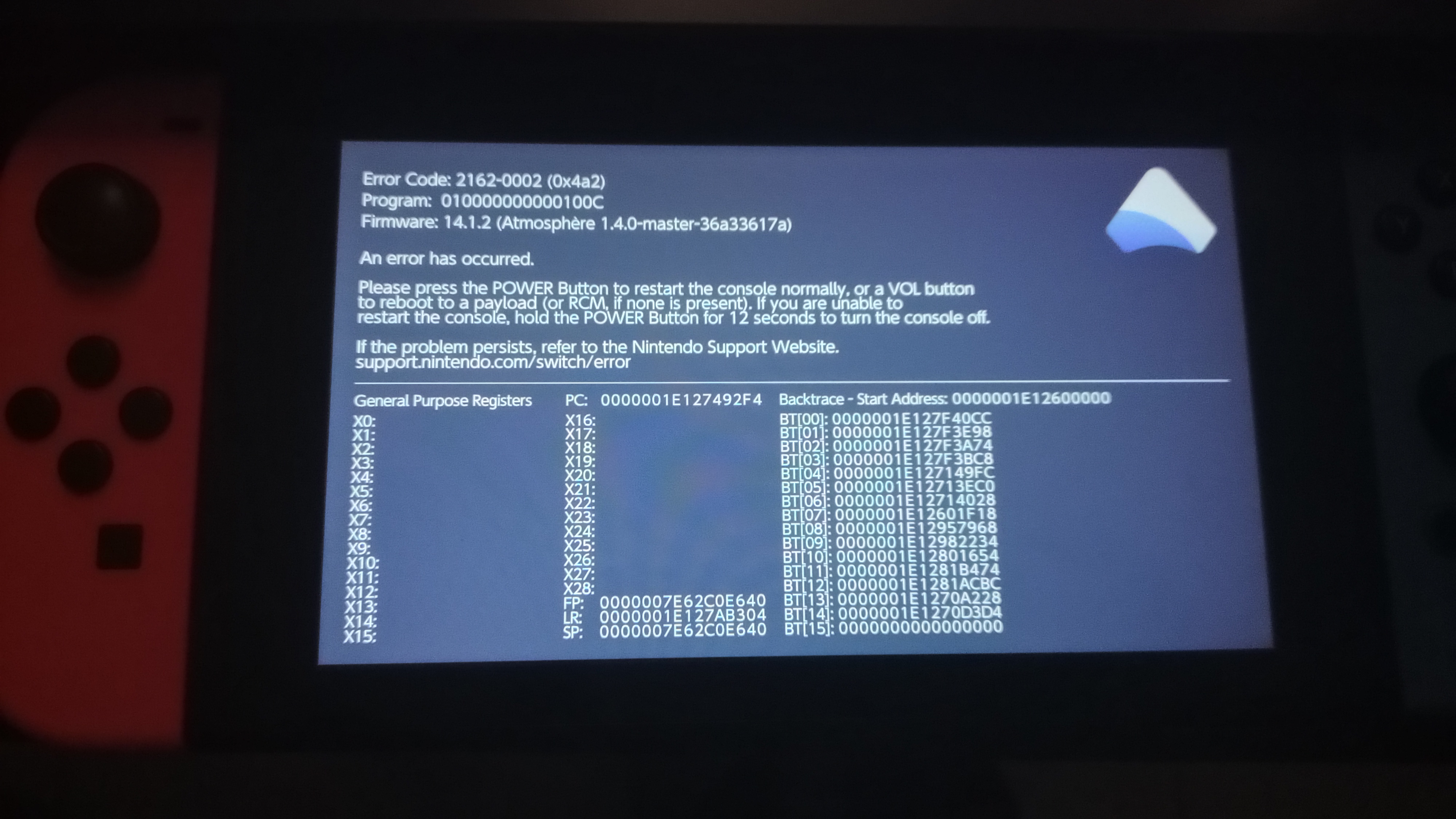
IMG_20230121_023521849_HDR.jpg
 

Attachments

Hi everyone.

I keep getting this error every time I try booting into Atmosphere. When the Home menu is about to show up, all I get is the Atmosphere error screen below saying this error.

Just so you know, I don't have the atmosphere/contents/010000000000001000 or 01000000000000100c folder.

Atmosphere is currently on 1.4.0. OFW is on 15.0.1. I've deleted my atmosphere, bootloader and switch folders and reinstalled everything, but nothing happens. I usually try booting into CFW by chain-loading fusee.bin from Hekate.

I'm also including the two fatal-reports generated. Bear in mind I do not have anything on my SD card named 010000000000001000 or 01000000000000100c, unless there are other copies of this folder. It was working well earlier today, but I had booted it back to OFW earlier. Now, a fwe moments ago when I tried booting back into CFW, it started doing this. I tried reading through other threads but I couldn't find anything to solve my issue.

I'll be really grateful for any help you can provide.

View attachment 348542

I answered this common question over here: https://gbatemp.net/threads/switch-noob-paradise-ask-questions-here.488277/post-10053487
 
  • Like
Reactions: Draxzelex
Ah, thanks! I'll check it out and let you know if it works. :D

Have you a custom theme installed? Maybe that's the cause of your problem....
I'm afraid not - as I mentioned, I don't have the folder where themes show up. I don't have any theme managers anymore either because I've had trouble with them in the past - unless a folder from those past installations managed to stay installed. :(
 
It's emuNAND, yeah. But I can't update it. I can't boot into CFW at all to use daybreak. :(
right... my bad. have you tried any older atmosphere version? i dont see any problem keeping those folders you deleted... maybe somethings wrong with the hekate_ipl.ini? otherwise, i guess creating a new emunand is indeed easier so you are already on 15.0.1 and hopefully it boots without problems. if you are already following binkinators steps on the other thread, good luck getting it to work again ^^
 
  • Like
Reactions: Kunzel and BigOnYa
right... my bad. have you tried any older atmosphere version? i dont see any problem keeping those folders you deleted... maybe somethings wrong with the hekate_ipl.ini? otherwise, i guess creating a new emunand is indeed easier so you are already on 15.0.1 and hopefully it boots without problems. if you are already following binkinators steps on the other thread, good luck getting it to work again ^^
Thank you! He did tell me to make a new emmc and I think it worked, thankfully! I did lose the games I had there, but I don't mind. Thank you for your help as well! Not sure what was causing but I'm glad it's solved. =D
 
  • Like
Reactions: JackTheFroster

Site & Scene News

Popular threads in this forum