I'll only cover general information, and no link or step-by-step guide here. just to let you know learn and understand what you'll need to do. choose what you want and search more about it. if you need more information, just ask.
what do i need to do if i reboot it?
1. you'll need a way to boot the console into RCM (recovery mode).
2. you'll need a way to send a payload while in RCM to boot the AMS CFW (atmosphere)
1. there are different method to go into RCM.
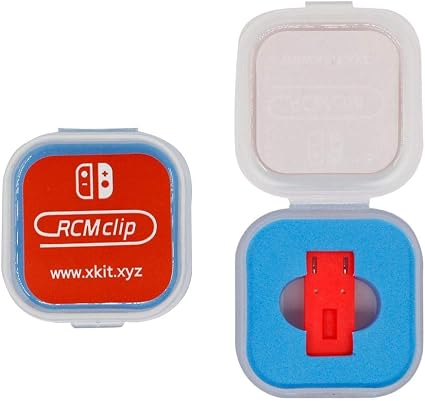
easier method is by short circuiting two connectors of the right joycon port by using a jumper like this one (there are different models) :
you put it in your right joycon port while the console is OFF.
You press Vol+ and power to enter RCM.
Second method is AutoRCM.
By creating a bug on purpose on the console's boot header, the console put itself in recovery mode because it can't boot.
Maybe that's what he did, and why he told you it'll be "dead" if you reboot ?
Because it will look dead, it'll be in RCM, without display, and no input would work.
if you are in RCM, you'll have to keep the Power button pressed for 12-16 seconds to really powerOFF, or it'll drain the battery (because it's not OFF).
If you plug USB (to charge it) while it's OFF, it'll power ON and ends in RCM too.
Another method is to install a chipset (harder), so I'll pass.
2.
then, while you are in RCM, you'll have to send a file through USB.
the RCM has no display and is like your console is OFF, but it's not. You just don't know it's ON, so it can discharge the battery without you knowing. That's not a bug ! it's just ON without display, waiting for a file from USB.
There are different method to send that file.
Phone (android/iOS), dongle, PC, etc.
There are bundles with RCM clip (the little thing which goes into the joycon port) and USB dongle (which contains the payload (CFW booter) to send to RCM, like this one (just an example):
The file you'll have to send is either the custom firmware booter (AMS), or a console manager (which can also launch CFW) like Hekate.
There are also different payload you can send while in RCM, like Lakka (a linux booter with retroarch), or some homebrew to get different features (like extracting your console's keys, etc.)
Personally, I'm using my smartphone and an android APP to send Hekate.
AutoRCM is really nice, even if it can look scary.
It'll always go into RCM without a need of external clip and special method to boot the console. You'll only have to plug your Switch to your smartphone and it takes less than 1second to boot.
you can find all these methods and the needed files on the forum.
also if this a good version to be on or should i update it?
Don't go online !
If not already the case, you'll be banned.
Maybe he sold it because that console is already banned ?
Unless he patched his identification data, which let you go online without a way to identify and ban that console.
To update, there are offline homebrew updater.
11.0.1 | ams .19.4|s <-- no need to update, even if 12.0.3 is available, no game should require it yet.
but you should get the time to learn how to update for the future.
You'll have to find the firmware files yourself (forbidden to share here), put them on your SD card, then run a homebrew to update the console.