
Kamikaze gone horribly wrong

MyWiiDosentWii

Member
Newcomer
Joined
Jun 2, 2023
Messages
16
Reaction score
3
Trophies
0
Age
18
XP
110
Country
United States
Preface: I assumed I could do this procedure without any special equipment like I did with my modchip, however that was not the case (which became apparent quickly). Previously I was just using my eyes, a needle, and some flux/rubbing alcohol. (I know, horrid)

I went ahead and bought a TOMLOV 1200X electric microscope and Maant D1 grinder.

I guess I’m just asking how I should proceed.
I connected everything to the main board and it won’t boot. I am almost 100% sure I severed multiple traces. PICA0004.jpegPICA0004.jpeg
I also worried about the trace I circled in magenta. Could that be a fatal error?
IMG_0845.jpegIMG_0847.jpeg
Post automatically merged:

I know it’s hard to make out but could this possibly be the dat0 trace? I tested both of those points and they test around 0.500 for both.
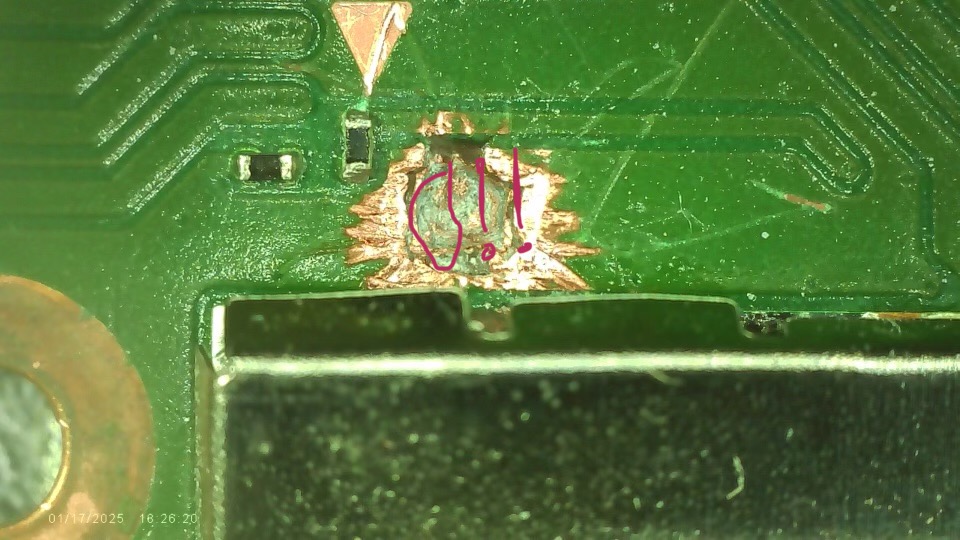
PICA0004.jpeg
 
Last edited by MyWiiDosentWii,
the trace on the top is a bit beat up but it's probably still connected. I would put some solder mask on it to kinda stabilize the situation, though.
 
  • Like
Reactions: MyWiiDosentWii
Picture #2 seems fine. Scrape some of the green paint off on the right side of the trace and then you can check with a multimeter to see if the trace has been severed,

It looks like you went a layer to deep.
Get a $15 microscope from aliexpress.
Even a cheap one will work.

Here you can find the board layers for all Switch models :
https://files.zzattack.org/index.php?dir=img/console/switch

Stuff in the top and bottom layers are just power rails that run all over the place.
As long as those layers don't make any contact with the actual data lines your good.
Take some other pcb with layers for some practice and then you'll need to do some more grinding to expose a bigger area to repair this.

If only the DAT0 line has been severed, other solutions would be a DAT0 adapter, an emmc pcb adapter or a direct wire to the dat0 pad. The latter 2 need reballing though.

Or just admit your loss and ask an expert to fix this because it still can be fixed.
 
  • Like
Reactions: MyWiiDosentWii
Picture #2 seems fine. Scrape some of the green paint off on the right side of the trace and then you can check with a multimeter to see if the trace has been severed,

It looks like you went a layer to deep.
Get a $15 microscope from aliexpress.
Even a cheap one will work.

Here you can find the board layers for all Switch models :
https://files.zzattack.org/index.php?dir=img/console/switch

Stuff in the top and bottom layers are just power rails that run all over the place.
As long as those layers don't make any contact with the actual data lines your good.
Take some other pcb with layers for some practice and then you'll need to do some more grinding to expose a bigger area to repair this.

If only the DAT0 line has been severed, other solutions would be a DAT0 adapter, an emmc pcb adapter or a direct wire to the dat0 pad. The latter 2 need reballing though.

Or just admit your loss and ask an expert to fix this because it still can be fixed.
I did do a bit more digging and it seems it should be fine. I ordered some 0.1mm copper wire as it seems my 32 wag magnet wire is too thick. I think I should just be able to make some jumper cables, reinstall that resistor, and be on my merry way.
IMG_0899.jpeg
 
  • Like
Reactions: JonJaded
Yes I was kind of thinking you'd made it through the layer 1 and 2 ground planes and were just starting to see the traces on layer 3 which is your target. Definitely don't do it without the proper tools though.
 
  • Like
Reactions: MyWiiDosentWii
More progress, added solder mask and pre tinned the points and traces. Just need to wire things up now.
 

Attachments

  • IMG_0904.jpeg
    IMG_0904.jpeg
    662.8 KB · Views: 28

Site & Scene News

Popular threads in this forum