Hacking Docker Linux-Toolchain & Kit

  • Thread starter Thread starter nold
  • Start date Start date
  • Views Views 4,968
  • Replies Replies 17
  • Likes Likes 9

nold

Member
Newcomer
Joined
Apr 25, 2018
Messages
6
Reaction score
12
Trophies
0
Age
30
XP
86
Country
Germany
Hi guys,

First of: Sorry, can't include real links because of spam protection -.- ..

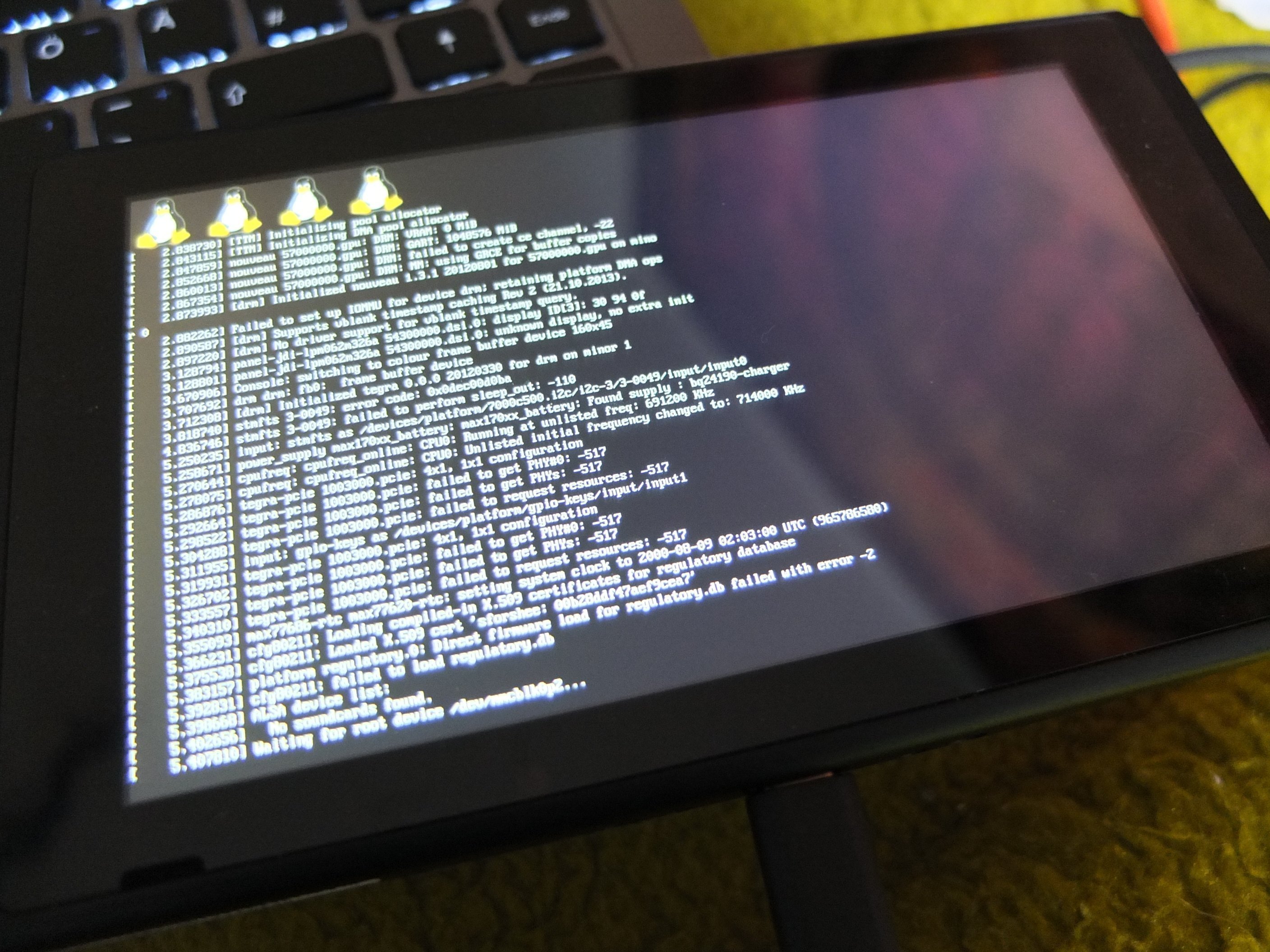
here is something i put together today. Basically it uses a Docker-Container Image that includes everything needed to build coreboot, uboot, linux, ... for the switch.
If you already have docker running on your system, you can compile the whole fail0verflow-toolchain + exploit & kernel in just a few commands, without trashing your own system.

Everything you need can be found on my github:
"Linux Kit": github / Nold360/switch_linux_kit
"Toolchain Container": github /Nold360/docker-switch_linux_toolchain (not needed, you can just use the image from Dockerhub!)

Observing the included scripts & Dockerfile you can also see which dependencies you need to built it yourself on debian/ubuntu.

Cloning
Code:
git clone github ... /Nold360/switch_linux_kit
cd switch_linux_kit
git submodule update --init


Compiling

Note: You'll still need to get coreboot/tegra_mtc.bin on your own. (Don't know if it would be legal to include it in my git :/)

Code:
docker run -ti --rm -v$(pwd):/source nold360/switch_linux_toolchain bash 00_build.sh


Running

Note: You still need to prepare a rootfs SD-Card like described here: fail0verflow/shofel2

Then simply run the exploit & uboot-scripts:
Code:
bash -x 02_exploit.sh
bash -x 03_uboot.sh


Profit!
DSCF6818.JPG
Happy Hacking!
 
Last edited by nold,
thanks for this! I've been reading all the posts in the last 48h and I'm so happy this is happening :)
Could you or someone do a screen capture video while doing this so I can follow your steps and not screw it up? :)
 
i'll just wait for someone to report they used this successfully and that this does not melt your switch :yayswitch:
 
thanks for this! I've been reading all the posts in the last 48h and I'm so happy this is happening :)
Could you or someone do a screen capture video while doing this so I can follow your steps and not screw it up? :)

You can't do anything ATM with it anyways.. so i think if you really can make use of it, you should know by now how to do it ;-)
 
Wait.. what? Arent we suposed to be able to run dolphin? I know how to copy paste commands into the terminal but I would feel more confident to do it while watching a video
 
Wait.. what? Arent we suposed to be able to run dolphin? I know how to copy paste commands into the terminal but I would feel more confident to do it while watching a video
AFAIK it's not released yet. It really looks awesome - can't wait for it! (Even if dolphin might not be the best performing application on the switch's hardware ^^)
 
AFAIK it's not released yet. It really looks awesome - can't wait for it! (Even if dolphin might not be the best performing application on the switch's hardware ^^)

My understanding is that we just need to get mesa working, fail0verflow says (https://twitter.com/fail0verflow/status/988663367320592384) that with the recent mesa patches it should work (Mesa is the graphics library)

After that we would need to run a desktop environment and then we can run a dolphin version compiled for the tegra x1 (I am not sure if they used anbox).
 
Thanks nold, this is a very helpful repo and I've booted the Linux kernel successfully. What isn't currently working is the SD card - I'm using a 64GB SanDisk and the kernel panics with "mmc0 timeout waiting for hardware interrupt". I'd expect the card to work, I took it from my action camera and reformatted it, but it seems to not like something about it.
 
Thanks nold, this is a very helpful repo and I've booted the Linux kernel successfully. What isn't currently working is the SD card - I'm using a 64GB SanDisk and the kernel panics with "mmc0 timeout waiting for hardware interrupt". I'd expect the card to work, I took it from my action camera and reformatted it, but it seems to not like something about it.

Do you formated it with two partitions? You need two, one first in fat32 and other in ext4.
 
Do you formated it with two partitions? You need two, one first in fat32 and other in ext4.

Yep, although it occurs to me that I didn't actually format the fat32 partition. I'll give that a try.

Edit: Yup, looks like that was it. Userland is booting now. Thanks!
 
Last edited by cmsj,
It's my first time with Docker. This is okay or I am missing something?

Code:
C:\Users\SEEKER>docker run -ti --rm -v$(pwd):/source nold360/switch_linux_toolchain bash 00_build.sh
Unable to find image 'nold360/switch_linux_toolchain:latest' locally
latest: Pulling from nold360/switch_linux_toolchain
2115d46e7396: Pull complete
aa41126400f8: Pull complete
05ffe88955ef: Pull complete
4459b8c3f651: Pull complete
88d308ee6c70: Pull complete
Digest: sha256:a75cc82a5e7c139226cb464aae7bf7d12e1c9fe0bce76b6264150f4c2b4aa259
Status: Downloaded newer image for nold360/switch_linux_toolchain:latest
docker: Error response from daemon: create $(pwd): "$(pwd)" includes invalid characters for a local volume name, only "[a-zA-Z0-9][a-zA-Z0-9_.-]" are allowed. If you intended to pass a host directory, use absolute path.
See 'docker run --help'.

Besides, thanks for share~
 
It's my first time with Docker. This is okay or I am missing something?

Code:
C:\Users\SEEKER>docker run -ti --rm -v$(pwd):/source nold360/switch_linux_toolchain bash 00_build.sh
Unable to find image 'nold360/switch_linux_toolchain:latest' locally
latest: Pulling from nold360/switch_linux_toolchain
2115d46e7396: Pull complete
aa41126400f8: Pull complete
05ffe88955ef: Pull complete
4459b8c3f651: Pull complete
88d308ee6c70: Pull complete
Digest: sha256:a75cc82a5e7c139226cb464aae7bf7d12e1c9fe0bce76b6264150f4c2b4aa259
Status: Downloaded newer image for nold360/switch_linux_toolchain:latest
docker: Error response from daemon: create $(pwd): "$(pwd)" includes invalid characters for a local volume name, only "[a-zA-Z0-9][a-zA-Z0-9_.-]" are allowed. If you intended to pass a host directory, use absolute path.
See 'docker run --help'.

Besides, thanks for share~

OMG - I didn't though anyone would run docker on win :D $(pwd) is a included command, to get the absolute directory path you are working in & then mount it as a volume to the container..
So you should be able to to do something like "-v C:/my/git/checkout:/source
 
  • Like
Reactions: BL4Z3D247
@nold thanks for this, works great.

To anyone running into errors because of the missing tegra_mtc.bin file:

I managed to get everything to build on my Mac running Sierra, and even pull the tegra_mtc.bin out of the Pixel C bootloader image, by changing the 00_build.sh script.

You have to download the Pixel C image yourself and copy it to the switch_linux_kit folder.

The modified script is attached. Rename it by removing the .txt extension (the website wouldn't let me upload the script without changing the extension).
 

Attachments

Last edited by Dread_Pirate_PJ,
+ cbfstool /source/bootloader-dragon-google_smaug.7900.97.0.img extract -n fallback/tegra_mtc -f /source/coreboot/tegra_mtc.bin

/source/bootloader-dragon-google_smaug.7900.97.0.img: No such file or directory


Any Help ?
 
+ cbfstool /source/bootloader-dragon-google_smaug.7900.97.0.img extract -n fallback/tegra_mtc -f /source/coreboot/tegra_mtc.bin

/source/bootloader-dragon-google_smaug.7900.97.0.img: No such file or directory


Any Help ?

You need to download that from Google's repo of stock Android builds for the Google Pixel C. Here:

https://developers.google.com/android/images

Or forget that step and download the tegra_mtc.bin that other people have uploaded elsewhere (can't find the link right now, though).
 
  • Like
Reactions: Deleted User
bash -x 02_exploit.sh

+ cd shofel2/exploit

+ sudo ./shofel2.py cbfs.bin ../../coreboot/build/coreboot.rom

#

File descriptor: 5

b'c005010c000000104074316401101062'

entry 400168ed

throwing more

Performing hax...

Size: 0x6c68


b'820000000000686c'

b'0200000000000000000000000000000000840477c57f0000716c000000000000000000000000000000000000000000000f0f00000000000000'

URB address: 0x7fc57689e800

Traceback (most recent call last):

File "./shofel2.py", line 247, in <module>

rcm.pwn()

File "./shofel2.py", line 205, in pwn

s.ep0_read_unbounded(overwrite_len)

File "./shofel2.py", line 76, in ep0_read_unbounded

fcntl.ioctl(s.fd, USBDEVFS_SUBMITURB, urb)

OSError: [Errno 9] Bad file descriptor

+ cd -


Any Clue ? System OSX
 
Last edited by ,

Site & Scene News

Popular threads in this forum