



Hi everyone,
I have recently decided to update my Nintendo switch emuMMC and sysMMC. My setup consists of :
I started updating the stock firmware and following the safeguards to avoid the fuses burning. That is when the console restarts the JIG was inserted and the volume + was pressed to put the console instantly in RCM mode avoiding the fuses to burn since I had auto RCM enabled and the stock firmware disables it.
I have injected the payload and launched emuMMC from the menu, but I got the following error :
After a google search it seems that the issue was a sysmodule ( https://github.com/ndeadly/MissionControl/issues/76 ).
I have decided to rename the folder `010000000000bd00` and in my mind disable the module. But after renaming it and trying to boot the emuMMC the Atmosphere failed with a different error ( I do not remember now ) and I tried again, but this time it was like there was no SD inserted.
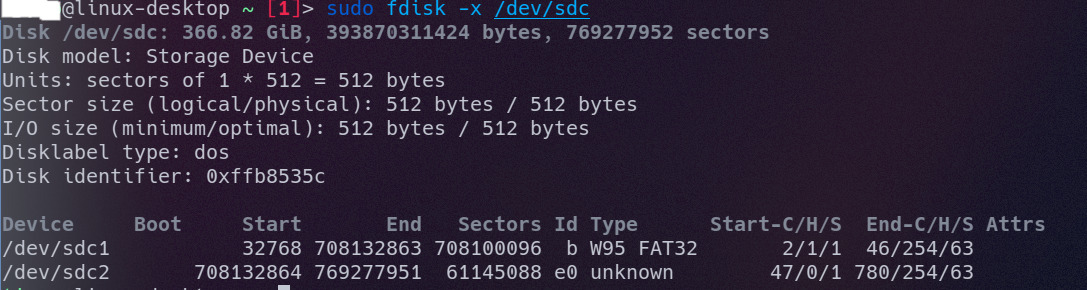
I poped my SD back into my OS and it is not being recognised anymore. It seems that the partition table got corrupted as seen on the images below ( attached ) :


Has anyone already experienced the same issue and how got it fixed ?
Many Thanks.
I have recently decided to update my Nintendo switch emuMMC and sysMMC. My setup consists of :
- emuMMC running in a 400GB SD, currently on firmware 10.x.x ( not sure the exact version ) ;
- sysMMC running in the switch NAND on version 9.x.x ( Not sure the version now ).
I started updating the stock firmware and following the safeguards to avoid the fuses burning. That is when the console restarts the JIG was inserted and the volume + was pressed to put the console instantly in RCM mode avoiding the fuses to burn since I had auto RCM enabled and the stock firmware disables it.
- I downloaded the lastest hekate ( hekate v5.5.6 & Nyx v1.0.3 ) and copied the bootloader over the one already on my SD ;
- And did the same for atmosphere ( atmosphere-0.19.3-master-691a453d+hbl-2.4.1+hbmenu-3.4.0.zip ).
I have injected the payload and launched emuMMC from the menu, but I got the following error :
Code:
A fatal error occurred when running Atmosphere.
Program ID: 010000000000bd00
Error Desc: std::abort() called (0xffe)
Report saved to /atmosphere/fatal_errors/report_000000000c0024e6.bin
Press POWER to reboot
After a google search it seems that the issue was a sysmodule ( https://github.com/ndeadly/MissionControl/issues/76 ).
I have decided to rename the folder `010000000000bd00` and in my mind disable the module. But after renaming it and trying to boot the emuMMC the Atmosphere failed with a different error ( I do not remember now ) and I tried again, but this time it was like there was no SD inserted.
I poped my SD back into my OS and it is not being recognised anymore. It seems that the partition table got corrupted as seen on the images below ( attached ) :
Has anyone already experienced the same issue and how got it fixed ?
Many Thanks.


