by me wifi with ps4 is by luck

  • Thread starter Thread starter Horizon0D
  • Start date Start date
  • Views Views 1,201
  • Replies Replies 8

Horizon0D

Well-Known Member
Member
Joined
Aug 8, 2022
Messages
295
Reaction score
8
Trophies
0
Age
45
Location
sicilia
XP
961
Country
Italy
now it sucks it's slow and streaming video stops
a few days ago I was alone at home and there were no devices connected and I rebooted the router
the wifi with the ps4 sucked and after a long time the wifi was working fine
should i be worried about the ps4's ethernet card?
I use my smartphone as a repeater
the wifi from the router to the smartphone and from the smartphone to the ps4 with the hotspot

 
I'd more suspect interference.
there is someone who says that in the room where the router is there should be no aluminum objects
some say that with aluminum the connection improves
there are 3 PCs in the room where the router is
if i'm lucky the connection goes well in my room
router/smartphone with hotspot/ps4
yesterday i was lucky and then the connection got worse
even if I'm alone and there are no devices connected
I restart the router before trying
 
The only way I've ever had a consistently good internet connection on my PS4 pro is via direct ethernet cable to the router.
Even when the router was less than 10 feet away from the console, with direct line-of-sight, and literally nothing else on the network, the wi-fi was 'variable' at best. I've not had the same issues with my other consoles that are in the exact same location - ie my Wii U, PSTV, handhelds, etc, work fine over wi-fi.
 
I don't know if this would have anything to do with it, but the phat ps4's are only capable of 2.4Ghz, while slim and pro can use the 5Ghz band. if you have a dual-band router, try the other band or another channel.
 
I don't know if this would have anything to do with it, but the phat ps4's are only capable of 2.4Ghz, while slim and pro can use the 5Ghz band. if you have a dual-band router, try the other band or another channel.
I can't do it
I have the vodafone powerstation router
I go to router page 192.168.1.1
then what should i do?
with my ps4 slim i can't see 5 ghz networks
 
I can't do it
I have the vodafone powerstation router
I go to router page 192.168.1.1
then what should i do?
with my ps4 slim i can't see 5 ghz networks

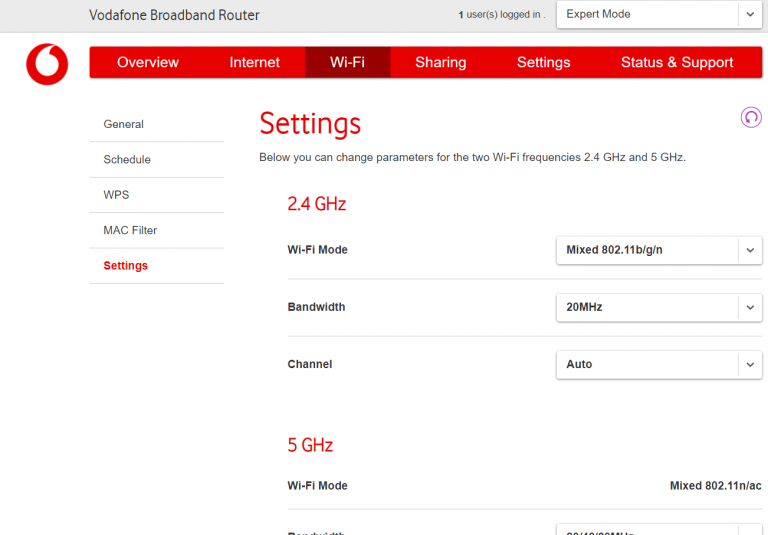
expert-mode-change-channels-cropped-768x535.png


Check under wifi settings.
 

Site & Scene News

Popular threads in this forum