

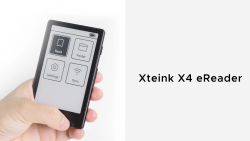
 Xteink X4 GBAtemp review
Hardware
Product Information:
- Official Store: https://www.xteink.com/products/xteink-x4
e-readers come in all shapes and sizes, and their e-ink display is becoming quite popular, being featured on tablets and even phones. Xteink is a newcomer to the industry that takes e-readers to the basics, quite literally. The company has released two e-readers, the X3 and X4, both of which stand out with their tiny form factor. We’ll take a look at the slightly “larger” (relative to the X3) Xteink X4 in this review.
Xteink X4 contents and specs
The Xteink X4 is currently sold overseas only via the official xteink.com website. The company doesn’t officially authorise sales through other platforms, and units from such platforms might be the cause behind some users not being able to flash custom firmware (more on that later). On the official product page, the X4 costs $69 and comes with the following items:
- 1 × X4 E-Reader
- 1× Quick Start Guide
- 1× MicroSD Card
- 1× Screen Protectors
- 2× Magnetic Stick-on Rings


Specs of the device are as follows:
- Display: 4.3 inch
- Resolution: 220 PPI
- Dimensions: 114 × 69 × 5.9 mm (4.49" × 2.72" × 0.23")
- Weight: 74g
- CPU: ESP32
- Storage: Comes with a 32 GB microSD card, supports expansion up to 512 GB
- Connectivity: Wi-Fi 2.4 GHz & Bluetooth wireless technology
- Ports: USB-C
- Physical Buttons: Power Button, Page-Turn Buttons
- Battery: 650 mAh
- Supported Formats: Document: EPUB, TXT / Image: JPG, BMP / Fonts: BIN
- Colour Options: Space Black / Frost White
- Languages: English, Simplified Chinese, Traditional Chinese, and Japanese
- Others: Does not support 3rd-party Apps
- Front light: No
- Touchscreen: No
First product, promising hardware
As Xteink’s first product, I was quite impressed by the X4’s hardware. It is a slim and compact e-reader that fits neatly in the hands. Its tiny form factor makes it stand out while also looking cute.
While the chassis is made of plastic, it does not feel cheap in any way. The physical buttons don’t noticeably rattle in the shell, and they are all accessible with single-handed manoeuvres. The buttons offer satisfying, audible clicks, which help the user to register their input; a feature that’s handy as the X4 doesn’t feature a touchscreen (likely to keep costs low).
I was positively surprised to see that Xteink includes a screen protector, two magnetic stick-on rings and a microSD in the package. Most tech companies would have you buy these individually, adding to the overall cost. However, Xteink’s decision makes the device more consumer-friendly and a better package overall, especially considering its cost.
That being said, the company notes that, due to the increasing cost of memory components, they have switched the included SD card capacity from 32GB to 16GB. 16GB is still plenty of storage space for e-books, and you can still upgrade to a larger capacity storage if needed (up to 512GB).
Xteink also has a growing line of accessories for its e-readers. There is a magnetic cover ($9) and a magnetic reading light ($10). I’d recommend the magnetic cover for added protection, and that’s how I use the X4 myself. The magnetic reading light is a nice-to-have accessory as the X4 doesn’t feature a backlight, but you could still manage with ambient light in most conditions.


The Xteink X4 was designed to be a pocketable accessory, and its suite of accessories supports this. The magnetic stick-on ring lets you attach it to the back of your smartphone, purse or even notebook. The X4 can attach magnetically on its own if your device has a magnetic back. This makes the X4 readily available. I tend to use it standalone as it fits neatly in my pocket, and I can just pull it out to read whenever I want. Its form factor is great for such use cases and attests to a thoughtful design.
Pocketable library
To start using the X4, you’ll have to load it up with some e-books. The device currently supports a handful of formats, including DRM-free EPUB and TXT. There are a few ways to upload files to the device. You can slot the microSD card in an SD card reader and copy documents onto it, or you can transfer wirelessly from your phone or desktop browser. The latter is a bit finicky, so I prefer loading via the microSD card myself.
After having uploaded your files, you are ready to bring your library in your pocket. The X4 does not have a touchscreen and operates solely via its physical buttons. There are two main (face) buttons with two keys under each. The left button has a ‘back’ and a ‘select’ key, while the right button has a ‘left’ and a ‘right’ key. On the right flank, you will find the power button and another side button with two keys (another ‘left’ and another ‘right’).
Navigating through the main menu and settings takes some getting used to, especially with the uncommon layout of the physical keys. But you can easily get accustomed after a few times using the X4, and each key is accessible with the fingers while holding the X4 in the same hand.
Xteink advertises the X4 as a minimalist e-reader, and the device is indeed this, sometimes to a fault. The latest official firmware (version 5.1.6) does not support on-device font type/size adjustment. This is rather inconvenient if you want to jump right in your book. Instead, you will have to make use of some community-made tools to modify your documents, ideally before loading them onto your SD card.
For example, the EPUB to XTC Converter from h0rm0 lets you tweak a range of settings from margins to font size and preview them. Another handy tool is the XTEink Web Font Maker from Lakafior. In fact, there is a whole open-source custom firmware called Crosspoint Reader that offers a whole suite of features that are not present on the official firmware, such as battery percentage (you can only see a battery icon when pulling up the menu when reading a book) and on-device text adjustments.
Such projects leverage the ESP32 microcontroller on the X4, and it is great to see owners of the device having access to alternative firmware solutions. Recently, there has been some concerns that some users were not able to flash custom firmware on their X4. However, Xteink notes on its website that “all units purchased directly through the XTEINK official website are exempt from third-party firmware restrictions. This commitment applies to all past and present models, with no planned changes for future updates.” Such issues might arise from units bought from third-party resellers that the company doesn’t endorse. It’s refreshing to see that the company is open to third-party firmware experimentation, making the device feel akin to the open-source retro handhelds and promises more opportunities in the future.
Xteink X4: tiny but mighty
At its core, the Xteink X4 is made for reading digital books, and it does that very well. There are a few kinks that you need to overcome, like adjusting the font type/size on a separate device to something that’s comfortable for you. There’s also the limited format support, but as far as books are concerned, the current compatibility is sufficient. PDFs would be nice to have, but it would lead to awkward scaling and navigation on the X4’s 4.3” display. It’s made for reading books, and should not be considered as a mini-phone with an e-ink display.
Personally, I’m sticking to the official firmware, editing files with the EPUB to XTC Converter and loading them to the microSD. I’m hoping that Xteink brings some of Crosspoint’s features over to its own firmware, but it seems like they are moving more slowly with official updates. The company is improving the user experience, albeit at a slower pace, for example, with the latest firmware introducing transparent book cover options.
It’s been a great device to read shorter books that I’ve been meaning to read but haven’t gotten around to. With it, I’m able to say that I’ve finally checked off Franz Kafka and Stanisław Lem titles from my must-read list. Its pocketable design lets me pick it up during commutes and breaks to flip through chapters before going on with my day. I’ve also seen people online calling it a “cure for doomscrolling”, and I can see how it can be a more productive alternative to browsing social media.
Having a backlight would have been useful, but there are workarounds (just like with physical books). Omitting this feature also likely helped keep the costs down, helping keep this e-reader at an attractive price point.
While the 650 mAh built-in battery might sound small for today’s tech standards, e-readers aren’t as power-consuming. On a single charge, the X4 can last for about 2 weeks with an average of 2 hours of daily reading time. If you use it less often than that, you can expect a longer lifespan.
It’s a niche device, even among e-reader enthusiasts. The 4.3-inch e-Ink display with a 220ppi resolution isn’t the sharpest out there, and the physical button navigation and limited features can feel limiting to some. However, the X4 really takes minimalism to the next level in the field of e-readers, showcasing that this tiny device can be a mighty one.
Verdict
- Well designed and very pocketable e-reader
- Simply fun to use
- Affordable e-reader
- Accessories included in package
- Strong community support
- No backlight
- Limited document format support
- Official firmware features could be improved