 GEEKOM IT13 Max GBAtemp review
Hardware
Product Information:
- Official Store: https://www.geekompc.com/geekom-mini-it13-mini-pc/
Review Approach:
GEEKOM are back throwing a familiar CPU into a larger shell. With the Ultra 9 185H being well documented as a solid daily driver, does this system do enough to warrant the price of entry in these times of high prices?
Out of the Box
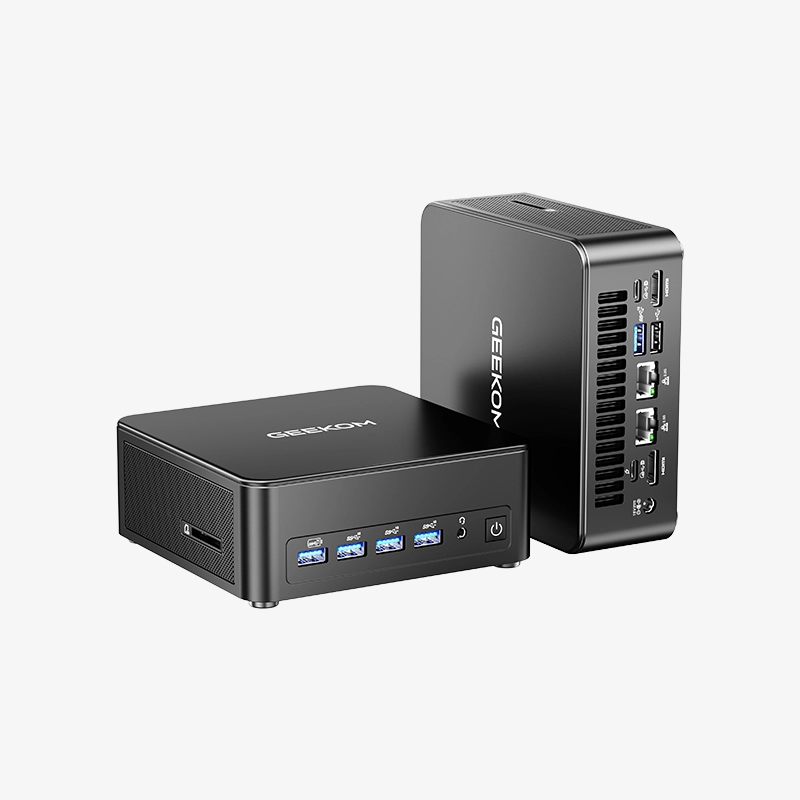
A lot of what’s on offer here will be familiar if you’ve seen me cover one of GEEKOM’s “Max” models before. The Max variants feature larger shells that allow for more ports, with them being split into three different types of aesthetic. The one here is most typical on their Intel systems, and is pretty middle of the pack in my mind. It’s an unassuming black box, but I will always commend this design for just how easy it is to open up. There’s no fighting with tightly packed antennae or adhesive tabs. Four screws and you’re in.
In terms of ports, you’ll more than likely find your needs met here. Between the six USB As and two high spec USB Cs, you’ll have plenty of room for your peripherals. Or even docks if you still need more. You can find a breakdown of what’s on offer below:
Front
- 4x USB A 3.2 (1x Always On)
- 3.5mm Combo Jack
- Power Button
Left Side
- SD Card Slot
Right Side
- Kensington Lock
Back
- 1x USB A 3.2
- 1x USB A 2.0
- 2x USB C 4.0 (1x PD In)
- 2x 2.5G Ethernet
- 2x HDMI 2.0
Now where this system is a little unique is in the two available variants. Unusually they’re both the same price, with the choice not being the most clear cut. The one we’re looking at here comes with 24GB of RAM and a 512GB SSD. If you’re thinking 24GB is an unusual amount for a PC, it’s because it’s actually soldered here, meaning the only point of upgrade is that SSD. The other model comes with 16GB of RAM and a 1TB SSD, with the added bonus of that RAM not being soldered. It’s a really interesting offering in my mind, and both do have some value.
My personal preference would probably be towards the 16GB model. For the day to day browsing and miscellaneous office tasks that this PC excels at, 16GB of RAM is enough. Being able to upgrade it down the line is nice, but really it’s that extra storage that would push me in that direction. I can see far more people struggling to manage a 512GB SSD than the more limited pool of RAM. The choice is something I appreciate all the same. It’s a solid middle ground that gives a buyer options. In this current market, that’s only a good thing.
I’ll throw a bemused note out here for the plethora of stickers littering the system when you first unbox it too. Covering both of the Ethernet ports, as well as the front of the system, you get these bright yellow markers telling you not to connect the system to the internet until you’ve set it up. It is nice that such an option is still readily available during the setup process, but I really do wonder what kind of customer service experiences have gone into them feeling like they need something like this. For what it’s worth, it’ll work fine either way. It does, as they say, just get you to the desktop a good bit faster if you connect to the internet later.
Everyday Performance
Under the hood, we find the familiar Ultra 9 185H. At this point it’s a few generations old, but remains more than capable for day to day usage. That includes navigating Windows with a typical multi-monitor setup, going through your various office applications, and of course things like 4K playback on YouTube and other streaming sites.
You can find the usual assortment of benchmarks below:
Cinebench 2026.1.3
- Multi Thread - 3603
- Single Core - 575
- Single Thread - 422
Geekbench 7
- Multi Core - 14276
- Single Core - 2199
PCMark 10
- Overall Score - 8226
- Essentials Score - 9810
- Productivity Score - 15226
- Digital Content Creation Score - 10114
3DMark
- Steel Nomad Light - 3082
- Steel Nomad Light Stress Test - 98.5% (Pass)
Something that stood out to me here is the lack of instability when running 3DMark. This is something I’ve seen on a number of other Ultra 9 185H systems, where the scores actually improve after a few runs before settling into a stable state. Here the results remained relatively consistent throughout.


When it comes to gaming you should generally know what to expect with a system like this. Your larger 3D titles will run, but they will run with compromises. It’s not a system you should expect to work great out of the box in this department, and not one I would recommend in general if gaming is your primary goal. Where it does do well is in those lighter games. Your indies, your 2D platformers, your simpler roguelikes. There’s a lot you can run here, but your expectations should be suitably tempered.
On the emulation side of things, the experience is actually pretty good. Your older platforms will run without issue, with you even able to take things all the way to Wii U and Switch on the Nintendo side of things. There will be some demanding titles that won’t be possible here, with Pokemon Scarlet and Violet struggling even on systems with discrete graphics, but the integrated Arc graphics can go a surprising distance. With the Ultra 9 185H being a few years old at this point, there’s also plenty of footage to dive into online to see what will and won’t run.
A Solid Choice
The IT13 Max isn’t the kind of system that’ll go down in history for pushing boundaries. You’ve got a familiar CPU that’s more than enough for your day to day usage paired with a shell that’s easy to open up with plenty of IO to go around. I do think the RRP of $1400 is too high, but with the sales currently active making the system half of that, it’s a much more compelling package. I also appreciate the options available at checkout, letting the buyer pick what’s more important to them between more (non-upgradeable) RAM and less storage, and less RAM with more storage out of the box. The latter would be my personal choice, but I can say the 24GB RAM model I have to hand has had no problems. If you're in need of a PC to tide you through these trying times, the IT13 Max is unlikely to do you wrong.
Verdict
- Reliable and performant CPU
- Fantastic IO offerings
- Easy to open up housing
- Two product variants to allow buyers to pick what's most important to them
- RAM not upgradeable on the 24GB model
- Priced too highly when not on sale