

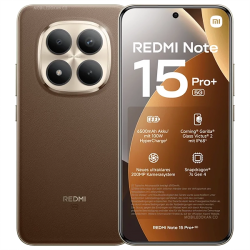
 Xiaomi Redmi Note 15 Pro+ 5G GBAtemp review
Hardware
Product Information:
- Official Store: https://www.mi.com/uk/product-list/phone/redmi/
Redmi is the Chinese branch of Xiaomi, a phone company with just 15 years of experience behind them, and ranges including Xiaomi, Redmi, and the fantastic POCO gaming smartphones.
The Redmi Note 15 Pro+ is the latest in the Note Pro series, with the "Pro+" moniker indicating that this is the higher end, more premium model, with enhanced charging, higher capacity battery, and upgraded 200mp camera hardware. Typically, "Note" devices are aimed at business professionals, those who need to be productive on the move, and those who spend most of their time out side of any physical office space, but can this style of device also be great for gaming and emulation?
This model comes complete with a sim pin, a silicon case, a pre-installed plastic screen protector to the micro-curved display, a leather effect rear casing, and most notable of all, a 100w charging block capable of charging from 0-100% in under one hour. The battery is also 10% Silicon-Carbon which, while an industry first, helps retain 80% of its capacity, even after 1600 cycles, or 6 years use!
No price has been announced as of yet, due to Xiaomi releasing that information at launch, but I will update the article as and when those details surface.


Technical Specifications:
Colour Options: Mocha Brown, Glacier Blue, Black
Dimensions: 163.3 x 78.3 x 8.47 mm (Mocha) 163.3 x 78.3 x 8.19 mm (Glacier/Black)
Display: 6.83" CrystalRes AMOLED, 68B colors, 120Hz, 3840Hz PWM Dimming, DCI-P3 wide colour gamut, HDR10+, Dolby Vision, 3200 nits, 2560Hz touch sampling
Weight: 208g (Mocha) 207.1g (Glacier/Black)
Materials: Gorilla Glass Victus 2 front, silicone polymer eco leather rear, aluminum frame
SIM type: Dual Nano SIM, HSPA, LTE, 5G, eSim
Battery: 6500 mAh (10% silicon carbon)
Charging 100W HyperCharge wired, 22.5W reverse charging.
Display: 1.5K (2772 x 1280) 120Hz 12-bit colour depth (447 ppi)
OS: Android 15, HyperOS 2.0.201.0
Chipset: Qualcomm SM7635-AC Snapdragon 7s Gen 4 (4 nm) ARMv8, Surge T1S tuner.
CPU: Octa-core 4 @1.80 GHz / 3 @ 2.40 GHz / 1 @ 2.71 GHz
GPU: Adreno 810
Memory: 512+12gb / 256gb + 12gb / 256+8gb (LPDDR4X + UFS2.2)
Camera cluster: 200 MP ultimate clarity, f/1.7, 23mm (wide), 1/1.4", 0.56µm, multi-directional PDAF, OIS / 8 MP, f/2.2, 15mm, 120˚ (ultrawide), 1/4.0", 1.12µm / 2 MP (macro)
Video Capture: 4K@24/30fps, 1080p@30/60/120fps, gyro-EIS, OIS
Selfie camera: 32mp HD wide angle lens
Video capture: 1080p@30/60fps
Speakers: Dual Speakers, 400% volume boost, Dolby Atmos Hi-Res.
Connectivity: GSM / HSPA / LTE / 5G
Bluetooth: 5.4, A2DP, LE
GPS: GPS (L1+L5), GALILEO, GLONASS, QZSS, BDS
Sensors: Fingerprint (under display, optical), accelerometer, gyro, compass, proximity, NFC, AI face unlock
Pricing: ???


Aesthetically Pleasing Design Language
The Redmi Note 15 Pro+ is quite the head turner. With an overall stature, almost identical to my recently purchased iPhone 17 Pro Max, the 163.3 x 78.3 x 7.9 mm frame of this Android 15 device, is only slightly thinner in terms of depth. This smartphone has opted for the camera cluster to be placed dead center, which gives the device a balanced look and I find this far more pleasing than having all the cameras running down one edge, or off-center at the top.
Moving around the circumference of the Note 15 Pro+, just like the latest POCO phones, you'll only find buttons on the right hand side, just a volume rocker and a power button. The left edge contains no buttons whatsoever, the top edge houses a speaker grill and a microphone, and the bottom edge also has a speaker grill (providing loud rock-solid stereo sound when placed in landscape mode), a microphone, dual sim slot, and the USB-C charging socket. There are no 3.5mm headphone sockets to be found on this device either.
On the rear is a faux leather looking back panel, which if I'm honest is not my favourite feature of this model, especially in the niche Mocha brown colourway. There is also no wireless charging built in, so you will need to use the charger provided in the old fashioned wired way, but as stated above, you can blast it with 100 watts of power and have it from 0-100% in roughly 40-50 minutes.
The screen itself is a vibrant OLED display with a resolution of 1280 x 2772px, which is essentially an elongated full HD screen with a tall aspect ratio. When it comes to watching movies and streaming media, the screen is superb for widescreen content, and the 120Hz panel is as smooth and responsive as you possibly could wish for.
The brightness and intensity of the screen is also extremely nice, even in outdoor conditions, such as sunny, bright environments, where the screen is also retains its clarity, and cleverly dims or illuminates depending on your surroundings.
Productivity Focused
The Note series of phones are the ones you want if you're glued to your device 24/7. The 6500 mAh battery gives you a stunning 34 hours of life in balanced mode, 42 hours in battery saver, and an incredible 110 hours in ultra battery saver mode. That's four full days. The latter restricts everything down to its bare minimum though, only allowing for only basic connectivity, essentially turning it into a dumb phone. Extreme situations call for extreme measures, so it's better to have this mode and not need it, than need it and not have it.
Going back to basics, the phones speaker and microphone quality when making and receiving calls is impeccable. The speakers are crystal clear, reproducing sound exquisitely, and the microphone is clean and crisp and captures minimal background noises when making calls, or recording voice clips, for example.
The speakers in particular are very powerful too. Powered by Dolby Atmos there is no perceivable tinny characteristics to the sound profile, though there is a distinct lack of bass throughout the experience, which is to be expected as there is no dedicated subwoofer built in. The 400% volume boost feature certainly floods the vicinity with sound, and is ideal for watching streaming content, or playing back videos.
When benchmarking the Note 15 Pro+, we can see that the Snapdragon 7s gen 4 and Adreno 810 combo is not a high-end powerhouse, and so we must temper our expectations when it comes to exactly what this device can be used for, and how powerful it is for GPU heavy tasks.
As you can infer from the results below, the single core scores of 1219 (single) and 3218 (multi) imply that this device is not designed with high-end gaming in mind. Instead, this is a more productivity and content creation-driven device, which can multitask with ease, and thanks to the spiffy OS, it can handle multiple apps, layered in windowed form, or full screen and backgrounded. I would recommend only aiming to play mid-range android game son this device, rather than
The POCO F8 Pro demonstrated its gaming-forward prowess with its 2301 / 8533 core scoring, though that device weighs in with a heavier price tag for packing the Qualcomm SM8750-AB Snapdragon 8 Elite CPU with and Adreno 830 GPU in it's arsenal.
As a consumer, you need to decide what the focus of your device needs to be, so if its work-related budget friendly and mid-range, then Redmi is the way to go, but if it's a premium gaming-forward performant device you want, it will be the POCO series you need to look into.


Superb Capture Quality
Along with the standard photography modes you would expect of any smartphone, including panoramic and video capture modes, the main USP of this device is the 200mp "Ultimate Clarity" camera sensor. The main thing to note here is that the larger the sensor, the larger the image that is captured, not necessarily the higher quality or better composition of the image taken. That largely relies on the user.
The video recording using the cluster of cameras on this device grants you a range of modes, including capturing full 4K at 24 or 30 FPS, or 1080p at 30, 60, or 120 FPS. For content creators specifically, this means capturing crystal clear, lagless video on the go with a range of file sizes that are ideal for directly uploading to web, or archiving for use in professional video editing suites, even on the device itself.
As for photography, the difference between the ultra and standard camera modes are that the images captured are significantly larger. As an example, a standard image comes in at 3060 x 4080 and weighs in at 3.52 MB. The Ultra version of the exact same image was 12240 x 16320 and a whopping 24 MB file size. These images cam get larger still if you utilise the pro mode photography options, setting ISO, exposure, and capturing greater detail on more intricate or colour varied scenes. Some images I took exceeded 50 MB, where things like HDR and exposure were most pronounced and vivid.
I took the camera around my local area and attempted to take some sample shots to demonstrate the HDR capture quality, though because of compression, the images displayed here will not be the full quality, but give you a good idea of the general colour warmth and level of detail you can capture, even with absolutely minimal camera skills.
Thankfully, camera modes like the pro setting uses AI to automatically adjust exposure settings, ISO, and focus to capture you the best possible images without you needing to know exactly what everything does. For those seasoned photographers, there is the option to turn off all the automation and allows you to dial in exactly the settings you wish to use, to take photos to your exacting standards.


Emulation Capable but Limited
First things first, the GPU within the Note 15 Pro+ is an Adreno 810, and not the latest Adreno 830 model. This means that the device will handle mid-range gaming perfectly fine, but anything higher tier, like Alien Isolation, Genshin Impact, or COD Mobile will struggle to run adequately. Equally, when it comes to emulation, the capabilities of this device will be limited, but this didn't stop me from pushing it to its limits with some recently improved emulators.
Running Eden's latest RC build, I attempted to play a variety of games and immediately noticed that even 2D gaming was struggling. Games such as Super Mario Odyssey and Luigi's Mansion 3, for example, I would class as unplayable, because their frame rates, more often than, not dipped into unfavourable numbers where the juice was not worth the squeeze.
2D games such as Super Mario Bros. Wonder actually handled itself quite well though, but only once the shaders were built and the additional boost from "Gameturbo" mode was activated. Within the security settings of the device you can add applications to the "Gameturbo" function, and when running them, the system can be swiftly cleansed and adapted to help boost their frame rates or resolutions.
Without "Gameturbo" SMBW ran roughly, somewhere between 10 and 40 FPS, with constant dips during effect heavy sections, or when multiple enemies entered the screen. With the function enabled, it managed a far more palatable and stable 25-30 FPS with minimal dips when the action heated up.
It's far from perfect, but with a bit of tweaking and some patience, you can eke out reasonably playable performance on 2D games, as long as you employ the use of pre-built shaders and as many boost/turbo modes as you can shake a stick at. For anything more demanding than a 2D side-scroller, I simply wouldn't bother wasting much time tinkering on this device, as you will not see the necessary gains to make them playable enough to make it a worthwhile experience.


Scaling back a little to Dolphin emulation, I tested out a couple of Wii and GameCube titles. Super Mario Galaxy didn't want to run well at all running sub 30 FPS, so I went back a little further, breaking out Super Mario Sunshine, which definitely ran considerably better.
With just the stock settings, the game does hit constant frame dips when entering new areas, but with the gaming mode optimised, these become far less frequent. The game was extremely playable, though I would say that you should use a Bluetooth controller for the best experience as I could not for the life of me catch shadow Mario in the opening sections using the on screen controls.
Overall, most GameCube games should hit a relatively playable 27-30 FPS without much interruption, but again, mileage will vary depending on the games demanding features, or the compatibility with the emulator and the Adreno 810.


While this is not an ideal device for high-caliber emulation, if you were to stick to the likes of Sega Dreamcast and below, for systems such as Nintendo 64, PlayStation One, Saturn and the 16-bit and handheld consoles pre-Vita or 3DS, you will have a wonderfully retro time with the Note 15 Pro+.
Systems like PS2 for example, are simply too hit and miss, dependent on the games you're playing, but by and large its the 2D scrolling games that will work well, like Metal Slug and anything 3D or triple A on these systems like GTA or God of War will struggle purely due to the strength of the hardware.
Overall I like the Note 15 Pro+'s computer-in-your-pocket build style and the incredible camera and outstanding battery life its is built around. The ability to take huge, detailed images is ideal for professionals who wish to crop and zoom in on specific areas quickly, but for anyone looking at this device strictly for gaming and emulation purposes, I would highly suggest turning your focus towards Xiaomi's POCO range.
There is a trade off between enhanced productivity, creativity, and the large-screen multimedia experience gained from having a note model, in that you'll pay out a far smaller price, but sacrifice more powerful CPU+GPU compute speeds in favour of higher spec camera sensors and increased battery capacity.
Verdict
- Excellent camera features
- Incredible battery life
- Brilliant for content creation and productivity.
- Adreno 810 isn't great for high end gaming.
- No wireless charging.
