



The Legend of Zelda: A Link to the Past — ALEKS Ultimate NX
A modern Nintendo Switch version of A Link to the Past built on snesrev/zelda3.
Native widescreen, Dual Screen, Flip Grip, RetroAchievements, Save States,
Quick Items, QoL features and multilanguage support.
Hi everyone!
After working on this for a while and testing it directly on real Switch hardware,
I'm finally releasing ALEKS Ultimate NX.
The idea was to take the excellent reverse-engineered zelda3 engine and
build a Switch-focused version of A Link to the Past around it, while also
bringing over the portable/second-screen ideas from the 3DS and Android ports.
This is not an emulator and the game is not simply stretched to widescreen.
The Zelda3 software renderer itself draws the expanded view.
Download / Source
GitHub:
https://github.com/Alexgg1014/The-Legend-of-Zelda-A-Link-To-The-Past-Alek-s-Ultimate-NX-Edition
The repository contains:
- Full source code
- Installation instructions
- Screenshots
- Detailed technical information
- Credits
- Third-party notices
- True 16:9 native expanded rendering
- True 16:9 Expanded with additional horizontal and vertical game view
- 4:3 Classic for the original presentation
- Normal Mode
- Dual Screen Mode
Gameplay and the companion interface shown at the same time. - Flip Grip Mode
Vertical stacked layout designed for portrait play. - Companion Screen
- Light World / Dark World maps
- Dungeon maps
- Items
- Gear / progression
- Save States
- Settings
- Touchscreen + controller navigation
- Save States
- Multiple slots
- Thumbnails
- Overwrite confirmation
- Configurable Quick Slot
- Quick Save / Quick Load
- Quick Items / Quick Use
Use another item from a configurable hotkey without replacing the item assigned to Y.
For example: keep the Bow equipped on Y, assign Bombs to ZL, press ZL to place a
Bomb, and the Bow stays equipped. - RetroAchievements
- Login
- Game identification
- Rich Presence
- Achievement unlocks
- Achievement badges/toasts
- Multilanguage support using compatible user-supplied translated ROMs
- Hold to Advance for dialogue
- Fixed Camera option for widescreen
- Multiple optional Zelda3 QoL / bug-fix features
- Native first-run asset extraction directly on the Switch
Dual Screen
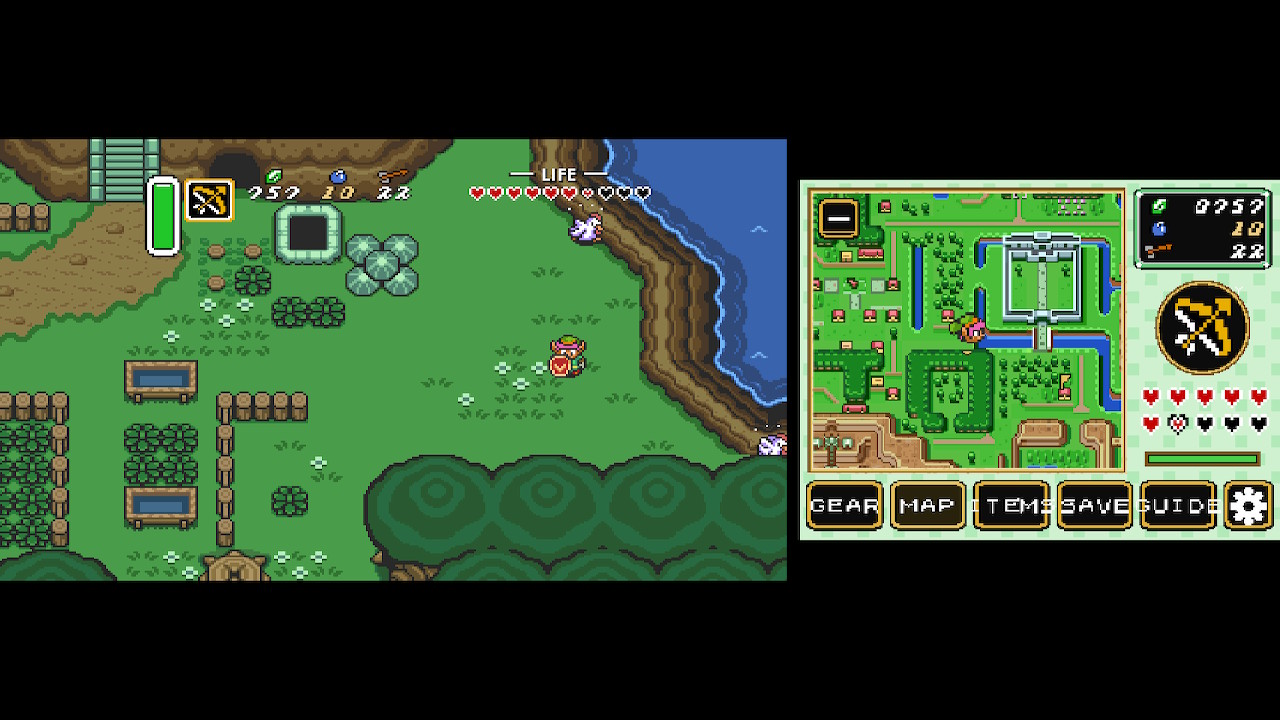
Gameplay and the companion interface running together.
Flip Grip
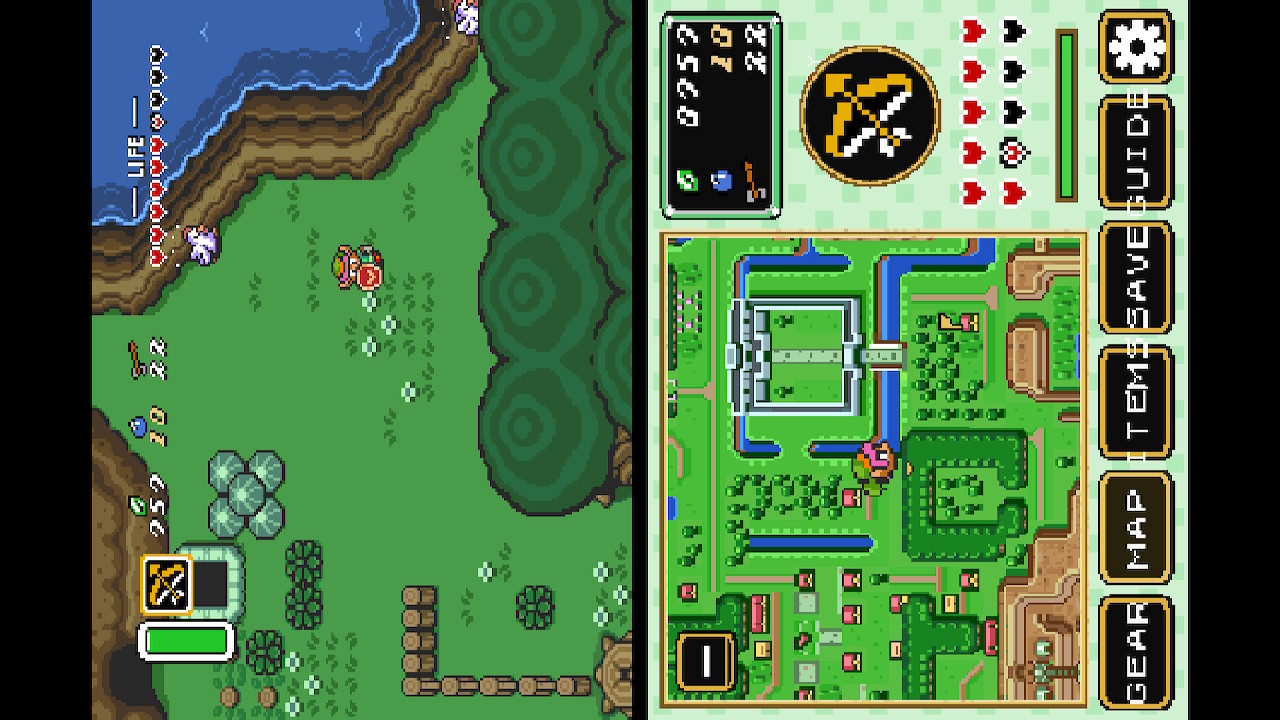
Portrait layout designed around Flip Grip-style play.
RetroAchievements
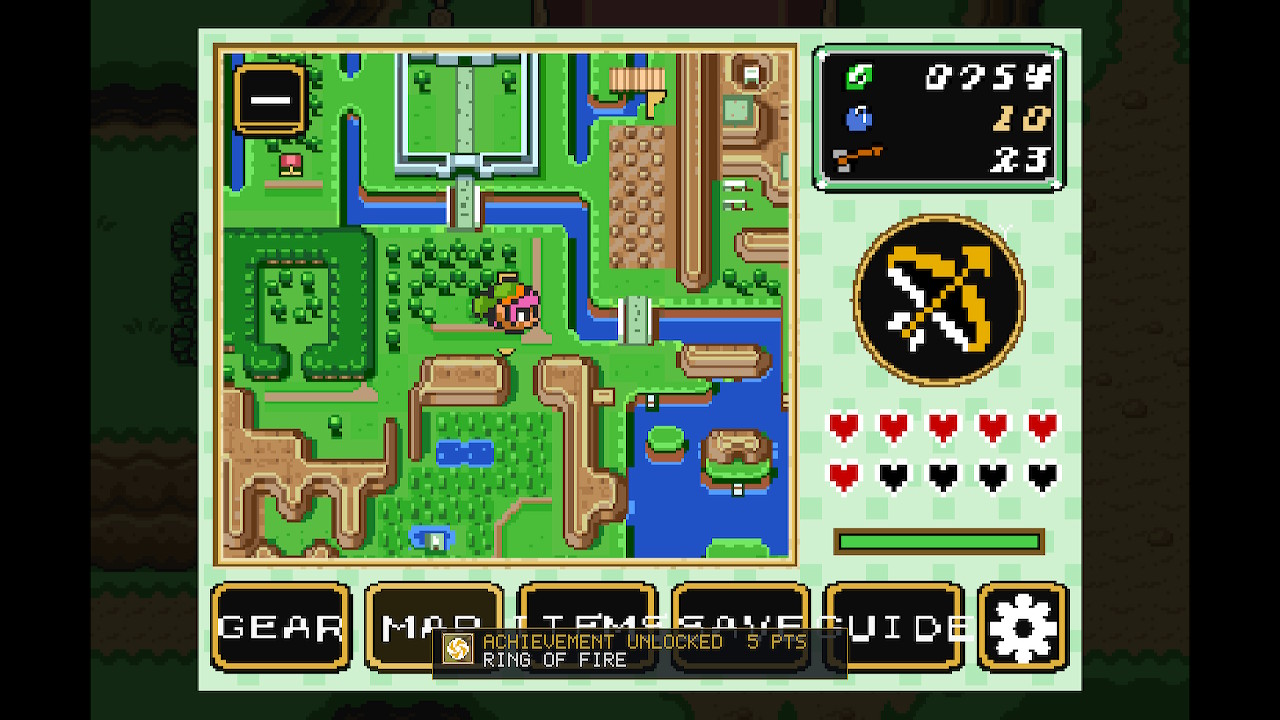
A real RetroAchievements unlock running on Switch hardware.
Installation
No ROM is included with this project.
You need your own legally obtained USA copy of A Link to the Past.
- Create this folder:
Code:sdmc:/switch/Zelda3/ - Place the ALEKS Ultimate NX `.nro` inside that folder.
- Place your USA `.sfc` or `.smc` ROM in the same folder.
- Launch the homebrew.
On the first launch, ALEKS Ultimate NX validates your ROM and generates
`zelda3_assets.dat` locally on your Switch.
No Python, PC extractor or pre-generated asset package is required.
The ROM itself is never included with the project.
Folder Layout
Code:
sdmc:/switch/Zelda3/
├── Zelda3-ALEKS-NX.nro
├── zelda3.sfc
├── zelda3_assets.dat
├── zelda3.ini
├── saves/
├── languages/
├── msu/
├── screenshots/
└── logs/
The USA ROM is required and should remain in the root Zelda3 folder.
Runtime directories and generated files are created automatically as needed.
Optional translation ROMs and MSU-1 content are supplied by the user.
Multilanguage
Optional translated dialogue can also be extracted locally.
Place a compatible translated ROM inside:
Code:
sdmc:/switch/Zelda3/languages/The translated ROM does not replace the required USA ROM.
The language system extracts the dialogue, dictionary, font and character-width
information locally from the translation ROM.
Compatibility depends on the ROM/text-engine layout rather than just the
language itself.
This has been tested on real Switch hardware with a compatible Spanish
translation based on the USA ROM layout.
Other translations using the same basic text-engine layout are expected to work,
even if they are not specifically listed beforehand.
Known incompatible categories include:
- Official PAL releases using a different ROM/text layout
- Translation hacks that substantially replace or remap the original text/font system
An incompatible translation is rejected cleanly and the game continues in English.
Changing languages currently takes effect after restarting the game.
True 16:9
ALEKS Ultimate NX includes three user-facing aspect modes:
- 4:3 Classic
Original presentation. - True 16:9
Approximately 342x224 internally, showing more game world horizontally. - True 16:9 Expanded
Approximately 366x240 internally, showing more game world horizontally and vertically.
These modes are rendered through Zelda3's software PPU.
They are not a stretched 4:3 image.
True 16:9 Expanded uses the engine's 240-line rendering path to expose additional
vertical game space where the current room or area actually contains valid world data.
Display Modes
Normal
Traditional single-screen gameplay.
The companion interface can be opened as an overlay.
Dual
Gameplay remains on one side while the portable companion UI stays visible beside it.
Flip
A portrait-oriented layout using a 720x1280 design canvas and rotated for
Flip Grip-style play.
The Switch itself is not actually changing its physical screen resolution to
720x1280 — that is simply the internal layout canvas.
Companion Screen
The portable companion interface is available in all three display modes.
Current pages include:
- Map — Light World, Dark World and dungeon maps
- Items — inventory and Y-item selection
- Gear — equipment and progression
- Save States
- Settings
It supports both controller and touchscreen navigation.
Quick Items / Quick Use
Quick Items do not simply equip another item.
They use the selected item through Zelda's normal item-dispatch path without
replacing the item currently assigned to Y.
Example:
Code:
Y  = Bow
ZL = Bombs
Press ZL and Link places a Bomb.
The Bow remains equipped on Y afterwards.
The system still respects normal item ownership, ammunition, magic and player-state
restrictions because the original Zelda item logic is still being used.
Save States
The companion interface includes a dedicated Save States page.
- Multiple save-state slots
- Thumbnail previews
- Save confirmation
- Overwrite confirmation
- Configurable Quick Slot
- Quick Save
- Quick Load
On the Save States page:
X = Save
Y = Load
Saving to an occupied slot asks before overwriting and defaults to NO.
Save States are separate from Zelda's normal SRAM saving system.
The game's normal saves remain authoritative.
RetroAchievements
RetroAchievements support uses the official rcheevos client.
I have tested the following directly on real Switch hardware:
- Login/authentication
- Game identification
- Rich Presence
- Achievement evaluation
- Achievement unlock submission
- Real achievement unlocks
- Badge and toast rendering
Softcore only.
Hardcore mode is currently not supported because ALEKS Ultimate NX includes
Save States and Quick Load functionality.
A failed login, unavailable RetroAchievements server or no network connection
does not prevent the game from running.
Quality of Life
The project exposes multiple optional Zelda3 QoL features.
Examples include:
- Item Switch L/R
- Turn While Dashing
- Collect Items With Sword
- Break Pots With Sword
- Disable Low Health Beep
- Skip Intro
- Max Items in Yellow
- More Active Bombs
- Carry More Rupees
- Miscellaneous bug fixes
They are individually configurable from the companion Settings interface.
Hold to Advance
Hold to Advance allows normal dialogue pages to continue while the advance button
is being held instead of requiring a separate button press for every page.
Explicit choices and confirmation prompts are excluded, so the game still waits
for deliberate input where necessary.
Controls
The standard Zelda controls are remappable from Settings.
ALEKS also includes Switch-specific shortcuts and chords.
Code:
ZR + L3  = Cycle display mode
ZL + L3  = Toggle companion
ZL + R3  = Open Settings
ZL + ZR  = Next companion page
Additional shortcuts can be assigned for:
- Companion
- Settings
- Next Page
- Quick Save
- Quick Load
- Display Mode
- Quick Item 1
- Quick Item 2
The configuration system filters conflicting controls so shortcuts do not fight
normal gameplay input.
Hardware Testing
This project has been developed and repeatedly tested directly on a real Nintendo Switch.
Currently verified on real hardware:
- Normal Mode
- Dual Screen
- Flip Grip
- Save States
- Save-state thumbnails
- Save / Load / overwrite confirmation
- Asset extraction from a user-supplied ROM
- RetroAchievements login
- RetroAchievements game identification
- RetroAchievements Rich Presence
- Real achievement unlocks
- Achievement badge/toast rendering
- Multilanguage extraction using one compatible Spanish translation
- Spanish accented dialogue
Some newer functionality still needs broader testing across more areas of the
entire game, especially:
- True 16:9 Expanded
- Docked output
- Other translation ROMs
Bug reports and hardware feedback are very welcome.
Project Lineage / Credits
This project would not exist without the work of other developers.
snesrev / zelda3
Main reverse-engineered Zelda3 engine and upstream base.
https://github.com/snesrev/zelda3
EstebanPdN / zelda-alttp-3ds
Primary portable implementation used as a reference/donor for the companion
screen, portable UI, Fixed Camera and translation-related work.
Portions were used/adapted with permission from Esteban.
https://github.com/EstebanPdN/zelda-alttp-3ds
samyost1 / zelda3-android
Earlier dual-screen Zelda3 work that forms part of the technical lineage of the
second-screen implementation.
https://github.com/samyost1/zelda3-android
RetroAchievements / rcheevos
RetroAchievements client library.
https://github.com/RetroAchievements/rcheevos
devkitPro / libnx / SDL2
Nintendo Switch toolchain and platform libraries.
ALEKS Ultimate NX adds the Switch-specific integration around these projects,
including the compositor/layout system, Normal/Dual/Flip modes, True 16:9 modes,
Switch UI/input handling, Save-State UX, Quick Use, multilingual Switch extraction,
Zelda-specific RetroAchievements integration, runtime configuration and diagnostics.
The GitHub repository contains a more detailed attribution and third-party notice.
Development Note
This project was developed through source analysis, implementation, iterative
debugging and testing directly on Nintendo Switch hardware.
AI-assisted code analysis and integration were also used during development.
That does not replace or change the attribution of the upstream and donor projects
listed above.
Known Limitations
- RetroAchievements Hardcore mode is not supported.
- Changing language currently requires restarting the game.
- Translation compatibility depends on the ROM's text-engine layout.
- True 16:9 Expanded can show a black area at the bottom when the original
room/area does not contain additional world data below the normal viewport. - Story Guide content is not implemented yet.
Bug Reports
If you find a bug, please include as much of the following as possible:
- Normal / Dual / Flip mode
- 4:3 / True 16:9 / Expanded
- Handheld or docked
- What you were doing when the issue happened
- Whether RetroAchievements was enabled
- Whether a translation was enabled
- Relevant logs from `sdmc:/switch/Zelda3/logs/`
Issues can also be reported on GitHub.
Legal
This is an unofficial fan/homebrew project.
It is not affiliated with, authorised by or endorsed by Nintendo.
No game ROM is included or provided.
Users must provide their own legally obtained copy of
The Legend of Zelda: A Link to the Past.
Game assets and optional translation data are generated locally from files
provided by the user.
The Legend of Zelda, A Link to the Past and related trademarks belong to Nintendo.
Thanks for checking it out!
If you test it — especially True 16:9 Expanded, docked mode, Flip Grip or other
translations — I'd really appreciate feedback.











 |
|


