

Hello, I've been trying to change one of the Mii hairstyles to a different style by replacing the model, so that a friend's kid can have their hairstyle on their mii. I don't care about having to replace the model in every single game to make it consistent across the board, I'm willing to go through whatever work is necessary. For clarification's sake, I am not trying to add a hairstyle, but rather overwrite and already existing one.
However, this has gone from trying to edit a dumped copy of Wii Sports Resort (and looking for hair models), to looking through a dumped copy of Wii Sports, to then trying to edit a file on the NAND which I'm not even sure exists. I've given up on trying to figure this out on my own.
From the little bit that I've been able to understand, some games that use Miis use two files in the NAND in a folder called "FaceLib": RFL_DB.dat and RFL_Res.dat, the former for the composition of the Miis (eye width, hairstyle number, etc.), and the latter for the models and textures (the appearances of the eyes, the head shapes, etc.) In a decompilation effort of Wii Sports, there's seemingly a call made for the file, which at least confirms that being the case for Wii Sports (unless if I've completely misread the code, I have no idea.)
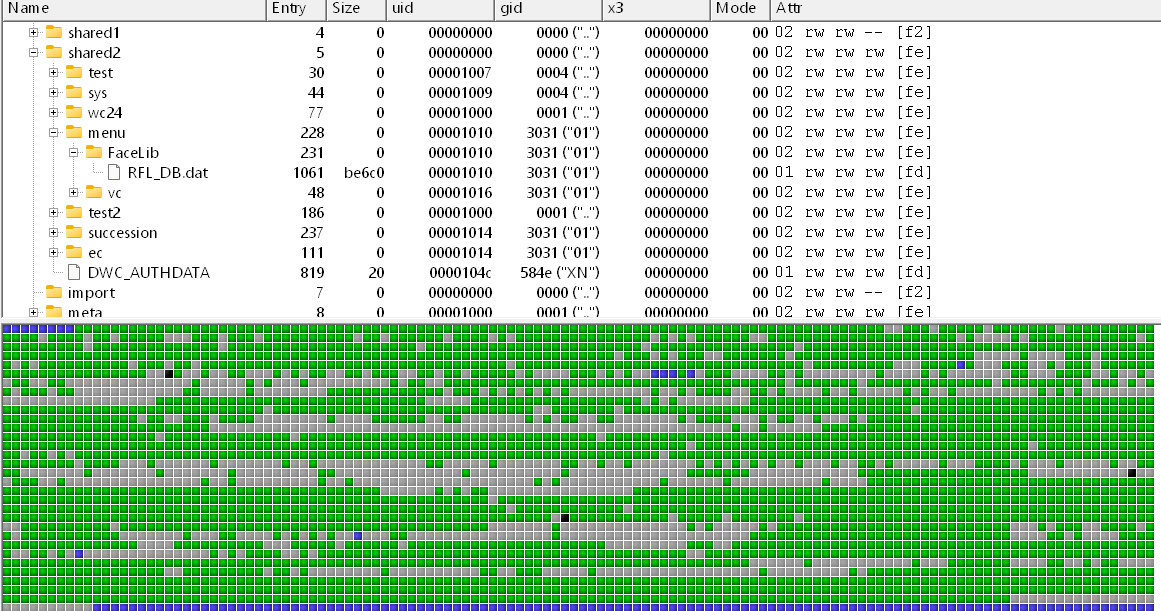
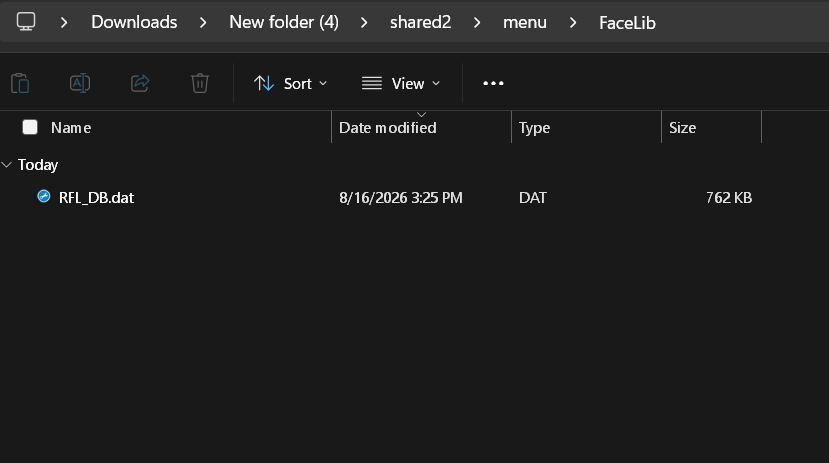
However, in my dumping of my NAND, which I have done both on my vWii and Wii, only RFL_DB.dat appears in facelib when using both bootmii (done only on Wii) and nanddumper@ios. Neither or lead to RFL_Res.dat being exported, if it is actually a part of NAND. Either that, or I somehow exported NAND wrong.
I already have an editor for RFL_Res.dat (https://mkwiiki.org/wiki/RFL_Res.dat_Editor), and I use NAND Extract for extracting my NAND. The only problem is how I should go about obtaining and editing RFL_Res.dat. If there's something I'm getting seriously wrong, please inform me.
Websites and Info I'm working off of:
NAND Directories as reported by WiiBrew: https://wiibrew.org/wiki//shared2/menu/FaceLib
Wii Sports Decompilation (most files in this folder, but especially RFL_NANDAccess.c): https://github.com/doldecomp/ogws/b...01bec7e887109/src/RVLFaceLib/RFL_NANDAccess.c
Images are also attached of my NAND, just in case if there's anything suspect. (Google Drive link if File Garden is down: https://drive.google.com/drive/folders/1N9XO69lPzfV0c3AQP66c_DalKPM_qbMC?usp=sharing)
Any answer is appreciated. Thank you.
However, this has gone from trying to edit a dumped copy of Wii Sports Resort (and looking for hair models), to looking through a dumped copy of Wii Sports, to then trying to edit a file on the NAND which I'm not even sure exists. I've given up on trying to figure this out on my own.
From the little bit that I've been able to understand, some games that use Miis use two files in the NAND in a folder called "FaceLib": RFL_DB.dat and RFL_Res.dat, the former for the composition of the Miis (eye width, hairstyle number, etc.), and the latter for the models and textures (the appearances of the eyes, the head shapes, etc.) In a decompilation effort of Wii Sports, there's seemingly a call made for the file, which at least confirms that being the case for Wii Sports (unless if I've completely misread the code, I have no idea.)
However, in my dumping of my NAND, which I have done both on my vWii and Wii, only RFL_DB.dat appears in facelib when using both bootmii (done only on Wii) and nanddumper@ios. Neither or lead to RFL_Res.dat being exported, if it is actually a part of NAND. Either that, or I somehow exported NAND wrong.
I already have an editor for RFL_Res.dat (https://mkwiiki.org/wiki/RFL_Res.dat_Editor), and I use NAND Extract for extracting my NAND. The only problem is how I should go about obtaining and editing RFL_Res.dat. If there's something I'm getting seriously wrong, please inform me.
Websites and Info I'm working off of:
NAND Directories as reported by WiiBrew: https://wiibrew.org/wiki//shared2/menu/FaceLib
Wii Sports Decompilation (most files in this folder, but especially RFL_NANDAccess.c): https://github.com/doldecomp/ogws/b...01bec7e887109/src/RVLFaceLib/RFL_NANDAccess.c
Images are also attached of my NAND, just in case if there's anything suspect. (Google Drive link if File Garden is down: https://drive.google.com/drive/folders/1N9XO69lPzfV0c3AQP66c_DalKPM_qbMC?usp=sharing)
Any answer is appreciated. Thank you.