Homebrew Homebrew game [RELEASE] rd-132211(old minecraft) ported to the 3ds!

boriszkerzering

New Member
Newbie
Joined
Mar 13, 2026
Messages
4
Reaction score
3
Trophies
0
Age
28
XP
32
Country
Cuba
UPDATE: 3D Support has been added in v1.2! Make sure to download the correct/new attached file!

Hello:)!
For the past few days I've been working on my first major 3ds homebrew project.
I ended up porting this project over to the 3ds, which is essentially just a rewrite/clone of RubyDung in c++.
Most of the code stayed intact except for any opengl related stuff which was a pain since I had no experience with Citro3D.
Eventually I got pretty comfortable with it, and was able to get it running at 60 fps on both old and new 3ds models.
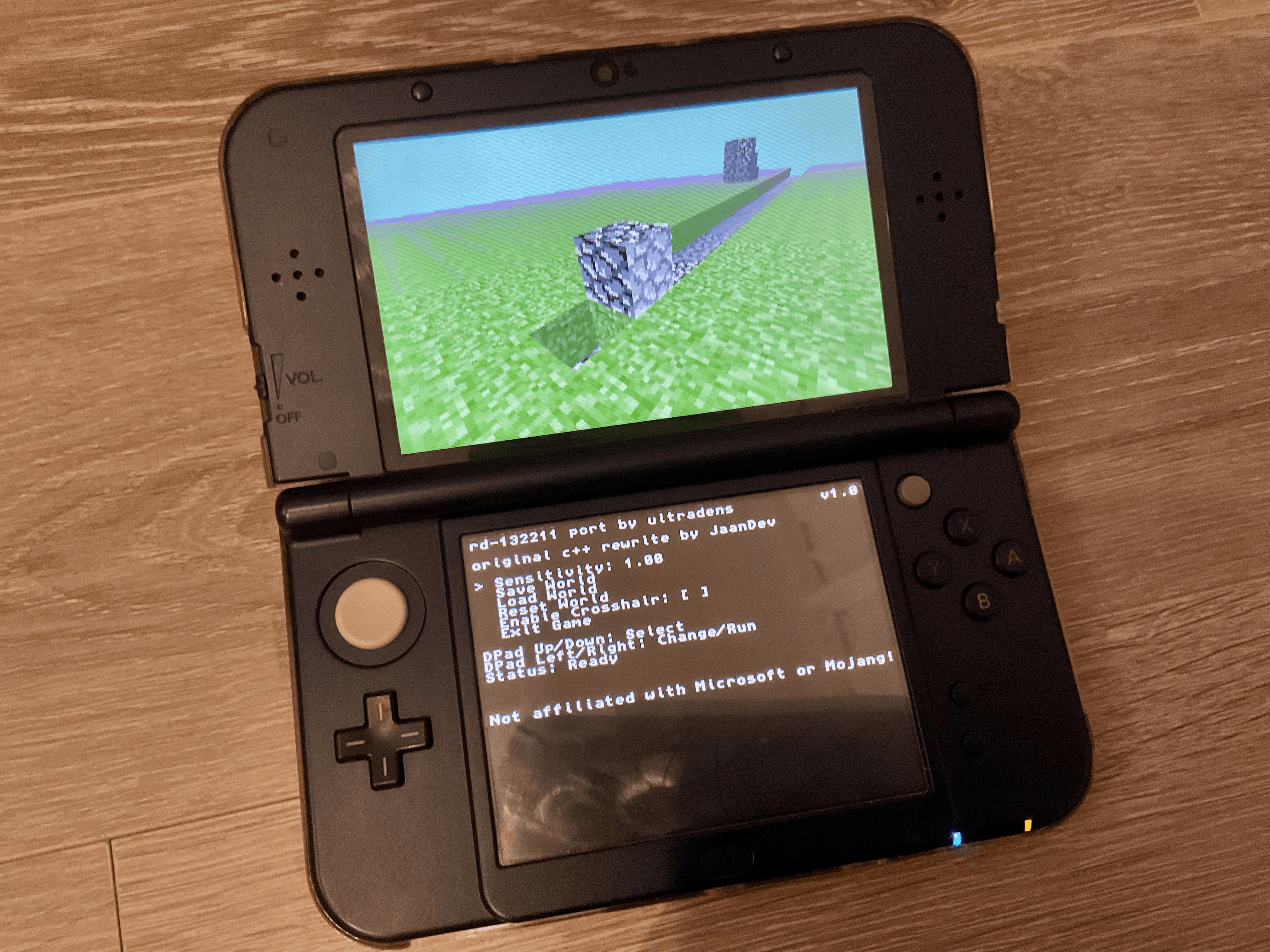


demo.png


Project details (obviously not a lot since this is a fairly simple project):

Features:

  • Simple & convenient menu on the bottom screen (controlled with the d-pad)
  • World saving, resetting, and loading (world saves fully compatible with the original pc version!) - saved in SD:/3ds/RubyDung/
  • QoL feature: crosshair (toggleable)
  • Camera sensibility slider
Controls:
(adapted for old 3ds models)
  • camera control: c-stick, ABYX buttons, touch screen
  • movement: circle-pad (duh)
  • jumping: START button
TODO:
  • add 3D support ig ✅ - added in v1.2
Installation:
  • download the attached file, and extract the .3dsx file into the /3ds directory on your SD card like any other homebrew app.

Anyway, I had a lot of fun(not really) working on this project, and I'm happy to share it with you guys. Of course all credits to JaanDev, the original creator of the c++ rewrite.
 

Attachments

Last edited by boriszkerzering,
Hello:)!
For the past few days I've been working on my first major 3ds homebrew project.
I ended up porting this project over to the 3ds, which is essentially just a rewrite/clone of RubyDung in c++.
Most of the code stayed intact except for any opengl related stuff which was a pain since I had no experience with Citro3D.
Eventually I got pretty comfortable with it, and was able to get it running at 60 fps on both old and new 3ds models.


View attachment 562023

Project details (obviously not a lot since this is a fairly simple project):

Features:

  • Simple & convenient menu on the bottom screen (controlled with the d-pad)
  • World saving, resetting, and loading (world saves fully compatible with the original pc version!) - saved in SD:/3ds/RubyDung/
  • QoL feature: crosshair (toggleable)
  • Camera sensibility slider
Controls:
(adapted for old 3ds models)
  • camera control: c-stick, ABYX buttons, touch screen
  • movement: circle-pad (duh)
  • jumping: START button
TODO:
  • add 3D support ig
Installation:
  • download the attached file, and extract the .3dsx file into the /3ds directory on your SD card like any other homebrew app.

Anyway, I had a lot of fun(not really) working on this project, and I'm happy to share it with you guys. Of course all credits to JaanDev, the original creator of the c++ rewrite.
Cool!
Is a survival mode planned?
 
A cool history of Minecraft ported to the 3DS, nice! I wonder if someone would be able to port the leaked Pocket Edition 0.6.1, even though that code is legally dubious, but we would get proper Pocket Edition instead of the weird official port.
Post automatically merged:

Cool!
Is a survival mode planned?
Survival mode didn't even exist at that point of development. That mode was added in Minecraft Classic, Classicube would be a more appropriate target.
 
A cool history of Minecraft ported to the 3DS, nice! I wonder if someone would be able to port the leaked Pocket Edition 0.6.1, even though that code is legally dubious, but we would get proper Pocket Edition instead of the weird official port.
Post automatically merged:


Survival mode didn't even exist at that point of development. That mode was added in Minecraft Classic, Classicube would be a more appropriate target.
Thank you! I'm currently working on a port of CavEX to the 3ds(beta 1.7.3 clone for the wii), the project is already compilable with no errors, but the rendering still needs more work.

Porting Pocket edition to the device sounds interesting, I might take a look into it to see if it is feasible or not.
 
Wow this looks amazing! Pffff a game like this with 3d enabled would be mind boggling. I hope you get to figure out the 3d effect. Biggest contribution to Minecraft on the 3ds ever.
 
Wow this looks amazing! Pffff a game like this with 3d enabled would be mind boggling. I hope you get to figure out the 3d effect. Biggest contribution to Minecraft on the 3ds ever.
Welp, you're in luck as I just implemented 3D support!
 

Attachments

UPDATE: 3D Support has been added in v1.2! Make sure to download the correct/new attached file!

Hello:)!
For the past few days I've been working on my first major 3ds homebrew project.
I ended up porting this project over to the 3ds, which is essentially just a rewrite/clone of RubyDung in c++.
Most of the code stayed intact except for any opengl related stuff which was a pain since I had no experience with Citro3D.
Eventually I got pretty comfortable with it, and was able to get it running at 60 fps on both old and new 3ds models.


View attachment 562023

Project details (obviously not a lot since this is a fairly simple project):

Features:

  • Simple & convenient menu on the bottom screen (controlled with the d-pad)
  • World saving, resetting, and loading (world saves fully compatible with the original pc version!) - saved in SD:/3ds/RubyDung/
  • QoL feature: crosshair (toggleable)
  • Camera sensibility slider
Controls:
(adapted for old 3ds models)
  • camera control: c-stick, ABYX buttons, touch screen
  • movement: circle-pad (duh)
  • jumping: START button
TODO:
  • add 3D support ig ✅ - added in v1.2
Installation:
  • download the attached file, and extract the .3dsx file into the /3ds directory on your SD card like any other homebrew app.

Anyway, I had a lot of fun(not really) working on this project, and I'm happy to share it with you guys. Of course all credits to JaanDev, the original creator of the c++ rewrite.
yo this is cool in all but it needs a video of how to do it because im new to doing this
 

Site & Scene News

Popular threads in this forum