SuperChis Prime: How I Fixed the SuperCard SD's Flaws on a Budget

Hello players, I'm one of the designers behind the SuperChis project. I’d like to share, from an engineer’s perspective, the thinking and execution behind our new GBA flash cartridge, the SuperChis Prime.

Our goal was clear: to create a genuinely "good" budget cartridge within a $15~$25(depends on tax and shipping) price range by solving the core issues that plague the classic SuperCard SD.
This wasn't just about patching an old design; It's a reconfiguration for a better future.
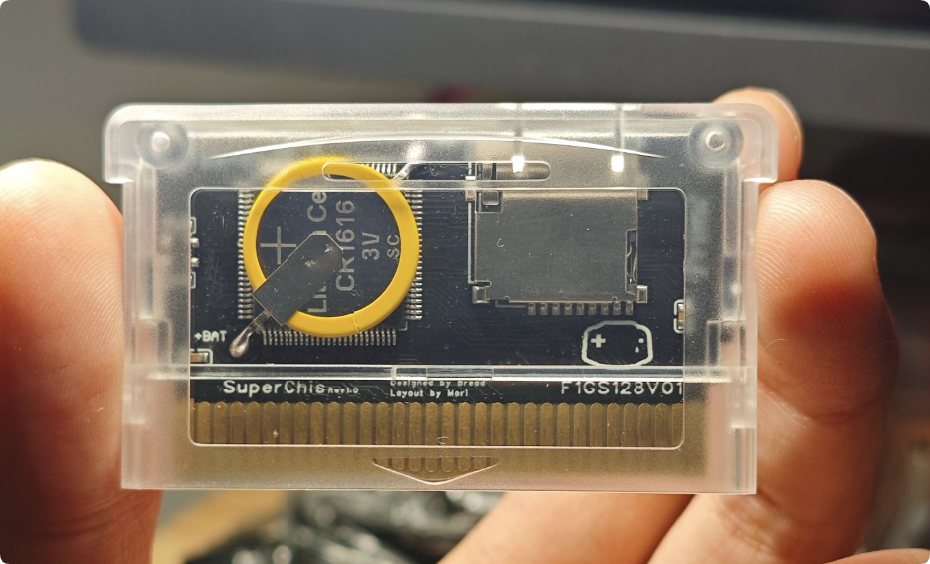
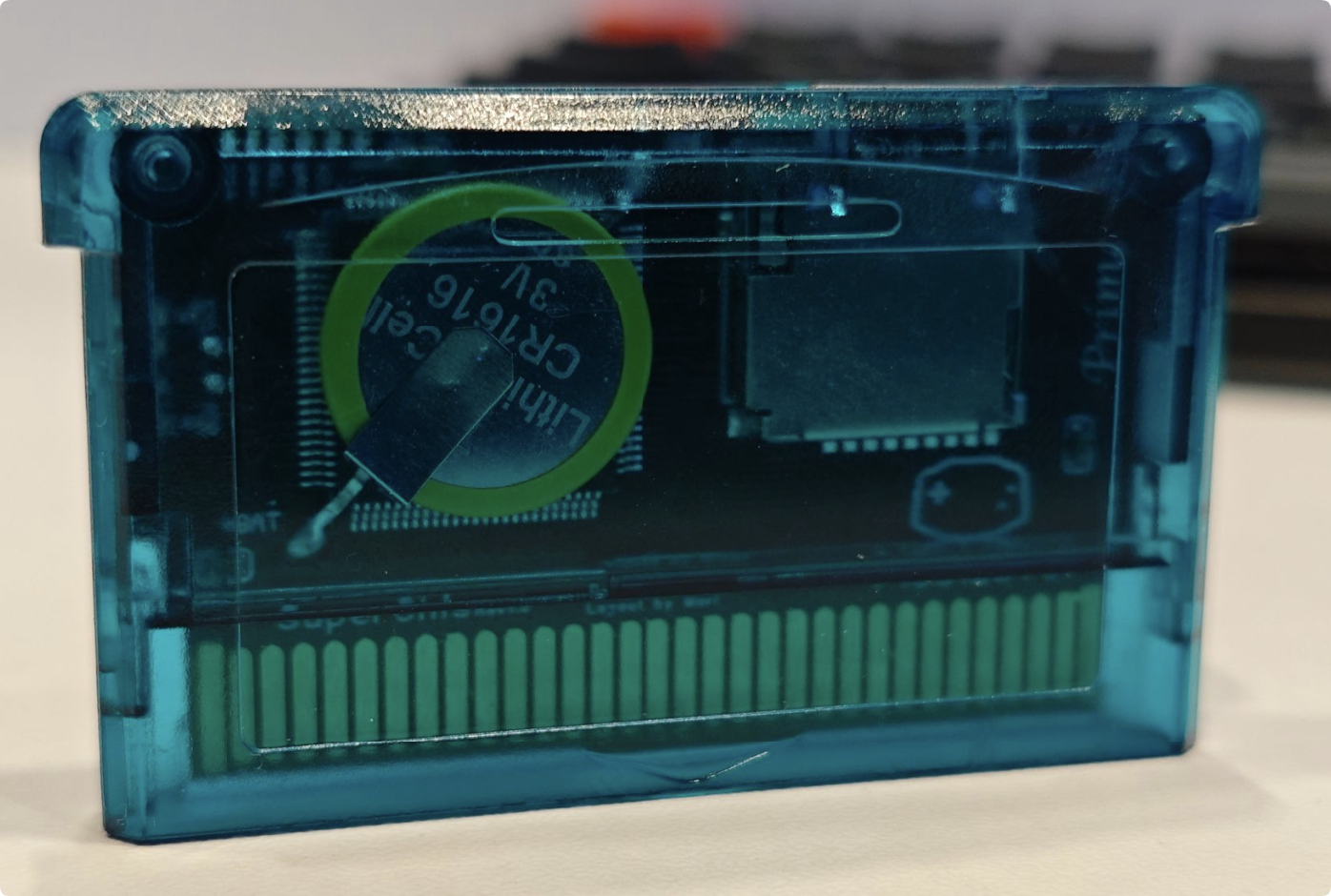
1768192599542.png
1768192570785.png

1. Hardware: Targeted Solutions​

The root causes of the classic SuperCard's problems—"slowdown" and "white screens"—lie in its SDRAM timing compatibility and the need for "slowdown patches" for every game. Our approach was twofold:

  1. Using Large NOR Flash to Bypass SDRAM Issues: I replaced the NOR Flash with a larger-capacity chip. When a game is written to the Flash, the GBA CPU reads directly from it, completely bypassing the problematic SDRAM access timings. This eliminates "slowdown" and the "white screen/freeze" caused by failed patches at a fundamental level. We also deeply optimized the write speed. Burning a 32MB game takes about 105 seconds on the standard version, and only about 85 seconds on the "Micron" version with higher-performance Flash.
  2. Premium PCB Process: To ensure long-term reliability, especially for the contact fingers, we use a 2U Immersion Gold (ENIG) process for our PCB manufacturing. It's an invisible upgrade, but we believe it's essential.
  3. Standardized and elegant PCB layout: It can improve product stability and avoid some anomalies that are not caused by component quality. Thanks to Mori, for his perfectionism.

2. CPLD Firemware: A Clean-Slate Approach for a Better Future​

The original SuperCard's CPLD firmware was "black box". So, we made a decision: we started from scratch with a completely new, forward-designed firmware. Thanks to davidgf for the many suggestions, which have benefited me a lot.

  • More Developer-Friendly: The new firmware has clear logic, avoiding potential register conflicts and other hidden issues. This provides a much better foundation for long-term support and feature development for excellent third-party kernels like SuperFW.
  • Multiple compatibility interfaces: We are compatible with SuperCard SD's SD Write/Read, and also support SuperCard Lite's SD Read. This helps to quickly migrate existing excellent software.

3. "Hybrid Architecture" and Fragmented Flash Management​

Making a simple NOR Flash cart isn't hard. The challenge was balancing flexibility and features at a low cost.

  • Fragmented Flash Management: Users don't need to worry about a game's physical location on the Flash. You can add or delete games as easily as managing files on your phone, and the system handles the space allocation automatically.
  • Retaining SDRAM for Unique Value: We didn't discard the SDRAM just because we added Flash. We repurposed the SDRAM as a "preview/launch area" and, crucially, as the memory for some feature. This "Flash + SDRAM" hybrid architecture allows us, at a low cost, to offer both "instant game launch with no slowdown" (from Flash) and "advanced features like Instant Saves" (from SDRAM).

4. GBA Firmware​

At present, SuperFW has fully supported SuperChis and may be released in next version. Because SuperChis are forward compatible, there will be more custom firmware support in the future. It's worth noting that the time to enter the SuperFW was reduced from 6 seconds to 1 second because we had a larger Flash and avoided asset decompression. davidgf's rotating meta data design largely avoids uneven flash writes.

5. The Necessary Trade-Offs​

Within our strict cost targets, we had to make some compromises:

  1. No RTC/Rumble/... Support: This was to control core chip complexity and cost. The software clock in the SuperFW kernel keeps time while in-game.
  2. Standard Battery-Backed Save: The standard version uses a CR1616 battery with low-power SRAM, offering a theoretical save retention of up to 20+ years (conservatively estimated at 10). We solved the problem of SuperCard batteries dying prematurely by using low-power SRAM and designing strictly according to the manual.
  3. Compatibility issues: We have found that the some GBAs on the motherboards labeled 02 have power supply issues, and cannot use the common NOR Flash, and need to use the more expensive low-power, high-performance NOR Flash, for which I have already funded research, and hope that the 02 motherboards can be resolved in the future with a simple mod. Or you can replace it yourself with a more expensive flash like the MT28.
  4. Save Game Handling: Support for games with EEPROM/Flash saves relies on the SuperFW database and patching engine. While this covers virtually all commercial games, some homebrew titles (e.g., certain Pokémon ROM hacks) may require manual intervention.
  5. Use recycled ICs: Whether it is mass production or DIY, for GBA game scenarios I recommend using tested recycled ICs. Especially for those NOR Flash that still have more than half of their life left. This is more economical and environmentally friendly. Of course, the test process includes full erasure, writing, stress testing, etc. Of course, you can also replace it with a new NOR Flash by yourself, which will cost $20~$30. As long as the speed is faster than S29GL01GS12, it will be a good Flash choice.

6. Acknowledgments and Planning​

Thanks to Mori, and Davidgf for supporting this project. More versions of the SuperChis series will be released in the future, and the core ideas will be open-sourced to encourage more interesting innovations. The CPLD implementation of the original SuperCard can be found at SuperChis.
 
That's great to hear, as I've already ordered a SuperChis Prime on Ali, I took a risk even if I have an 02 mobo for my AGB-001. My old SuperCard SD still works fine but has problems with the games while using SuperFW, and the EZ Flash Air has issues which are deal breakers for me.

All I want is to be able to play Metroid Fusion, Advance Wars 2 (which is unloadable in SuperCard), an obscure 16MB game called Super Robot Taisen Original Generation without much fuss (as SuperCards are known to have saving issues with 16MB games), Mario and Luigi Superstar Saga, and the Golden Sun games. I don't really care for RTC so there's that.
Buy fram
Post automatically merged:

Hi, there is a problem with superchis shell it needs to redesign because I found a problem with it. mine broke so I swap with old supercard shell.
 

Attachments

  • 20260506_185438.jpg
    20260506_185438.jpg
    1.2 MB · Views: 8
  • 20260506_185631.jpg
    20260506_185631.jpg
    1.3 MB · Views: 4
  • 20260506_185641.jpg
    20260506_185641.jpg
    1.2 MB · Views: 4
Last edited by sam2895,
That's great to hear, as I've already ordered a SuperChis Prime on Ali, I took a risk even if I have an 02 mobo for my AGB-001. My old SuperCard SD still works fine but has problems with the games while using SuperFW, and the EZ Flash Air has issues which are deal breakers for me.
Even if you have any issues, keep in mind it was said that a potential fix could be released for existing cartridges, so that's something to look out for.
 
  • Like
Reactions: ColdFireDX
Yo, is anyone else having problems with it on DS's running flashme firm?

It runs fine fine on my standard DS lite, but wont boot on my other 2 with flashme installed.

EDIT: Nvm i was being an idiot, turns out superfw supports ds mode on flashme devices, so it doubles as a ds flashcard it seems, and i can just hold SEL at startup to boot into gba mode, pretty cool. Might buy a second one for this alone.
Yo, is anyone else having problems with it on DS's running flashme firm?

It runs fine fine on my standard DS lite, but wont boot on my other 2 with flashme installed.

EDIT: Nvm i was being an idiot, turns out superfw supports ds mode on flashme devices, so it doubles as a ds flashcard it seems, and i can just hold SEL at startup to boot into gba mode, pretty cool. Might buy a second one for this alone.
You can install Twilightmenu++ flashcard pack into it to boot in ds mode. (but the ds mode compatibility of superfw is not good enough though)
 
Hello players, I'm one of the designers behind the SuperChis project. I’d like to share, from an engineer’s perspective, the thinking and execution behind our new GBA flash cartridge, the SuperChis Prime.

Our goal was clear: to create a genuinely "good" budget cartridge within a $15~$25(depends on tax and shipping) price range by solving the core issues that plague the classic SuperCard SD.
This wasn't just about patching an old design; It's a reconfiguration for a better future.

View attachment 550669View attachment 550667

1. Hardware: Targeted Solutions​

The root causes of the classic SuperCard's problems—"slowdown" and "white screens"—lie in its SDRAM timing compatibility and the need for "slowdown patches" for every game. Our approach was twofold:

  1. Using Large NOR Flash to Bypass SDRAM Issues: I replaced the NOR Flash with a larger-capacity chip. When a game is written to the Flash, the GBA CPU reads directly from it, completely bypassing the problematic SDRAM access timings. This eliminates "slowdown" and the "white screen/freeze" caused by failed patches at a fundamental level. We also deeply optimized the write speed. Burning a 32MB game takes about 105 seconds on the standard version, and only about 85 seconds on the "Micron" version with higher-performance Flash.
  2. Premium PCB Process: To ensure long-term reliability, especially for the contact fingers, we use a 2U Immersion Gold (ENIG) process for our PCB manufacturing. It's an invisible upgrade, but we believe it's essential.
  3. Standardized and elegant PCB layout: It can improve product stability and avoid some anomalies that are not caused by component quality. Thanks to Mori, for his perfectionism.

2. CPLD Firemware: A Clean-Slate Approach for a Better Future​

The original SuperCard's CPLD firmware was "black box". So, we made a decision: we started from scratch with a completely new, forward-designed firmware. Thanks to davidgf for the many suggestions, which have benefited me a lot.

  • More Developer-Friendly: The new firmware has clear logic, avoiding potential register conflicts and other hidden issues. This provides a much better foundation for long-term support and feature development for excellent third-party kernels like SuperFW.
  • Multiple compatibility interfaces: We are compatible with SuperCard SD's SD Write/Read, and also support SuperCard Lite's SD Read. This helps to quickly migrate existing excellent software.

3. "Hybrid Architecture" and Fragmented Flash Management​

Making a simple NOR Flash cart isn't hard. The challenge was balancing flexibility and features at a low cost.

  • Fragmented Flash Management: Users don't need to worry about a game's physical location on the Flash. You can add or delete games as easily as managing files on your phone, and the system handles the space allocation automatically.
  • Retaining SDRAM for Unique Value: We didn't discard the SDRAM just because we added Flash. We repurposed the SDRAM as a "preview/launch area" and, crucially, as the memory for some feature. This "Flash + SDRAM" hybrid architecture allows us, at a low cost, to offer both "instant game launch with no slowdown" (from Flash) and "advanced features like Instant Saves" (from SDRAM).

4. GBA Firmware​

At present, SuperFW has fully supported SuperChis and may be released in next version. Because SuperChis are forward compatible, there will be more custom firmware support in the future. It's worth noting that the time to enter the SuperFW was reduced from 6 seconds to 1 second because we had a larger Flash and avoided asset decompression. davidgf's rotating meta data design largely avoids uneven flash writes.

5. The Necessary Trade-Offs​

Within our strict cost targets, we had to make some compromises:

  1. No RTC/Rumble/... Support: This was to control core chip complexity and cost. The software clock in the SuperFW kernel keeps time while in-game.
  2. Standard Battery-Backed Save: The standard version uses a CR1616 battery with low-power SRAM, offering a theoretical save retention of up to 20+ years (conservatively estimated at 10). We solved the problem of SuperCard batteries dying prematurely by using low-power SRAM and designing strictly according to the manual.
  3. Compatibility issues: We have found that the some GBAs on the motherboards labeled 02 have power supply issues, and cannot use the common NOR Flash, and need to use the more expensive low-power, high-performance NOR Flash, for which I have already funded research, and hope that the 02 motherboards can be resolved in the future with a simple mod. Or you can replace it yourself with a more expensive flash like the MT28.
  4. Save Game Handling: Support for games with EEPROM/Flash saves relies on the SuperFW database and patching engine. While this covers virtually all commercial games, some homebrew titles (e.g., certain Pokémon ROM hacks) may require manual intervention.
  5. Use recycled ICs: Whether it is mass production or DIY, for GBA game scenarios I recommend using tested recycled ICs. Especially for those NOR Flash that still have more than half of their life left. This is more economical and environmentally friendly. Of course, the test process includes full erasure, writing, stress testing, etc. Of course, you can also replace it with a new NOR Flash by yourself, which will cost $20~$30. As long as the speed is faster than S29GL01GS12, it will be a good Flash choice.

6. Acknowledgments and Planning​

Thanks to Mori, and Davidgf for supporting this project. More versions of the SuperChis series will be released in the future, and the core ideas will be open-sourced to encourage more interesting innovations. The CPLD implementation of the original SuperCard can be found at SuperChis.

Are you considering a version that integrates rumble, accelerometer, and solar sensor functions?

I don't expect (it would be excessive) that the sonar (Pocket Sonar), the infrared sensor (Robopon Sun, Star and Moon versions), blood glucose monitoring (Glucoboy), the camera (Game Boy Camera) or the printer (Game Boy Printer) will be integrated.
 
Hi all, I bought a SuperChis prime FRAM version on Ali, it generally works, and I upgraded the firmware to 0.20 but I wanted to try to write a GBA game to Flash, to see if it would improve the performance, but it says Insufficient disk space. Why is that? I'm using an 8gb microsd, there's still a decent amount of space, the game itself is 16M. I'm playing on a GBA SP if that helps.
 
Hi all, I bought a SuperChis prime FRAM version on Ali, it generally works, and I upgraded the firmware to 0.20 but I wanted to try to write a GBA game to Flash, to see if it would improve the performance, but it says Insufficient disk space. Why is that? I'm using an 8gb microsd, there's still a decent amount of space, the game itself is 16M. I'm playing on a GBA SP if that helps.
Nor flash is only 124 mb
 
Actually it was my mistake, the Flash memory was full of some stuff that was already loaded on there. I found out how to clear the flash memory. My flash memory is 124M on my SuperChis
 
I got a Superchis cart just the other day for my (recently bought from a con) DS Lite but I'm having a lot of trouble with it.

It only works correctly sometimes. The other times the menu entries are all garbled and the system eventually hangs (or it starts already not working at all). I can't tell if it's a cartridge issue, a SD card Issue or a Slot-2 (physical) issue.

EDIT: In this state, *IF* I manage to get into a game I stored into the flash, it'll work completely fine until I try to open the in-game menu, which will make everything crash.
IMG_20260531_040635.jpg
 
Last edited by KAZ_x01,
I got a Superchis cart just the other day for my (recently bought from a con) DS Lite but I'm having a lot of trouble with it.

It only works correctly sometimes. The other times the menu entries are all garbled and the system eventually hangs (or it starts already not working at all). I can't tell if it's a cartridge issue, a SD card Issue or a Slot-2 (physical) issue.

EDIT: In this state, *IF* I manage to get into a game I stored into the flash, it'll work completely fine until I try to open the in-game menu, which will make everything crash.
View attachment 575739
Try with another memory card (must format fat 32 clust 32 kb) clean your nor flash and flash new game to it if the same problem happened than you've a faulty superchis
Post automatically merged:

Try with another memory card (must format fat 32 clust 32 kb) clean your nor flash and flash new game to it if the same problem happened than you've a faulty superchis
Note: pay attention there is fake superchis called superchis v2.0 it worse than supercard most games don't work and glitch
 
Try with another memory card (must format fat 32 clust 32 kb) clean your nor flash and flash new game to it if the same problem happened than you've a faulty superchis

Note: pay attention there is fake superchis called superchis v2.0 it worse than supercard most games don't work and glitch

I *think* I solved my issues by flashing the firmware into the cart again. Seems it got corrupted somehow during the first time updating from 0.17 to 0.20.

EDIT: It looks like any time I write games to the flash it corrupts the firmware and it goes back to being all garbled and crashing again. At the very least I can run the games directly from the SD Card, even if it's not ideal for some games.

EDIT AGAIN (about a day later): Yeah no, it started going bonkers again without me doing anything to the flash memory. Something's definitely wrong. I had already changed to a brand new, legit Sandisk SD card but it didn't really make much of a difference. I have no other GBA\DS (yet) to test the cartridge on nor another GBA cart to test it on the DS.
 
Last edited by KAZ_x01,
  • Like
Reactions: Provare and sam2895

Site & Scene News

Popular threads in this forum