Launching Wii Games Boots CD Drive

  • Thread starter Thread starter GaroK
  • Start date Start date
  • Views Views 1,299
  • Replies Replies 11

GaroK

Well-Known Member
Newcomer
Joined
Apr 24, 2019
Messages
62
Reaction score
39
Trophies
0
Age
26
XP
488
Country
Poland
Hello.
I'm using WiiFlow, and I cannot launch Wii games, whenever I launch one, it will just try to boot a CD Drive. Gamecube games work fine.

The games are in wbfs folders in the root of the SD card. Inside there are folders named after the games and each has game.wbfs inside.

The games DID work fine before, I have no idea what was changed so now it doesn't.

Can anyone actually help? I've been having this problem for a while, been posting on discord several times, nobody ever responds, tried on reddit, but it's apparently so obvious that the automod keeps deleting it, but I just have now idea what's going on.


Update: I tested an SD card on 2 consoles.
My main one works just fine - WiiFlow plays Wii games.
Not so much on the second one - launching wii games just boots to disc drive.

What could be wrong?
 
Last edited by GaroK,

Hello,

did you use "wii backup manager" to manage your games on your SD card?

Please post a syscheck report here to see if everything is ok.

What version of wiiflow do you have?
 
I cannot launch Wii games, whenever I launch one, it will just try to boot a CD Drive. Gamecube games work fine.
Wii and GameCubes use a DVD drive, they do not support regular CDs.

The games are in wbfs folders in the root of the SD card. Inside there are folders named after the games and each has game.wbfs inside.

The games DID work fine before, I have no idea what was changed so now it doesn't.
Can you provide a SysCheck report for your system? It would be very helpful so that I can easily diagnose your problem.

I've been having this problem for a while, been posting on discord several times, nobody ever responds, tried on reddit, but it's apparently so obvious that the automod keeps deleting it, but I just have now idea what's going on.
Why do people cite Reddit for everything? It's like Wikipedia which is another place full of bullshit misinformation spread from one person who had the same problem and then onto others.

You are more than likely to get a better solution elsewhere.
 
  • Like
Reactions: jeannotte
Hello,

did you use "wii backup manager" to manage your games on your SD card?

Please post a syscheck report here to see if everything is ok.

What version of wiiflow do you have?
I don't believe I've used this program.
I have latest version of wiiflow, just updated from the link worm sent me.

I also just tried launching from the wiiflow's fire browser, it still boots the disc.
 
wtf
the card is now write protected..
I ran the syscheck app, but it didn't have any graphics in the HB menu.
It booted me to hackmii menu, not sure if that's what's supposed to happen so I quit it.
Put the SD card back into laptop, now it's write protected.
Yes, I am flipping the lock switch, tried on 3 adapters now.
 
wtf
the card is now write protected..
I ran the syscheck app, but it didn't have any graphics in the HB menu.
It booted me to hackmii menu, not sure if that's what's supposed to happen so I quit it.
Put the SD card back into laptop, now it's write protected.
Yes, I am flipping the lock switch, tried on 3 adapters now.
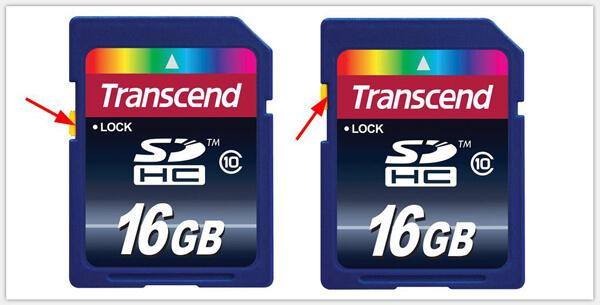
unlock-sd-card.jpg


The tab on the left-side of the card must be positioned upwards to enable writing. If your computer doesn't recognize your SD card, you most likely haven't formatted it correctly or are using a bad card reader.
 
  • Like
Reactions: jeannotte
unlock-sd-card.jpg


The tab on the left-side of the card must be positioned upwards to enable writing. If your computer doesn't recognize your SD card, you most likely haven't formatted it correctly or are using a bad card reader.
No, the card has been working just fine, I could transfer stuff in and out, and play normally, even wii up to a point.
I haven't touched the lock, I tried the syscheck, not sure if it even installed properly, it write protected now. How did that happen
 
No, the card has been working just fine, I could transfer stuff in and out, and play normally, even wii up to a point.
I haven't touched the lock, I tried the syscheck, not sure if it even installed properly, it write protected now. How did that happen
what type of SD card do you have exactly?

Format your SD FAT32 with "guiformat" ==>
http://ridgecrop.co.uk/index.htm?guiformat.htm
 
wtf
the card is now write protected..
I ran the syscheck app, but it didn't have any graphics in the HB menu.
It booted me to hackmii menu, not sure if that's what's supposed to happen so I quit it.
Put the SD card back into laptop, now it's write protected.
Yes, I am flipping the lock switch, tried on 3 adapters now.
I had this happen to me with a 128gb usb recently, except I was using it on a Nintendo switch when it happened. PNY was the brand iirc. I never did end up figuring it out, drive still works but is permanently write protected. I tried a bunch of formatting/repair tools too and no luck. If u find a solution I'll try the same thing on my usb. Maybe a particularly good formatting/partitioning tool could repair it, but I kinda think it's toast
Post automatically merged:

The games DID work fine before, I have no idea what was changed so now it doesn't.
At least now we know what changed!
 
Update: I tested an SD card on 2 consoles.
My main one works just fine - WiiFlow plays Wii games.
Not so much on the second one - launching wii games just boots to disc drive.

What could be wrong?
 

Site & Scene News

Popular threads in this forum