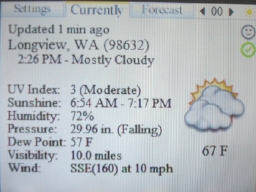
DSLiveWeather Update June 07

  • Thread starter Thread starter shaunj66
  • Start date Start date
  • Views Views 2,990
  • Replies Replies 8

shaunj66

GBAtemp Administrator
Administrator
Joined
Oct 24, 2002
Messages
12,348
Reaction score
22,037
Trophies
7
Age
41
Location
South England
Website
www.gbatemp.net
XP
32,217
Country
United Kingdom


DSLiveWeather Update June 07

New update!


Lick has released a new update to his DSLiveWeather homebrew app!
Lick said:
Built with: DevKitARM r20, libfat (DLDI), dswifi/wifilib 0.3.1, rebootlib 1.1


I hope it runs on ya devices!
download.gif
Download
icon11.gif
Home page

Thanks to Seyiji for the news!


How can I change it from Celsius to Fahrenheit? NVM I figured it out, you just tap the screen when you're on the "Currently" tab.
 
I also have the same problem with this wonderful homebrew.
I have the folder 'DSLiveWeather'
I have 3 files in it ( *.b) but they are all empty (0kb)...
It won't save my profile nor my forecast reports... :/

I have a R4 with the last firmware (so I shouldn't need to DLDIfied this) and I've tried both pre-DLDIfied and not pre-DLDIfied version...

Anybody can help me?
 
DSLiveWeather Update July 12 fix this. I was now able to save profiles with my CEvo. Unfortunately the wifi transmission is now broken !
It connects fine (to the new server) but freezes while transmitting. I try also with the old server same thing.

Is it just me ? or a server side probs ? i never had any wifi issue before.

QUOTE said:
The default server “lick.huuf.net”+”weather/fetch2.php” is now offline. Please change your settings to “lickr.org”+”weather/fetch2.php”.

QUOTEÂ Â * People experienced problems with Saving to FAT. This should be fixed.

  * This build uses the latest official DSWifi 0.3.2. I hope it fixes some of the WiFi problems.

updated version

I just check again with the previous version and it won't connect anymore so it could be a server issue... just wait & see

Thanks anyway
wink.gif
!
 
Whatever you do, don't check the weather in New Orleans. It crashes every time when I try.

edit: Actually, it seems for me, that having more than one profile causes all locations to crash upon update. When it was just my hometown, everything worked just fine. As soon as I added a second location, any updates crashes the application.

edit2: And, any attempt to delete the second profile also causes a crash. Well, I deleted the profile and forecasts and such from the card, and started over. I then created the same hometown location profile, and upon trying to get the weather, it crashed again. Guess I'm off to starting over completely.

 

Site & Scene News

Popular threads in this forum