

- Choose the song you would like to play. The Star Trek Theme is pretty easy and good start for beginners.
- As soon as you start the game you will see between 1 and 3 points.
-- The first row shows either A or B which means you have to press the A or B button.
-- The second row shows either R or L, which means you have to press the right or left trigger button.
-- The third row shows an arrow that can point left, right, up or down. This means you have to press the corresponding direction on one of the D-Pads. You only have to use one of the D-Pads, but it doesn't matter which one you use.
- While the points are above the line you can press what ever button you want, without making an mistake
- As soon as the points hit the line you have to be pressing the correct buttons. However, you can already press the right buttons while the points are on top of the screen and wait until they hit the line
- If you press more or less buttons then displayed (or the wrong ones) you are not scoring any points.
- You can score 100 points on every song. Your score should be displayed next to the "Select Song" text in the song menu. (Even though I experienced some errors on my VB)
- If your score is higher then 75 the game should say "You Rock", otherwise "You Suck"
- You can delete all scores by pressing the right and left trigger during the start screen
Thats it... and yes, the game is nothing for little girls. For those who are curios, there is nothing to be unlocked or the like.
- As soon as you start the game you will see between 1 and 3 points.
-- The first row shows either A or B which means you have to press the A or B button.
-- The second row shows either R or L, which means you have to press the right or left trigger button.
-- The third row shows an arrow that can point left, right, up or down. This means you have to press the corresponding direction on one of the D-Pads. You only have to use one of the D-Pads, but it doesn't matter which one you use.
- While the points are above the line you can press what ever button you want, without making an mistake
- As soon as the points hit the line you have to be pressing the correct buttons. However, you can already press the right buttons while the points are on top of the screen and wait until they hit the line
- If you press more or less buttons then displayed (or the wrong ones) you are not scoring any points.
- You can score 100 points on every song. Your score should be displayed next to the "Select Song" text in the song menu. (Even though I experienced some errors on my VB)
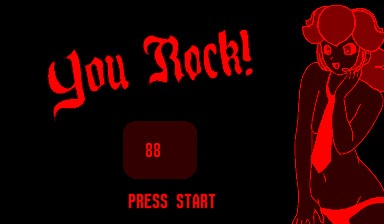
- If your score is higher then 75 the game should say "You Rock", otherwise "You Suck"
- You can delete all scores by pressing the right and left trigger during the start screen
Thats it... and yes, the game is nothing for little girls. For those who are curios, there is nothing to be unlocked or the like.