

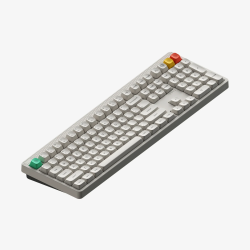
 NuPhy Node100 Mechanical Keyboard GBAtemp review
Hardware
Product Information:
Review Approach:
It wasn’t too long ago I covered the Node75, NuPhy’s latest 75% keyboard that’s available with both low and high profile switches to suit your preference. What wasn’t available at the time, however, was the option to just have more keys. For some people 75% of a keyboard is not enough, and for those people, I am happy to say that I might just have a great keyboard for you here.
100% Keyboard
Now for what is probably years now I’ve gotten used to smaller keyboards. I don’t necessarily use a numpad much in my day to day life, and find that having arrow keys and a function row is usually the sweet spot. The previous Node75 did me plenty well, but obviously having the opportunity to look at more keyboards is never a bad thing. The Node100 is really everything that made the Node75 great plastered onto a larger body. That is to say it’s a great keyboard out of the box.
Outside of the keyboard itself you’re treated to a relatively standard assortment of accessories. This includes a USB C to C cable and USB A adapter for wired connectivity, a keycap and switch combo puller, and a small set of accent keys if you want to swap a couple out. In the body of the keyboard you also have a 2.4G USB dongle for one of your three connectivity options. There’s nothing particularly out of the ordinary here, but I also can’t really think of anything else I would want.
The star of the show is obviously going to be the keyboard, and my lord it is a titan for somebody who has been using 75% keyboards for so long. The Node100, as the name might suggest, is a 100% layout keyboard. This largely just means it has a numpad, as well as the cluster of keys that sit between your alphanumerics and said numpad. There is little in the way of bells and whistles, but I am impressed at just how much they’ve managed to squeeze into something that retails for $110.


Both the top and bottom pieces of the case are made of ABS plastic, with a polycarbonate plate and gasket mount for something of a softer typing experience. Pressing down hard in the middle of the board you get a good bit of flex. If you’re the type of person who enjoys more rigid typing, this one might not be for you. I am personally quite fond of this though, with it usually feeling comfier for longer typing sessions. The keycaps that come with the keyboard are double-shot, meaning the legends won’t fade over time, in an mSA profile. They feel great to the touch, and though you certainly can replace them with your own, I don’t see much of a reason to. I will note here that the keyboard makes use of north-facing RGB lighting, which means you might run into a few issues with Cherry profile keycaps if you do decide to get a little adventurous down the line.
Going beyond the keycaps, the Node100 also supports hot-swappable switches too. The three options available, the silent “blush”, the linear reds, and tactile browns, will likely have most preferences covered, but if you do happen to have some nicer switches to hand, swapping them is as easy as pulling them out and popping some new ones in. Looking further into the keyboard does appear to be a little bit of a challenge though, with no obvious screws visible externally. Given the plastic construction I would assume the top and bottom parts are clipped together, but I’m not eager to pry at it to find out.
Shared with the Node75, the odd touch panel in the top-right of the board returns here, and just like with the Node75 I’m not its biggest fan. Giving you access to up to four gestures in swiping left and right, as well as double and triple taps, there might be something here if you feel 109 keys isn’t enough. In my mind though, making use of an additional function layer just makes more sense. It can thankfully be disabled without much effort, and blends into the dotted pattern across the top of the keyboard remarkably well. I do welcome experimentation in a market that can otherwise feel rather samey, but this one just isn’t for me.
Tri-Mode Connectivity
Looking at the connectivity options here you’ll find yourself wanting for very little. Outside of the obvious wired USB connection, you also get the aforementioned 2.4G USB dongle that fits snugly inside the keyboard’s body, and also three Bluetooth configurations you can swap between on a whim. Each of these wireless modes are available by default by holding Fn and pressing 1 through 3 for the Bluetooth configurations, and 4 for the 2.4G USB dongle. I’ve not any issues with each of these modes, though it’s worth pointing out that the polling rate when using Bluetooth is significantly lower than the other options, at 125Hz vs the 1000Hz elsewhere. I typically use the Bluetooth mode for connecting to my work laptop while having the USB dongle in a different PC, and it works well. For things like gaming though you’re likely to appreciate the higher polling rates.
In terms of battery life, the Node100 is something of a powerhouse. Packing a 4000mAh battery, it’s advertised to last between 60 and 100 hours when using the RGB lighting, and up to 1000 hours with no lights. Falling into the latter camp, especially on such a delightfully beige keyboard, I find the claim of up to 1000 hours absolutely wild. That’s just over 40 days of continual usage. Obviously I’m not able to test such an extreme, but I can at least say I’ve not needed to charge it at all since receiving it a little over a week ago, with maybe ten hours of usage per day between work and post-work meandering.
Solid Software
Supporting the Node100 is NuPhyIO, NuPhy’s in-house key binding and lighting customisation software. It is worth mentioning that all the lighting customisation can be configured on the keyboard itself through a number of shortcuts, but using an app to just get it setup how you want it once is the much better approach. To cut to the chase, NuPhyIO is a really good app. It’s software you can choose to install, with a web version also available, with all changes made being saved directly to the keyboard itself. This includes things like running macros.
The options available cover pretty much everything I would want from companion software. Setting key bindings is probably what most people will be using this for, and with four blank keys, as well as F13 and usually useless keys like Scroll Lock and Pause, you’ve actually got a lot to work with here if you need a place to put something non-standard. On top of this, you also have not one, but three additional function layers on top of the base layout. If I had to pull a small criticism, it’s that there’s no way to customise the behaviour of the numpad when Num Lock is disabled, but I’m not sure if that’s an issue with the keyboard of just how Windows itself sees the numpad keys. As always I was able to easily set Fn+Z to be my Non-US Backslash (NUBS if you ever find yourself looking for its shorthand), which is a must for me when a keyboard is only available in the more US-friendly ANSI layout.
Macros are easy to both record and assign, with you able to make use of either a set interval between keys or the actual timing of your inputs. Once recorded you can assign the macro to any number of keys across however many layers you feel like. A small shame is that I was unable to loop a macro, requiring me to press the key repeatedly for multiple run throughs, but outside of that it’s hard to complain.


For those who prefer wireless input, NuPhyIO does also allow you to customise the auto sleep of the Node100. Beyong just enabling and disabling auto sleep, you can customise how long it takes to go into Level 1 Sleep, which disables the lighting, and Level 2 Sleep, which will basically turn the keyboard off.
Terrific Typing
As out of the box typing experiences go, I really do put NuPhy up there with the best. For what they charge for their keyboards I find myself continually impressed by just how much I enjoy using them. I don’t feel like I have to rip off the keycaps and lube the switches, or stuff foam into wherever it’ll fit. They just sound and feel good. Obviously this is a point of entirely subjective taste, but if nothing else I can at least provide you a short typing test for you to get an idea of how the Red Max switches sound in this particular setting.
A Keyboard for the Numpad Enjoyers
At $110 there really is nothing stopping me from recommending it to anybody looking for a great keyboard with a numpad. Having the “Lunar White” model to hand this time around I absolutely adore the retro off-white aesthetic. Paired with some great keycaps, solid connectivity options, and a fantastic out of box typing experience, it more than punches above its price point for a 100% layout keyboard. Being just $10 more than the 75% model, it’s a no brainer if you for some reason look at keyboards for their key to dollar value.
Verdict
- Great typing experience out of the box
- Full 109 key layout
- Well priced at $110
- Fantastic battery life
- Solid software support
- Only available in ANSI layout
- North-facing RGBs may cause issues for people wanting to put Cherry profile keycaps onto it

Reviews
Anbernic RG Rotate Retro Handheld review
A pocketable handheld with a twist, we check out the latest Anbernic has to offer.
Wicked Cushions FreeZe PS5 Earpads review
Headsets are unsung heroes of gaming, keeping you immersed for long periods of time. But what if I told you your favorite set of cans could get a sweet upgrade?
Gaomon Pro 19 Pen Display review
A 19 inch pen display boasting a 4K resolution and professional colour accuracy, we take a look at the best of what Gaomon has to offer.
Yerba Buena review
A 70s mystery FPS with puzzles, this game definitely has my attention, but will it hold it?
CZUR K5S TouchBoard Pro review
CZUR, maker of document scanners and projectors, comes to us today with their K5S Pro bluetooth keyboard.
Site & Scene News
New Hot Discussed
Steam Machine waiting list goes live, starting at £879 with a 512GB SSD


178Pixel art MMO ‘Soulbound’ gets Steam Early Access release date


20New 'Pragmata' update introduces new outfit and addresses training simulation challenge

19Editorial 'Final Fantasy VII Rebirth' Impressions

27Homebrew Atmosphere v1.11.2 released, adds support for Switch firmware 22.5.0


29Super Mario 64 gets a brand new port on the Nintendo DS, brings support for full local multiplayer


42Firmware 22.5.0 released for Switch and Switch 2, brings new eShop layout to the original system


38Harbour Masters' latest PC port is Banjo Kazooie, and it's launching next month


33Community Contest GBAtemp Pokemon Showdown tournament sign ups open, set to run on the 20th of June


8The long awaited EarthBound Beginnings Remake romhack is now available after almost 2 decades in development


42Pokemon Platinum PC port gets a surprise release


103Steam Deck gets a major price bump, more than 40% increase for US buyers


176Nintendo Direct June 9, 2026 roundup - Ocarina of Time remake announced, Kingdom Hearts IV trailer


141Pokémon Crystal gets a PC port titled "suiCune" based on C/C++ language


55Paper Mario PC recompilation "ReCut" gets its first pre-release build


79Low-level 3DS emulator 3Beans released alongside setup tutorial video


52The long awaited EarthBound Beginnings Remake romhack is now available after almost 2 decades in development


42PlayStation State of Play June 2, 2026 broadcast - new God of War announced


71Super Mario 64 gets a brand new port on the Nintendo DS, brings support for full local multiplayer


42Call of Duty: Modern Warfare 4 to launch on Nintendo Switch 2 in October


63Steam Machine waiting list goes live, starting at £879 with a 512GB SSD
Steam Deck gets a major price bump, more than 40% increase for US buyers
Nintendo Direct June 9, 2026 roundup - Ocarina of Time remake announced, Kingdom Hearts IV trailer
Pokemon Platinum PC port gets a surprise release
What do you want to see in the next Nintendo Direct?
Paper Mario PC recompilation "ReCut" gets its first pre-release build
PlayStation State of Play June 2, 2026 broadcast - new God of War announced
Nintendo Direct to air on the 9th of June, set to feature 50 minutes of Switch and Switch 2 games launching this year
Call of Duty: Modern Warfare 4 to launch on Nintendo Switch 2 in October
Nintendo fined 35 million euros by the French government due to Switch 1 Joycon malfunctions