

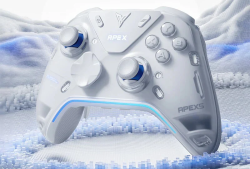
 Flydigi APEX 5 GBAtemp review
Hardware
Product Information:
Review Approach:
As a brand Flydigi is one that’s frequently fallen under the radar for me. Having largely stuck with brands like 8BitDo and Gulikit in recent years as my daily drivers and being relatively happy with those choices, I’ve not really found a reason to look into alternatives. Given the chance to play with the latest in their Apex series for this review, I was excited to try something new. Can is possibly be worth the $170 asking price though?
A Hefty Controller
To get straight into things the Apex 5 is one heavy controller, and that was pretty much the dominating thought when I picked it up for the first time. At 335g it’s the heaviest controller I own, clocking in a full 100g heavier than the Switch 2’s Pro Controller. I can see this extra weight putting some off right out of the gate, but to Flydigi’s credit I can at least understand the weight given everything they’ve crammed into this thing. Having used the controller for a few weeks now I definitely do notice it still when picking it up, but I don’t necessarily feel any more fatigued than with other controllers.
The larger controller shape closely resembles the Xbox Series lineup, albeit with a good chunk of bells and whistles that you probably would expect for the higher price point. Each of the four face buttons utilise micro switches under the hood with a small bit of travel both before and after the click. This isn’t quite like what PowerA did with their OPS v3 where there was a second tactile bump after the click though, instead just something that feels like a small bit of cushioning. The D-Pad is similarly clicky, giving precise and tactile feedback. As D-Pads go this is definitely up there for me, with the circular shape of it making it really easy to roll from one input to another when I wanted to. Playing a D-Pad heavy game like Super Mario Wonder I didn’t find myself catching up or down when running though; the inputs are accessible but easy to avoid when not needed.


Flipping to the backside of the gamepad we see some really pleasant-feeling rubber grips, paired with not just two mappable buttons built into them, but space for a further two that can be utilised by sliding in the included paddles. These back buttons are positioned really well. The two that are built into the controller are the ones I used the most, lining up with where my hands’ middle fingers tend to sit. The paddles by comparison line up with my ring fingers, and though it is a comfortable position as a whole, I just don’t have the mental capacity to be using so many fingers with a controller. More often than not I’d just slide the paddles off and play with the two built into the grip. It’s worth mentioning that you do actually have a further two mappable buttons sitting at the top of the controller between the bumpers and triggers, and these work exactly the same as the others. More buttons can never be a bad thing!


What probably stands as the star feature for the Apex 5 is the combination of both customisable stick tension and trigger feel. To start with the sticks I was a little put off at first. If you want to adjust them you first need to remove the controller’s faceplate, this requiring you pry away the D-Pad at minimum. This needs a good amount of force, to the point where it can feel like you were breaking the D-Pad if you didn't know better. Putting it back on after the first time also introduced a kind of creaking to the up inputs that wasn’t there before; a little contact cleaner did seem to help, but removing the faceplate a few times brings it back again. Once the faceplate is off though, you can make use of a small flathead-tipped tool that’s stored inside the controller to turn a screw head for each stick. Turning it left makes the stick looser, and turning it to the right makes it more stiff. It just works, and allows you a degree of customisation I’m really not used to seeing in a gamepad. These sticks do come with a caveat though, and that is that they have an unreal amount of snapback. At first I had assumed this was just an issue with having them at a lower tension, but even making them feel similar to an Xbox controller or one of 8BitDo’s Ultimate controllers, that snapback remains. This is something that can be worked around with dead zones, and having used the Apex 5 for a lot of Nightreign over the past few weeks it hasn’t been a noticeable issue. It is worth keeping in mind however if you play games that don't introduce dead zones of their own.
The triggers were something I had a surprising amount of fun with. You can think of these as the next evolution of trigger stops, and I am pretty impressed with them. What you get is five different modes outside of the regular trigger setup. These are labeled “Racer”, “Sniper”, “Recoil”, “Trig Lock”, and “Vibration”. Of these the trigger lock is the simplest to explain, and the only one with multiple settings. With this mode on, the triggers get a lot heavier at a set point, this point being customisable to one of three settings. When you reach the “lock” point you can still push the trigger down, making them feel a little different to your usual mechanical locking system. One small criticism here is that the triggers become incredibly sensitive, causing me to heavy attack when just grazing them in Nightreign more than a few times. I would've liked the trigger point to be just a little closer to the actual "stop" location.
Looking at the remaining four modes you’ve got some pretty situational options that are each fun in their own way, even if I do use them more sparingly. To start from the top, “Race” gives you a little resistance when pressing the trigger in and if gradually raising it, with it gliding back up if released quickly. Next up “Sniper” makes the trigger feel like what I imagine a gun trigger would. You’ve got a small bit of travel before hitting a bump, and then a small bit of recoil on the way down, before going back to neutral with no resistance. “Recoil” feels like a bit of a mix of the previous two, with it having a kind of staggered resistance when pressed in that feels a little bumpy. The final setting, “Vibration”, is one I don’t really understand. I naturally assume it ties into the controller’s vibration motors somehow, but to me it just feels like the normal trigger setting.
A Tiny Screen
Though still quite novel, this isn’t the first time I’ve used a controller with a tiny screen. The Manba One featured something similar quite predominantly, and it’s something I really enjoyed using as a way of avoiding awkward button combinations to switch modes and configure various settings. On top of that, it helps you stay away from controller-specific software on your PC where you otherwise might have had no other options. Flydigi did a similarly good job here with their screen.
Accessed by holding the Home button for a few seconds, the built-in screen throws a heap of useful informations and options at you. From left to right we have connection settings, button configuration, profile switching, an assortment of miscellaneous settings, and finally some information about the controller’s firmware. It’s pretty much everything you’d want out of dedicated driver software, and I really enjoyed how easy it was to use. The menus are navigated with the D-Pad, with A confirming options and B naturally canceling. This on-device menu is where you’ll find the options for things like mapping the extra buttons’ functionality, and moving between the six available trigger modes.
The ability to store multiple configuration profiles on the controller is something I really came to appreciate. More often than not I just map the back buttons to whatever the run button is, but naturally this is different from game to game. In Nightreign I’d want to map left stick being pressed, in Dark Souls it might be the B button, in Hitman it might be the left bumper. I also might want different trigger setups, with the “Sniper” effect being particularly fun in Hitman. Being able to set these up once and switch between them really is a great thing. It’s something of a shame they’re limited to being called “Config 1” to “Config 4”, but I’m still pretty happy to have them.


There is one annoying point to mention in the fact the screen is always on, and will play a Flydigi gif on loop when the menu isn’t open. Based on marketing materials the controller does have some kind of companion software on PC where this can be customised, but it’s a real miss for me that there’s no way to at least turn it off from the controller itself. I will also mention here that while I’ve been hands on with the controller, the software doesn’t appear to have been updated for the Apex 5, so I haven’t been able to try it myself. There may be other unique things it can do that you can’t from the controller's own menu.
Playing on the Switch 2
Beyond playing on the PC via the USB dongle, I also spent a good chunk of time on the Switch 2 with the Apex 5. It’s fully supported out of the box, with you just needing to load into the connection menu on the controller and switch over to the Switch option. From there it just works like any other Pro Controller, with functioning gyro and the button mapping automatically adjusting (the right button is now A, not the bottom one etc). The Apex 5 does also feature rumble support that works with the Switch and Switch 2, though it is notably not HD Rumble. If I were using the Apex 5 as my daily driver on Nintendo’s hybrid systems, I’d probably disable rumble entirely via system settings. It just stands out too much in games that are expecting the granular feedback official controllers can offer. Playing through Bowser’s Fury the small impacts that come from just walking around and interacting with the environment were entirely overblown to the point of it being detrimental to the experience.
It’s also only detected as a Switch 1 Pro Controller, and naturally that means you don’t have access to the per-game back button remapping the Switch 2 Pro Controller is capable of. This isn’t something I would be expecting from third parties for a good while yet, but it is worth mentioning all the same. One minor nicety I will add in here is that the four profiles you can access via the on-controller menus are unique per connection type, so you can at least make use of those for your most common setups knowing that they won’t interfere with whatever you’ve setup for your PC games.
Worth the High Price?
This has been my first time with a Flydigi controller and I have to say I’m impressed. With an incredibly premium feel and unique set of features, I can see this being exactly the controller some people would spend years of their lives looking for. Would I pay $170 for it though? Probably not. This is one of those controllers where I can so clearly see where the attention to detail has gone, and can see all the features that go into a price tag like that. For me personally those features wouldn’t be enough for me to actually go out and buy it, even if I am in a position where I’ll likely continue to use it as my controller of choice for the foreseeable future. It’s just difficult to justify when something like 8BitDo’s Ultimate 2 does pretty much everything I’d want at a third of the price, and also includes a charging dock. The Apex 5 does have a dock, but it’s an additional $60 on top of that $170.
The Apex 5 is one of those situations where you have an incredibly high quality controller that’s probably not going to sell in tremendous volumes, with the people who buy it ultimately being very happy with their purchase. It really is a stellar bit of hardware, albeit one I wouldn’t go out and buy for myself.
If you are interested in buying the controller, MINIXPC have provided a code for a small discount. As usual with this sort of thing we don't get any kind of kickback from it, so it's really just there to use at your own discretion. This one should give you $10 off the standard controller price when used on their storefront:
- MINIXPC Store ($10 Off: SLT10)
Verdict
- Feels great to hold
- Fantastic tactile D-Pad
- Solid button feel with both a click and a cushioned bottom out
- Six mappable buttons
- Adjustable stick tension using a tool that's stored inside the controller
- Adaptive trigger implementation
- Useful screen for controller settings
- Good connectivity options between USB dongle, Switch, Android, and iOS
- D-Pad squeaks a little after being removed to take off the faceplate
- A lot of snapback with the analogue sticks
- Additional software required to disable idle screen animation
- Heavier than other controllers I've used
- Very expensive, and doesn't include the charging dock at that price point

