


NOTE: THIS IS NOT A MODIFIED VERSION OF FUNKYSCOTT47'S FORWARDER + THIS IS NOT A FORWARDER
This is a vWii Wiiflow WFL app for the Wii U menu. I made this because me and other people have experienced issues with it sticking to a black screen after attempting to launch the app. The banner would show, then it would freeze, play a silent buzzing noise, and then crash stuck at a black screen. To combat this issue, I tried instead of making a forwarder, embed the main Wiiflow DOL file in to an app using TeconMoon's WiiVC injector for Wii U.
HOW TO INSTALL
First, you need to make sure you have a modded Wii U with Tiramisu or Aroma installed. If you hadn't already, look up a guide on how to do it. Next, you need to make sure you have WUP Installer GX2. Follow the video guide below by FunkyScott47 of how to install GX2.
After you've followed the guide, take the SD Card out of the Wii U and put it in your computer.
Next, extract all of of the contents of the zip to the root of the SD Card.
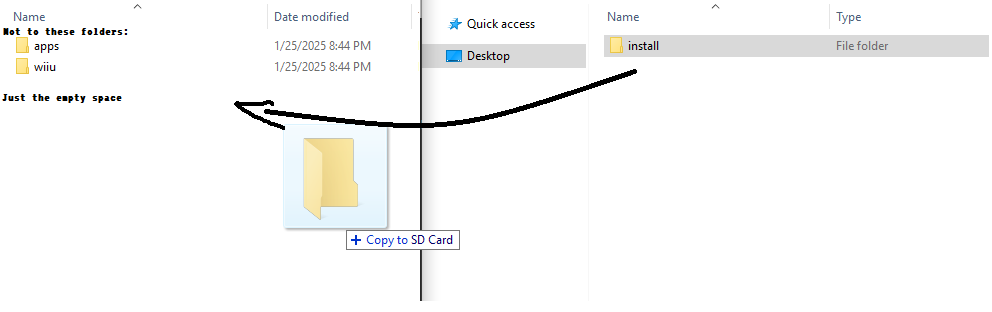
Take out the SD Card and put it back in your Wii U.
Then launch WUP Installer GX2.
You should see the button that says Wiiflow.

Select the button.

Then select install.

Select yes.

Select where you want to install. (Select NAND if you don't have a USB Drive.)

Wait for it to finish installing.
Once it's done, exit WUP Installer.

You now have a working embedded version of Wiiflow for the Wii U Menu!

That's the full guide.
I probably will never have to update this, because it worked first try with no issues, and it seems so basic that it needs no changes.
By the way, none of the art in the app is mine. I just googled, "Wiiflow Icon," and that's what I got and decided to use. Anyway, thanks for following the guide if you did, or installed it on your own. That's it.
This is a vWii Wiiflow WFL app for the Wii U menu. I made this because me and other people have experienced issues with it sticking to a black screen after attempting to launch the app. The banner would show, then it would freeze, play a silent buzzing noise, and then crash stuck at a black screen. To combat this issue, I tried instead of making a forwarder, embed the main Wiiflow DOL file in to an app using TeconMoon's WiiVC injector for Wii U.
HOW TO INSTALL
First, you need to make sure you have a modded Wii U with Tiramisu or Aroma installed. If you hadn't already, look up a guide on how to do it. Next, you need to make sure you have WUP Installer GX2. Follow the video guide below by FunkyScott47 of how to install GX2.
After you've followed the guide, take the SD Card out of the Wii U and put it in your computer.
Next, extract all of of the contents of the zip to the root of the SD Card.
Take out the SD Card and put it back in your Wii U.
Then launch WUP Installer GX2.
You should see the button that says Wiiflow.
Select the button.
Then select install.
Select yes.
Select where you want to install. (Select NAND if you don't have a USB Drive.)
Wait for it to finish installing.
Once it's done, exit WUP Installer.
You now have a working embedded version of Wiiflow for the Wii U Menu!
That's the full guide.
I probably will never have to update this, because it worked first try with no issues, and it seems so basic that it needs no changes.
By the way, none of the art in the app is mine. I just googled, "Wiiflow Icon," and that's what I got and decided to use. Anyway, thanks for following the guide if you did, or installed it on your own. That's it.
- Change log
- -1.0 (1/25/2025) | App is created
