- Joined
- Nov 7, 2007
- Messages
- 3,663
- Trophies
- 0
- Age
- 34
- Location
- Under your bed
- Website
- Visit site
- XP
- 591
- Country

For the people who don't understand it....
Wii (chip or non-chipped, doesn't matter),
SD Card (Remember the Wii doesn't read SDHC so you are limited to 2GB or less),
The Legend Of Zelda: Twilight Princess (Wii version),
Free Time,
Computer,
SD Card Reader,
WinRAR or any other .RAR/.ZIP extractor
Back Up -
First you may want to backup your twilight save if you have one. Go into setting -> Data Management -> Save Data -> Wii then save data and copy the twilight save to your SD Card. Connect the SD Card to your computer by a SD Card reader or a built in reader, inside the "private" folder there is another, just keep click on the folders untill you find the save. Move the BIN file to a safe location.
Now download the Twilight Princess hacked save. or if you have wii firmware 3.3 download this version
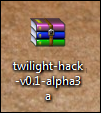
Extract it using your own .ZIP extractor. I use WinRAR so i would right click the .ZIP and choose "Extract to twilight-hack-v0.1-alpha3a".
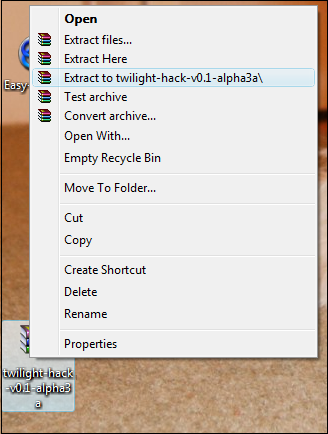
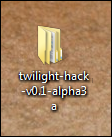
WinRAR will produce a folder called "twilight-hack-v0.1-alpha3a".
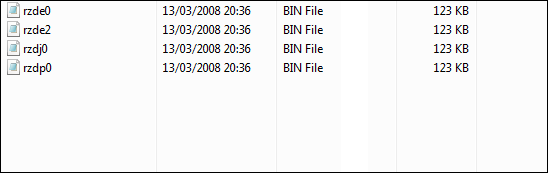
Inside that folder there is four BIN files.
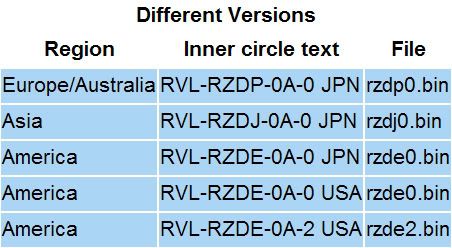
Refer to the Diagram below locate your Region and pick the file name from the diagram. Now select the correct file from twilight-hack-v0.1-alpha3a". So I'm from Europe i would pick rzdp0.bin from "twilight-hack-v0.1-alpha3a". Then copy the save from "twilight-hack-v0.1-alpha3a" into the SD Card where your last save was and name it data.bin.
Now take your SD Card and place it inside the Wii's SD Slot. Power on your console and go to settings -> Data Management -> Save Data -> Wii and at the very top there is a Tab called "SD Card" select that and pick the save, select "Copy". After a few seconds it will be done, you can go ahead and Erase this save from your SD Card as you don't need it anymore.
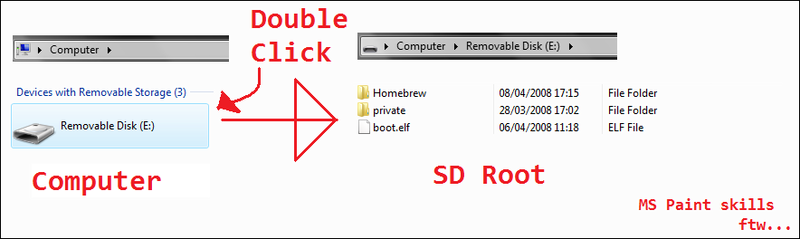
Now you have everything set up, but to get Homebrew working you must have the Homebrew. Homebrew for the Wii comes in .elf format. Over at Wiibrew.org they have a handy table of wii homebrew which has been released (not all homebrew tho). Pick your homebrew and download it. If it isn't already, rename the .ELF to "boot.elf" and place it on the root of your SD Card (the root is the place where you see when you click on your sd card reader in "My Computer").
Start up The Legend Of Zelda: Twilight Princess and choose the first save. Walk backwards and a black screen with white writing scrolling will appear. Your choice of homebrew will boot in a matter of seconds.
The twilight hack can only boot one boot.elf and it doesn't let you choose the homebrew to boot if you have 2 or more .elf's on your SD Card. This is where Loaders come into action. For this Tutorial i will be using the Wii Homebrew Launcher which requires a Gamecube controller. The loader will come in .elf format as normal. Rename it boot.elf and place it on your SD Card, overwriting any other boot.elf if need be.
Now for the Wii Homebrew launcher the different homebrew must be in diffeent folders. So make a folder called homebrew and a few new folders in that new folder, name each folder what ever name the homebrew is.
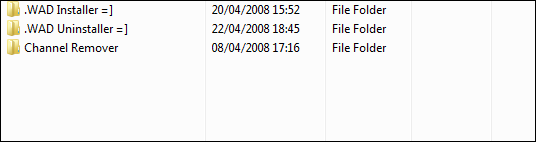
Download the required homebrew you want and rename all the .elf's you download to "boot.elf". Copy each boot.elf to the folders making sure there is a boot.elf in each folder.
Now take the SD Card, put it in the wii and load twilight princess, walk backwards and in a few seconds the loader will load.
NOTE: Some Homebrew require a Gamecube Controller.
Any questions? Post in this topic.
EDIT:
I recommend you use the Homebrew Channel instead of the loader, you then wouldn't need twilight princess
What You Need
Wii (chip or non-chipped, doesn't matter),
SD Card (Remember the Wii doesn't read SDHC so you are limited to 2GB or less),
The Legend Of Zelda: Twilight Princess (Wii version),
Free Time,
Computer,
SD Card Reader,
WinRAR or any other .RAR/.ZIP extractor
Summary: Back Up & Copy save to SD Card
Back Up -
First you may want to backup your twilight save if you have one. Go into setting -> Data Management -> Save Data -> Wii then save data and copy the twilight save to your SD Card. Connect the SD Card to your computer by a SD Card reader or a built in reader, inside the "private" folder there is another, just keep click on the folders untill you find the save. Move the BIN file to a safe location.
Now download the Twilight Princess hacked save. or if you have wii firmware 3.3 download this version
Extract it using your own .ZIP extractor. I use WinRAR so i would right click the .ZIP and choose "Extract to twilight-hack-v0.1-alpha3a".
WinRAR will produce a folder called "twilight-hack-v0.1-alpha3a".
Inside that folder there is four BIN files.
Refer to the Diagram below locate your Region and pick the file name from the diagram. Now select the correct file from twilight-hack-v0.1-alpha3a". So I'm from Europe i would pick rzdp0.bin from "twilight-hack-v0.1-alpha3a". Then copy the save from "twilight-hack-v0.1-alpha3a" into the SD Card where your last save was and name it data.bin.
Summary: Copying the save, booting up twilight princess
Now take your SD Card and place it inside the Wii's SD Slot. Power on your console and go to settings -> Data Management -> Save Data -> Wii and at the very top there is a Tab called "SD Card" select that and pick the save, select "Copy". After a few seconds it will be done, you can go ahead and Erase this save from your SD Card as you don't need it anymore.
Summary: boot your first .elf
Now you have everything set up, but to get Homebrew working you must have the Homebrew. Homebrew for the Wii comes in .elf format. Over at Wiibrew.org they have a handy table of wii homebrew which has been released (not all homebrew tho). Pick your homebrew and download it. If it isn't already, rename the .ELF to "boot.elf" and place it on the root of your SD Card (the root is the place where you see when you click on your sd card reader in "My Computer").
Start up The Legend Of Zelda: Twilight Princess and choose the first save. Walk backwards and a black screen with white writing scrolling will appear. Your choice of homebrew will boot in a matter of seconds.
Summary: Extra information
The twilight hack can only boot one boot.elf and it doesn't let you choose the homebrew to boot if you have 2 or more .elf's on your SD Card. This is where Loaders come into action. For this Tutorial i will be using the Wii Homebrew Launcher which requires a Gamecube controller. The loader will come in .elf format as normal. Rename it boot.elf and place it on your SD Card, overwriting any other boot.elf if need be.
Now for the Wii Homebrew launcher the different homebrew must be in diffeent folders. So make a folder called homebrew and a few new folders in that new folder, name each folder what ever name the homebrew is.
Download the required homebrew you want and rename all the .elf's you download to "boot.elf". Copy each boot.elf to the folders making sure there is a boot.elf in each folder.
Now take the SD Card, put it in the wii and load twilight princess, walk backwards and in a few seconds the loader will load.
NOTE: Some Homebrew require a Gamecube Controller.
Any questions? Post in this topic.
EDIT:
I recommend you use the Homebrew Channel instead of the loader, you then wouldn't need twilight princess