

 GEEKOM A5 Pro 2026 Edition GBAtemp review
Hardware
Product Information:
- Official Store: https://www.geekom.co.uk/geekom-a5-pro-mini-pc-2026-edition
Review Approach:
It’s a bad time to build a PC. Between spiralling costs of RAM and storage, many are choosing to hold out with the hardware they have in hopes of things getting better in the coming months and years. Not everybody needs a custom-built PC though, and not everybody needs the best specs and discrete graphics. For some, a laptop pushed into a small box will be enough, and at £599, the 2026 revision to Geekom’s A5 might just be appealing enough.
A Familiar Shell
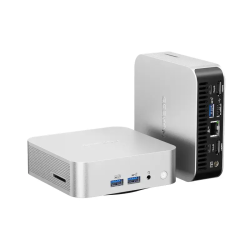
Looking from the outside Geekom really haven’t changed much. We once again see the shell that was introduced with their A series PCs a number of years ago, featuring a somewhat sleek Mac Mini-esque appearance. It’s incredibly compact, but still manages to hit all the key marks in terms of connectivity.
To give you a quick list of the IO, we have the following:
Front
- 2x USB A (3.2)
- 1x 3.5mm headphone jack
- 1x Power button
Left
- 1x SD card reader
Back
- 1x Barrel connector
- 2x USB C (3.2 with DP)
- 2X USB A (3.2 + 2.0)
- 2X HDMI (2.0)
- 1x Ethernet (2.5G)
As always it’s a relatively strong showing, with this shell being notable for its lack of Kensington Lock support when compared to its boxier siblings. We also retain the same frustrations when it comes to opening it up. Though still relatively accessible, requiring you to remove the adhered feet and unscrew four screws to access, it remains a frustrating system to upgrade due to its internal design.


If you do want to move beyond the 16GB of RAM and 1TB of internal storage seen on this model, you’ll need to work around a plate along the bottom of the system that holds the wireless antennas without much slack. It’s workable, but significantly more frustrating than Geekom’s other designs. For your troubles though you’ll gain access to an unused M.2 2242 slot, alongside those RAM slots and the M.2 2280 SSD the system comes with.
Capable Performance
Performance here is, according to 3D Mark, a little stronger than a 2023 office laptop featuring an i7-1360P. It’ll more than cover day to day browsing needs and all those more standard PC use cases, though will certainly fall short if you’re looking for something to fill that Steam Machine-shaped hole.
Cinebench 2026.1.0
- Multi Thread - 1600
- Single Core - 427
- Single Thread - 350
Geekbench 6
- Multi Core - 6924
- Single Core - 1860
PCMark 10
- Overall Score - 6078
- Essentials Score - 8656
- App Start-Up - 6794
- Video Conferencing - 8517
- Web Browsing - 11210
- Productivity Score - 14128
- Spreadsheets - 15325
- Writing - 13026
- Digital Content Creation Score - 4982
- Photo Editing - 7127
- Rendering and Visualisation - 4712
- Video Editing - 3683
3DMark
- Steel Nomad Light - 1050
- Steel Nomad Light Stress Test - 92.1% (Fail)
3D performance is lacking, with the system’s internal graphics struggling through the Steel Nomad Light benchmark. Its stability also got a failing grade, with the passing grade requiring the worst run be no less than 97% of what the best run could offer. There’s an argument to be made that the level of consistency is still passable here when you’re comparing 7fps with 8fps, but it is still a relatively good measure of how the system will throttle over longer sessions.
Gaming… With Some Compromises
As you might have guessed from those 3D benchmarks, this isn’t a gaming PC. You’ve basically got a laptop with integrated graphics here, and your expectations should be set accordingly. Having said that though, laptops are capable of a heck of a lot in 2026, and if you’re happy to compromise on graphical quality, you might be surprised at what can run.
The graphics feel... Artistic?
Now the big game on my mind for this review is Monster Hunter Stories 3. It’s the latest game in the series that just launched last month and, well, it does run. You’ll have to turn everything as low as it’ll go, don’t get me wrong. I’m talking all lowest settings, 720p, and FSR set to Ultra Performance. This is what I’d expect the game to look like if Capcom decided to launch it on the original Switch, but you do get an almost perfect 30fps. It’s consistent to the point that I wouldn’t notice the drops if I didn’t have the framerate on screen anyway.
If you set your sights a little lower and move away from AAA releases, you’re much more likely to get closer to a more regular gaming experience. To this end I wanted to check out some equally-recent, but somewhat less demanding titles. I ended up going with Blue Prince, Super Battle Golf, and Cursed Words.
Blue Prince is a game of very few settings to play with, which is something that can often be frustrating on systems like this. Thankfully it does still manage to perform well in spite of this though. At 1080p you manage to hit a consistent 30fps, with dropping the resolution down to 634p (unsure why 720p wasn’t an option here) does manage to boost things to a consistent 60fps. Both are perfectly valid ways of experiencing Blue Prince, with the relatively laid back pace of the game not necessarily suffering for the lower framerate.


Using the settings from my gaming laptop at first, Super Battle Golf absolutely chugged on the main menu. This is not a game that should be played at 4K or with high texture quality on a system like this. Coming down to a more reasonable 1080p and setting everything to Medium will net you something between 30 and 40fps, with a further drop to 720p getting you to that consistent 60. The simple nature of the game’s graphics do lend themselves well to these kinds of resolution and quality drops, with the larger gameplay experience not really feeling lesser for it. You’ll see some more jagged edges, sure, but it won’t get in the way of you firing a rocket as your friend charges their swing.
Last up is a game that by no stretch should be a challenge to run, but that I’ve been enjoying tremendously over the past few days and wanted to share. Cursed Words is the latest game to follow in the steps of Balatro and take a classic analogue game and throw a roguelike spin on it. This time the game is Boggle, and the game really goes out of its way to add some wild twists to it. Despite my initial thoughts, it does struggle a little more than I’d expected here. At 1080p you’ll fall just shy of a consistent 60fps, with 900p being the sweet spot I’d found. Realistically this isn’t a game where a 30fps lock would necessarily be an issue, so it’s another case of picking your preference.
A Good PC
At its £599 price point, I can see this being the type of system a lot of people would need at a time of high prices and generally unaffordable DIY options. If you’re happy for marginally worse performance, you can also pick up the previous revision of the A5 Pro with the 7430U for £499, or as low as £429 if you’re happy to settle for a 512GB SSD. There are plenty of great options available, and this one will certainly do you well if you know what to expect when buying. You’re not getting a gaming powerhouse here, but you will be getting a reliable system that should stand up decently well in 2026.
If you’re interested in picking up the 2026 revision of the A5 Pro, Geekom have as usual provided us with discount codes for you to use. We don’t get any kickback from you using them, so do so at your own discretion:
- UK Official Site (7% Off - GBAA5PRO)
- US Official Site (7% Off - GBAA5PRO)
- US Amazon (7% Off - GBAA5PRO)
Verdict
- Great IO offerings
- Reasonably priced for what's being offered
- Some upgrade potential with empty M.2 2242 slot
- Solid out of the box configuration
- Capable of gaming if you're happy to compromise on graphical quality
- Case is frustrating to open up
- Will fall short for GPU-heavy productivity tasks
